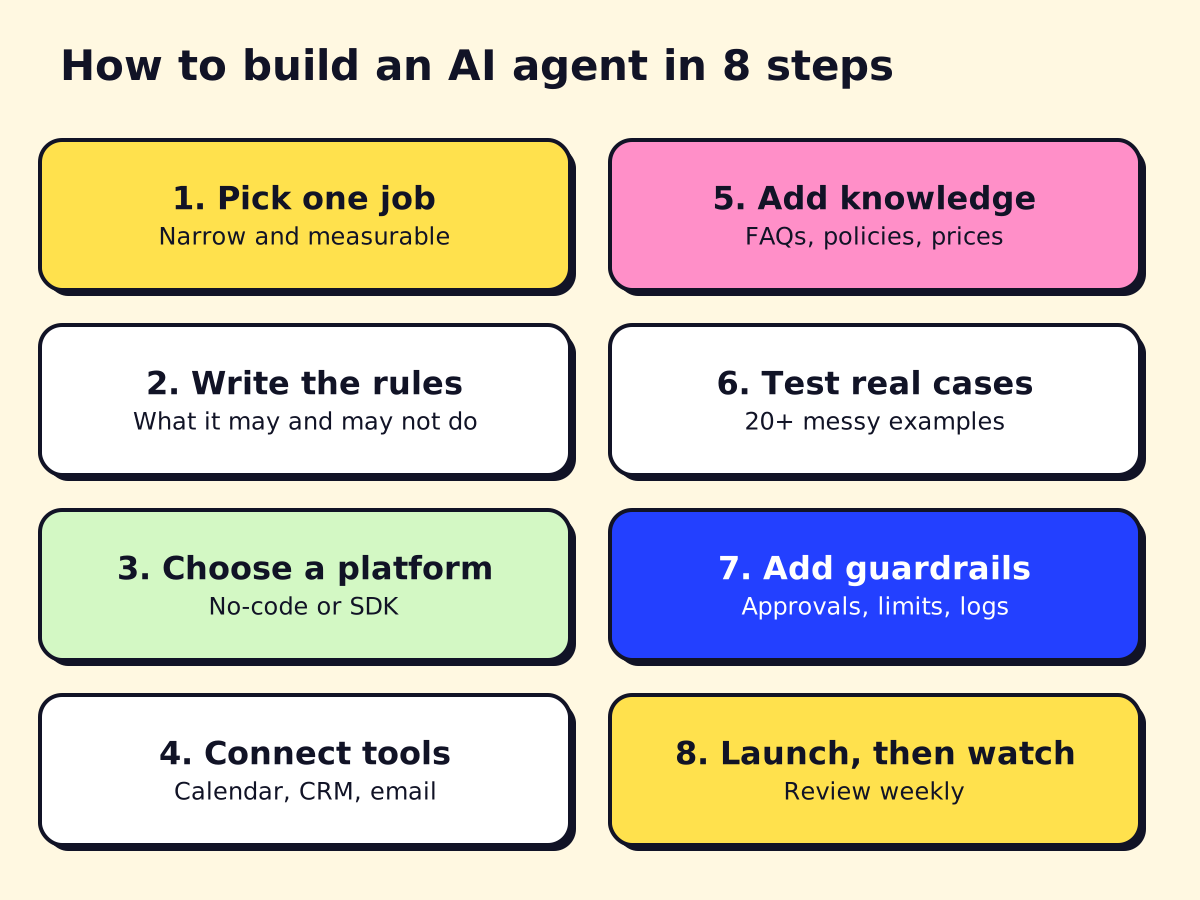
- To build an AI agent: pick one narrow job, write its rules, choose a platform, connect the tools it needs, test it on real examples, add guardrails, then launch small and review weekly.
- No-code options: n8n, Zapier Agents, Microsoft Copilot Studio, ChatGPT workspace agents. Code options: OpenAI Agents SDK, Claude Agent SDK, LangGraph.
- OpenAI is shutting down its visual Agent Builder on November 30, 2026, so don't start new projects there.
- Most of the work is not the AI. It is clear rules, clean data, reliable integrations and testing with messy real-world inputs.
To learn how to build an AI agent, start small: pick one narrow job, write down its rules, choose a platform (no-code like n8n or Copilot Studio, or code like the OpenAI Agents SDK), connect the tools it needs, test it on real examples and add guardrails before launch. The AI model is the easy part. Clear rules, reliable integrations and testing are where agents succeed or fail.
This guide walks through each step, compares the main no-code and code options as of November 2026, and includes a short Python example you can adapt. If you are still fuzzy on what counts as an agent, read what AI agents are first.
Step 1: Pick one job the agent will own
The most common mistake is building a “do everything” assistant. Pick one job that is:
- Repetitive: it happens dozens or hundreds of times a month.
- Rule-based enough to write down: a new hire could learn it in a week.
- Measurable: you can count bookings made, tickets resolved or hours saved.
- Low risk when wrong, or easy to check: booking a slot is low risk; giving legal advice is not.
Good first agents: answering missed calls and booking jobs, qualifying web leads, sorting a shared inbox, reading invoices into your accounting tool, answering staff questions from your handbook.
Write a one-sentence job description, for example: “Answer new-customer texts, collect address and problem, offer two open slots and book the one they choose. Hand off anything about pricing disputes or emergencies.”
Step 2: Write the agent’s instructions and rules
Your instructions (often called the system prompt) are the agent’s training manual. Write them the way you would brief a new employee:
- Role and goal: who it is, who it serves, what “done” looks like.
- Knowledge: services, service area, hours, prices it may quote.
- Allowed actions: which tools it can use and when.
- Hard limits: what it must never do (promise prices, give medical or legal advice, issue refunds).
- Escalation: exactly when and how to hand off to a human, with what summary.
- Tone: short, friendly, plain English (and Spanish or French if your customers use them).
Keep a list of 20 to 50 real examples of customer messages, including the strange ones. You will use them in step 6.
Step 3: Choose how to build it: no-code or code
| Route | Best for | Main options | Trade-off |
|---|---|---|---|
| No-code / low-code | Business teams, standard apps, fast pilots | n8n, Zapier Agents, Make, Copilot Studio, ChatGPT workspace agents | Fast to build; less control over complex logic |
| Code (SDK) | Custom products, unusual integrations, high volume | OpenAI Agents SDK, Claude Agent SDK, LangGraph, Google ADK | Full control; needs a developer and hosting |
| Hire a developer | You want it done and maintained | Agencies, freelancers | Costs more up front; least of your time |
No-code AI agent builders
- n8n. Visual workflows with an AI Agent node that can use tools, memory and MCP servers. Cloud plans start at €20 a month billed annually, and the Community Edition is free to self-host (n8n pricing, as of November 2026). Our what is n8n guide covers the basics.
- Zapier Agents. Describe the agent in plain English and give it access to Zapier’s app connections. Free plan with 400 activities a month; Pro from about $33 a month billed annually for 1,500 activities (Zapier Agents pricing, as of November 2026).
- Microsoft Copilot Studio. The natural choice if you run on Microsoft 365, Teams or Dynamics. Usage is billed in Copilot Credits: $200 a month buys a pack of 25,000 credits, and Microsoft 365 Copilot users ($30 per user per month, paid yearly) can build internal agents at no extra cost (Copilot Studio pricing, as of November 2026).
- ChatGPT workspace agents and Gemini Enterprise. Both let business teams build shared agents inside the assistant they already use, connected to apps like Google Workspace or Slack.
A warning about OpenAI Agent Builder. OpenAI launched a visual Agent Builder in 2025, but its deprecations page says it is scheduled to shut down on November 30, 2026, with the Agents SDK or ChatGPT workspace agents as the migration paths. OpenAI is also retiring custom GPTs. Don’t start new projects on either.
Code frameworks for AI agents
- OpenAI Agents SDK (Python and TypeScript). Lightweight: agents, tools, handoffs between agents, guardrails, sessions and built-in tracing.
- Claude Agent SDK (Python and TypeScript). The same agent loop that powers Claude Code, with file, shell and web tools built in, plus custom tools and hooks. Strong for agents that work with documents and files. Anthropic also offers Claude Managed Agents, which hosts the agent for you at $0.08 per session-hour plus model tokens (Claude pricing, as of November 2026).
- LangGraph (Python and JavaScript). Lower-level and model-agnostic. You draw the agent as a graph of steps, which suits complex flows with branches, retries and human approval points. Its sister library LangChain offers a quicker
create_agenthelper. - Google Agent Development Kit (ADK). Google’s open-source framework, tied to its Gemini Enterprise Agent Platform (the new name for Vertex AI since April 2026).
All four SDKs are free. You pay for model usage and hosting.
Step 4: Connect the tools the agent needs
Tools are what turn a chatbot into an agent. Each tool is a function the model can call, such as check_availability, create_booking or look_up_customer. You connect them in one of three ways:
- Built-in connectors in no-code platforms (Google Calendar, HubSpot, QuickBooks, Gmail).
- Your own functions that call an app’s API.
- MCP servers. The Model Context Protocol is an open standard for plugging tools into agents. Many apps now publish MCP servers, and n8n, Copilot Studio, the Claude Agent SDK and the OpenAI Agents SDK can all use them. Our AI agent architecture guide explains how it fits.
Give each tool a clear name and description. The model chooses tools by reading those descriptions, so “Books a 1-hour service visit. Only call after the customer confirms a time” works far better than “booking”.
Step 5: Give it knowledge and memory
- Short-term memory is the current conversation. Most platforms handle this for you.
- Business knowledge (FAQs, policies, price lists) goes either directly in the instructions if short, or in a searchable knowledge base the agent queries (often called RAG, retrieval-augmented generation).
- Long-term memory (past orders, customer preferences) should come from your CRM through a tool, not from the AI’s own notes. Your CRM is the source of truth.
How to build an AI agent in Python: a small example
Here is a minimal agent for an HVAC company built with the OpenAI Agents SDK. It has two tools and an input guardrail that blocks emergencies from going through the normal booking flow. The calendar functions are stubs; in a real build they would call your scheduling software’s API.
# pip install openai-agents   (and set OPENAI_API_KEY)
import asyncio
from pydantic import BaseModel
from agents import (Agent, Runner, GuardrailFunctionOutput,
                    InputGuardrailTripwireTriggered)
from agents.decorators import tool, input_guardrail


@tool
def check_availability(day: str) -> list[str]:
    """Return open 2-hour service windows for a day, e.g. 'Thursday'."""
    return ["9:00-11:00", "14:00-16:00"]  # replace with your calendar API


@tool
def book_visit(name: str, phone: str, address: str, window: str, problem: str) -> str:
    """Book a service visit. Only call after the customer confirms a window."""
    return f"Booked {window} for {name}. Confirmation sent to {phone}."


class Emergency(BaseModel):
    is_emergency: bool


triage = Agent(
    name="Emergency check",
    instructions="Is this a gas smell, carbon monoxide alarm, fire or flooding?",
    output_type=Emergency,
)


@input_guardrail
async def emergency_guardrail(ctx, agent, user_input):
    result = await Runner.run(triage, user_input, context=ctx.context)
    return GuardrailFunctionOutput(
        output_info=result.final_output,
        tripwire_triggered=result.final_output.is_emergency,
    )


booking_agent = Agent(
    name="HVAC booking assistant",
    instructions=(
        "You book service visits for a heating and cooling company. "
        "Collect name, phone, address and the problem. Offer open windows "
        "with check_availability and book only after the customer confirms. "
        "Never quote prices; say a technician will confirm on site."
    ),
    tools=[check_availability, book_visit],
    input_guardrails=[emergency_guardrail],
)


async def main():
    try:
        result = await Runner.run(
            booking_agent, "Hi, my furnace is making a banging noise. Thursday?"
        )
        print(result.final_output)
    except InputGuardrailTripwireTriggered:
        print("Emergency: transfer to the on-call technician now.")


asyncio.run(main())
What this shows: the agent decides when to call each tool, the instructions set hard limits, and the guardrail stops risky requests before the main agent sees them. Imports follow the SDK’s current tools and guardrails docs; older tutorials use function_tool, so check the version you install. The same pattern works in the Claude Agent SDK (tools via @tool and create_sdk_mcp_server, safety checks via hooks) and in LangGraph.
Step 6: Test with real, messy examples
Agents fail on the inputs nobody planned for. Before launch:
- Run your 20 to 50 real examples through the agent and score each answer: right, acceptable, wrong.
- Include edge cases: angry customers, two requests in one message, typos, Spanish or French, someone asking for a discount, someone trying to make the agent ignore its rules.
- Check every tool call: did it book the right slot, write the right fields, avoid duplicates?
- Re-run the full set every time you change the instructions or the model. Most SDKs include tracing so you can see each step the agent took.
Step 7: Add guardrails before launch
- Least privilege: give the agent its own account and only the permissions its job requires.
- Human approval for anything costly or irreversible: refunds, cancellations, messages to many people.
- Input and output checks: block emergencies, personal data leaks and off-topic requests (as in the code above).
- Limits: cap steps per task and spending per day so a loop cannot run up a bill.
- Clear handoff: a fast route to a person, with a summary so the customer doesn’t repeat themselves.
- Logs: keep transcripts and tool calls so you can review mistakes.
Our guide to AI governance and responsible AI has a fuller checklist.
Step 8: Launch small and keep improving
Start with a slice of traffic: after-hours calls only, or one service line. Review transcripts weekly for the first month and fix the instructions, knowledge or tools based on what you see. Track two or three numbers that matter to the business, such as bookings made, response time and handoff rate.
Using ChatGPT or Claude before you build
If you are not ready to build, you can still learn a lot by using ChatGPT or Claude as an assistant for the same job. Paste in your rules and a few real customer messages and see how it responds. It is a free way to find the gaps in your instructions. For business use, stay on business plans (ChatGPT Business or Claude Team), which don’t train on your data by default, and keep customer personal data out of consumer accounts.
When to hire help instead
Building it yourself makes sense for internal, low-risk agents on standard apps. Consider a developer when the agent talks to customers, needs custom integrations (practice management software, older systems), handles regulated data, or simply when your time is worth more running the business. Our guide to AI agent development services covers costs and how to choose a partner, and our best AI agents comparison helps if you’d rather buy than build.
opsmigo builds and maintains agents like the one above for service businesses. If you want us to look at your first use case, get in touch and we’ll tell you which route fits.
We build a free demo on your own services and hours.
FAQ
Can I build an AI agent without coding?
Yes. n8n, Zapier Agents, Make and Microsoft Copilot Studio let you build agents with drag-and-drop steps, connect apps and set instructions in plain English. You will still need to think like a builder: clear rules, test cases and error handling.
How long does it take to build an AI agent?
A simple no-code agent that answers questions from your documents can run in a day. An agent that books appointments, updates a CRM and handles edge cases reliably usually takes several weeks, mostly spent on integrations and testing.
How much does it cost to run an AI agent?
Running costs are model usage plus platform fees. Small models are cheap: Anthropic lists Claude Haiku 5.5 at $0.10 per million input tokens as of November 2026. Platforms add their own fees, such as n8n plans from €20 a month or Copilot Studio at $200 for 25,000 credits.
Which programming language is best for building AI agents?
Python has the most agent frameworks and examples, including the OpenAI Agents SDK, Claude Agent SDK and LangGraph. TypeScript is a close second and works well if your team already builds web apps.
How do I create a chatbot with ChatGPT?
For internal use, ChatGPT's workspace agents (on Business and Enterprise plans) let you build a shared assistant without code. For a chatbot on your website, use the OpenAI API with the Agents SDK or a chatbot platform that connects to it.