- n8n is a workflow automation tool: you connect apps with visual blocks called nodes, and it moves data and takes actions for you.
- Its source code is public, so you can run it free on your own server, or pay n8n for a hosted Cloud plan from €24 a month (as of November 2026).
- It has built-in AI Agent nodes, so a workflow can read an email or form, decide what to do and call tools on its own.
- It suits businesses with someone a little technical on hand. If nobody on the team will touch it, Zapier is easier to start with.
What is n8n? n8n (say “n-eight-n”) is a workflow automation tool that connects your apps and does repetitive work for you, like copying a new lead from a web form into your CRM, texting the owner and booking a follow-up. You build each workflow by linking visual blocks called nodes, and you can either run it on n8n’s Cloud or install it free on your own server.
That last part is what makes n8n different from Zapier and Make. This guide covers how n8n works, what its AI features actually do, cloud vs self-hosted, who it’s for, and how to get started without wasting a weekend.
What is n8n, in one paragraph
n8n is a “fair-code” automation platform made by the company n8n GmbH. Its source code is public on GitHub, and its homepage lists 500+ native integrations plus a generic HTTP Request node that can talk to almost any app with an API. The name is short for “nodemation”: automation built from nodes.
In practice, n8n sits in the same category as Zapier and Make. The differences are in the details: n8n counts a whole workflow run as one “execution” (not one charge per step), lets you self-host, and gives you more room for logic, code and AI agents. If you want a broader view of the category first, start with our guide to workflow automation for small businesses.
How n8n works: triggers, nodes and executions
Every n8n workflow has the same three parts.
- A trigger node starts the workflow. It can be a schedule (“every weekday at 8am”), an event in another app (“new row in Google Sheets”), a form submission, an incoming email, or a webhook (a URL another system calls when something happens).
- Action and logic nodes do the work. Action nodes create, update or send things in apps like HubSpot, Gmail, Slack or QuickBooks. Logic nodes decide the path: IF, Switch, Merge, Loop, Wait.
- Data flows between nodes as items. Each node shows its input and output, so you can click any step and see exactly what came in and what went out.
When a workflow runs from start to finish, n8n counts one execution. A two-step workflow and a twenty-step workflow both count as one execution per run. That matters a lot for cost, and we break it down in our n8n pricing guide.
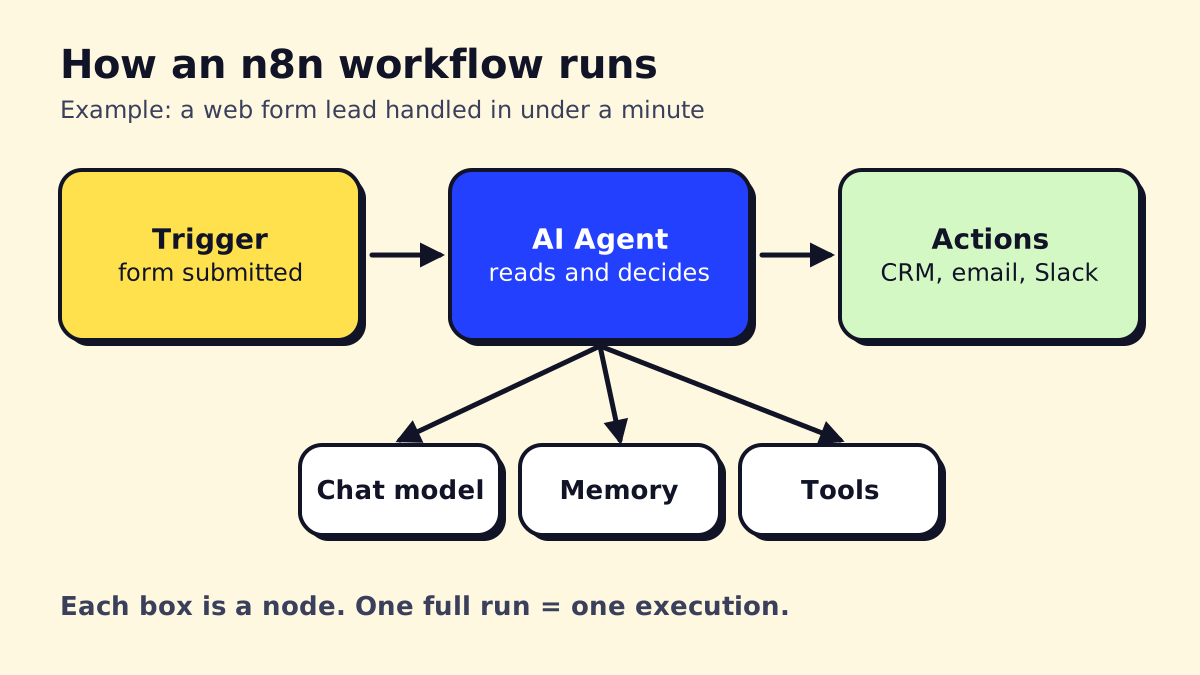 A typical n8n workflow: trigger, AI Agent with its sub-nodes, then actions.
Nodes you’ll use most
| Node | What it does | Typical use |
|---|---|---|
| Webhook | Gives you a URL that starts the workflow | Website forms, phone system events |
| Schedule Trigger | Runs on a timer | Daily reports, reminders |
| HTTP Request | Calls any API | Apps without a ready-made node |
| IF / Switch | Branches the flow | Route leads by service or urgency |
| Code | Runs JavaScript or Python | Clean up dates, phone numbers, text |
| AI Agent | Lets a language model decide and use tools | Triage emails, answer questions |
Community nodes
Besides the built-in nodes, developers publish community nodes for niche apps. You install them from the settings panel on self-hosted n8n. Treat them like any third-party plugin: check who maintains them and how recently they were updated before you trust them with client data.
n8n AI: what the AI Agent node actually does
“n8n AI” is the most searched topic around the tool, and for good reason. n8n has native nodes for building AI agents, not just a “send prompt to ChatGPT” step.
The AI Agent node works with sub-nodes you plug into it:
- Chat model: the brain. OpenAI, Anthropic Claude, Google Gemini, Mistral, or a local model.
- Memory: so the agent remembers earlier messages in a conversation.
- Tools: things the agent may do on its own, like search your knowledge base, look up a customer, check a calendar or call another workflow.
n8n’s homepage also lists human-in-the-loop approvals, guardrails and evaluations for agents, so you can require a person to approve an action (say, issuing a refund) before it happens. Recent versions also support MCP (Model Context Protocol), which lets AI assistants call your n8n workflows as tools.
A realistic example for a service business: a new email lands in the shared inbox. The agent reads it, decides whether it’s a quote request, a complaint or spam, drafts a reply in your tone, creates a lead in the CRM for quote requests, and posts complaints to a Slack channel for a human. If you want the concepts behind this, read what AI agents are and our walkthrough on how to build an AI agent.
One honest caveat: AI steps add model costs (you pay OpenAI or Anthropic per use with your own API key) and they need testing. Agents are good at reading messy text and choosing between a few clear options. They’re bad at anything where a wrong answer is expensive and nobody checks.
Is n8n open source?
Sort of, and the difference matters if you plan to resell it. n8n calls itself “fair-code.” The license file on GitHub is the Sustainable Use License, which lets you use and modify n8n for internal business purposes or personal use, for free.
What you can’t do is take n8n and sell it as your own hosted automation service. Some enterprise features (files marked .ee.) need a paid license key. For a dental office, HVAC company or law firm automating its own work, the free Community edition is fully usable.
n8n Cloud vs self-hosted
You can use n8n two ways.
n8n Cloud is the hosted version. You sign up, n8n runs the servers, handles updates and backups, and you pay a monthly plan based on executions. As of November 2026, n8n’s pricing page lists Starter at €24/month billed monthly (€20 billed annually) for 2,500 executions, and Pro at €60/month (€50 annually) for 10,000 executions.
Self-hosted means you install the free Community edition on your own server. The software costs nothing and there is no execution cap, but you pay for the server and you are responsible for updates, backups, security and uptime.
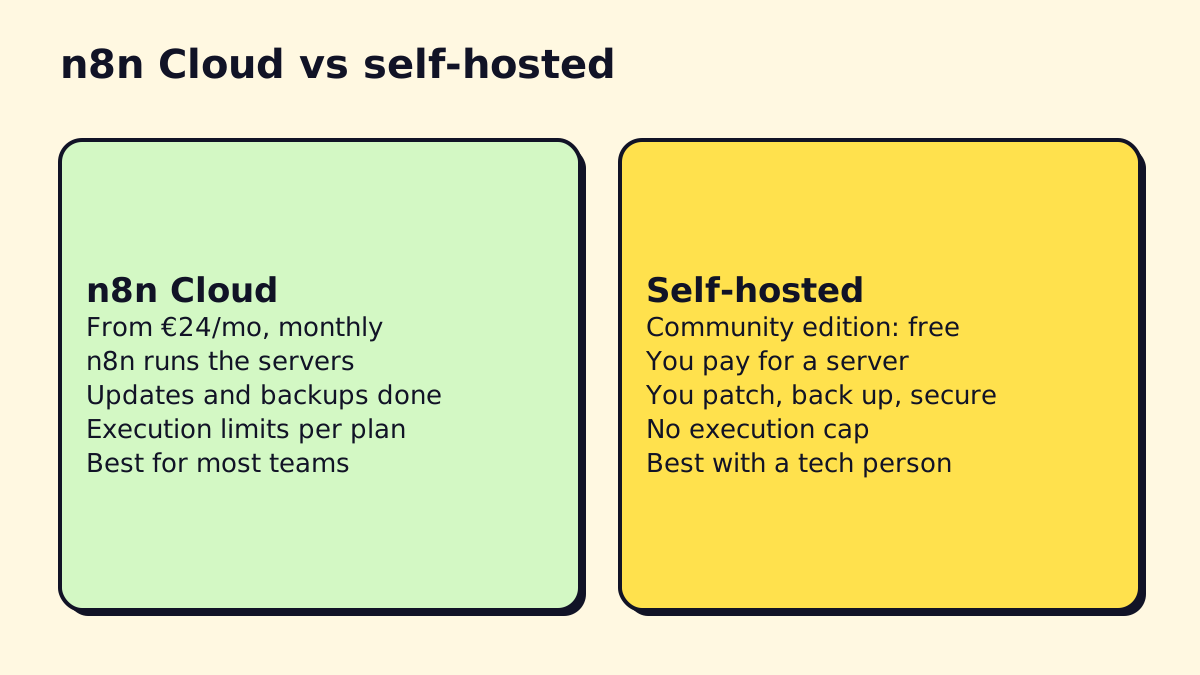
| n8n Cloud | Self-hosted | |
|---|---|---|
| Software cost | From €20–24/month | Free (Community) |
| Server cost | Included | You pay (often a small VPS) |
| Setup time | Minutes | An hour to a day |
| Updates and backups | Done for you | Your job |
| Execution limit | Per plan | Limited only by your server |
| Best for | Most small businesses | Teams with a tech person, strict data rules |
Our take: start on Cloud unless you have a specific reason not to (data must stay in your own environment, very high volume, or you already run servers). Saving €20 a month isn’t worth it if a failed update takes down your lead intake for a weekend.
n8n system requirements and default port
If you do self-host, here’s what to expect.
- Install method: Docker is the recommended path. The n8n hosting docs offer a one-line setup and a Docker Compose setup for production, and note that npm installs are deprecated from n8n 3.0.
- Server size: hosting guides such as Hostinger’s n8n tutorial suggest 1 vCPU and 1 GB RAM as a bare minimum and 2 vCPU with 2 GB RAM as a comfortable start. Plan for 4 GB or more if you run AI agents or large files.
- Database: SQLite works for testing. Use PostgreSQL for anything you rely on.
- Default port: n8n listens on port 5678. Put it behind a reverse proxy with HTTPS before exposing it to the internet.
- Kubernetes and Helm charts: possible, and n8n’s docs cover Kubernetes deployments, but only worth it for larger teams that already run Kubernetes. A single Docker host is plenty for most small businesses.
What can you build with n8n?
Here are workflows we see service businesses actually use:
- Missed-call text-back: when a call goes unanswered, text the caller within a minute and log it in the CRM.
- Lead intake and routing: form submission to CRM, AI scores the lead, hot leads ping the owner by SMS.
- Appointment reminders: pull tomorrow’s bookings each evening and send reminders.
- Invoice follow-up: chase overdue invoices from QuickBooks or Xero with a polite sequence.
- Document processing: read PDFs from an inbox, extract fields, file them, update a sheet.
- Review requests: after a job is marked done, send a review link.
We wrote node-by-node outlines for more than ten of these in our n8n workflow examples post.
A first n8n workflow, step by step
To make this concrete, here’s how a simple lead-intake workflow comes together in the editor. It takes about an hour the first time.
Goal: when someone fills in the quote form on your website, add them to a Google Sheet, email them a confirmation and text the owner if the job is urgent.
- Add a Webhook trigger. n8n gives you a test URL and a production URL. Point your website form (or a form tool like Jotform or Typeform) at the test URL and submit one sample entry. The webhook node now shows the fields it received: name, email, phone, service, message.
- Add a Set (Edit Fields) node to tidy the data: trim spaces, format the phone number, and add a timestamp. If the clean-up is fiddly, use a Code node with a few lines of JavaScript or Python.
- Add a Google Sheets node with the “Append row” operation. Connect your Google account once, pick the sheet, and map each column to a field by dragging it from the left panel.
- Add a Gmail (or Outlook) node to send the confirmation. Use expressions like
{{ $json.name }}to personalize the message. - Add an IF node that checks whether the message contains words like “leak”, “no heat” or “emergency”, or whether the service field equals “Emergency”.
- On the true branch, add a Twilio node that texts the owner’s phone with the lead’s name, number and message.
- Test the whole thing with “Execute workflow”, check each node’s output, then switch the form to the production URL and activate the workflow.
That’s seven nodes and one execution per form submission. On the Starter plan’s 2,500 executions, you could process roughly 80 leads a day before hitting the limit.
Later, you might swap step 5’s keyword check for an AI Agent node that reads the message and decides urgency. That’s usually where n8n starts to pull ahead of simpler tools.
n8n vs Zapier and Make at a glance
| n8n | Zapier | Make | |
|---|---|---|---|
| Billing unit | Execution (whole run) | Task (each action) | Credit (each module) |
| Self-hosting | Yes, free edition | No | No |
| Ease for beginners | Medium | Easiest | Medium |
| AI agents | Native nodes | Agents add-on | AI agents and Maia |
| Code steps | JavaScript, Python | Code by Zapier | Limited functions |
Each has a place. Zapier wins on number of integrations and ease; Make wins on visual design and low entry price; n8n wins on cost at volume, flexibility and control. Our full Zapier vs Make vs n8n comparison goes deeper, and if you’re leaning Make, our Make.com guide explains how its scenarios and credits work.
Common n8n mistakes to avoid
- No error workflow. A token expires, the CRM rejects a field, and nobody notices for two weeks. Always set an error workflow that alerts a person.
- Building on the test webhook URL. The test URL only listens while you have the editor open. Production traffic must go to the production URL with the workflow activated.
- Self-hosting without backups. If the server dies, your workflows and credentials go with it. Back up the database and the encryption key.
- One giant workflow. Split big processes into smaller workflows that call each other. They’re easier to debug and reuse.
- Letting AI act without limits. Give agents only the tools they need, and require approval for anything that sends money or messages to customers in bulk.
Who n8n is for (and who it isn’t)
Good fit:
- You have someone comfortable with spreadsheets, APIs or a bit of code, or you work with an agency.
- You expect multi-step workflows with branches, loops or AI, where per-step pricing gets expensive.
- You want the option to keep data on your own infrastructure.
Not a great fit:
- Nobody on the team wants to troubleshoot anything. Zapier’s setup is friendlier for one-off two-step automations.
- You need a vendor to sign a HIPAA business associate agreement for a hosted product. Ask n8n’s sales team before putting patient data on n8n Cloud; self-hosting in your own compliant environment is the usual route.
- You only need one or two simple zaps. The free tiers elsewhere may cover you.
Comparing options? See our side-by-side of Zapier vs Make vs n8n and other Zapier alternatives.
n8n pros and cons
| Pros | Cons |
|---|---|
| One execution per run, regardless of steps | Steeper learning curve than Zapier |
| Free self-hosted option | Self-hosting means you own maintenance |
| Strong AI agent nodes | Fewer ready-made integrations than Zapier’s 8,000+ |
| Code node for JavaScript and Python | Prices published in euros |
| Huge template library | Community nodes vary in quality |
How to get started with n8n
- Pick one painful, repetitive task. Something that happens at least weekly and follows rules. Lead intake is a good first pick.
- Start a Cloud trial. n8n’s pricing page says the trial needs no credit card and includes 1,000 executions.
- Copy a template. The n8n template library lists more than 14,000 workflows as of November 2026. Find one close to your task and adapt it rather than starting from a blank canvas.
- Connect credentials one app at a time and test each node with real sample data.
- Add error handling. Set an error workflow that emails you when something fails. This is the step most DIY setups skip.
- Run it alongside the manual process for a week, then switch over.
Where to learn: n8n docs and tutorials
The official n8n docs are good and include beginner courses. The community forum is active, and most problems you’ll hit have already been asked about there.
If you’d rather have n8n workflows built and maintained for you, that’s what we do at opsmigo; our page on working with an AI automation agency explains how that usually works and what it costs.
We build a free demo on your own services and hours.
FAQ
Is n8n open source?
n8n's code is public on GitHub, but it uses the Sustainable Use License rather than an OSI-approved open source license. You can use and modify it for your own business for free; you can't resell it as a hosted service.
What does n8n stand for?
n8n is short for "nodemation" (node plus automation): an n, eight letters, then another n. Most people say it "n-eight-n".
Is there an n8n discount or promo code?
n8n doesn't publish public coupon codes. The real savings are annual billing (about 17% cheaper than monthly), the startup program, which gives eligible companies under 20 employees a code for 50% off the Business plan, and the free self-hosted Community edition.
What port does n8n use?
n8n listens on port 5678 by default, so a local install opens at http://localhost:5678. You can change it with the N8N_PORT environment variable.
Can n8n run Python?
Yes. The Code node lets you write JavaScript or Python inside a workflow, which is handy for small data clean-up jobs that would take several nodes otherwise.
Is there an n8n app for phones?
n8n runs in the browser, so there is no separate app to install for building workflows. You can open your n8n instance on any device, though editing is far easier on a laptop.