- Every AI agent has the same core parts: a model that reasons, instructions, tools to act, memory, and a runtime loop that orchestrates them, wrapped in guardrails and logs.
- Start with one agent and a few well-described tools. Move to multi-agent orchestration only when one agent's job gets too broad to test.
- MCP is the open standard for connecting tools to agents; since December 2025 it sits in the Linux Foundation's Agentic AI Foundation.
- Frameworks changed a lot in 2025 and 2026: OpenAI's Agent Builder shuts down on November 30, 2026 and Vertex AI became Gemini Enterprise Agent Platform.
An AI agent architecture diagram shows five core parts: a model that reasons, instructions that set its role and rules, tools it can call to take action, memory that holds context, and an orchestration runtime that runs the plan, act and check loop. Guardrails, permissions and logs wrap around all of them.
This guide explains each part, compares single-agent and multi-agent designs, shows where MCP fits, and rounds up the framework changes of 2025 and 2026. If you are new to agents, start with what AI agents are.
AI agent architecture diagram: the core components
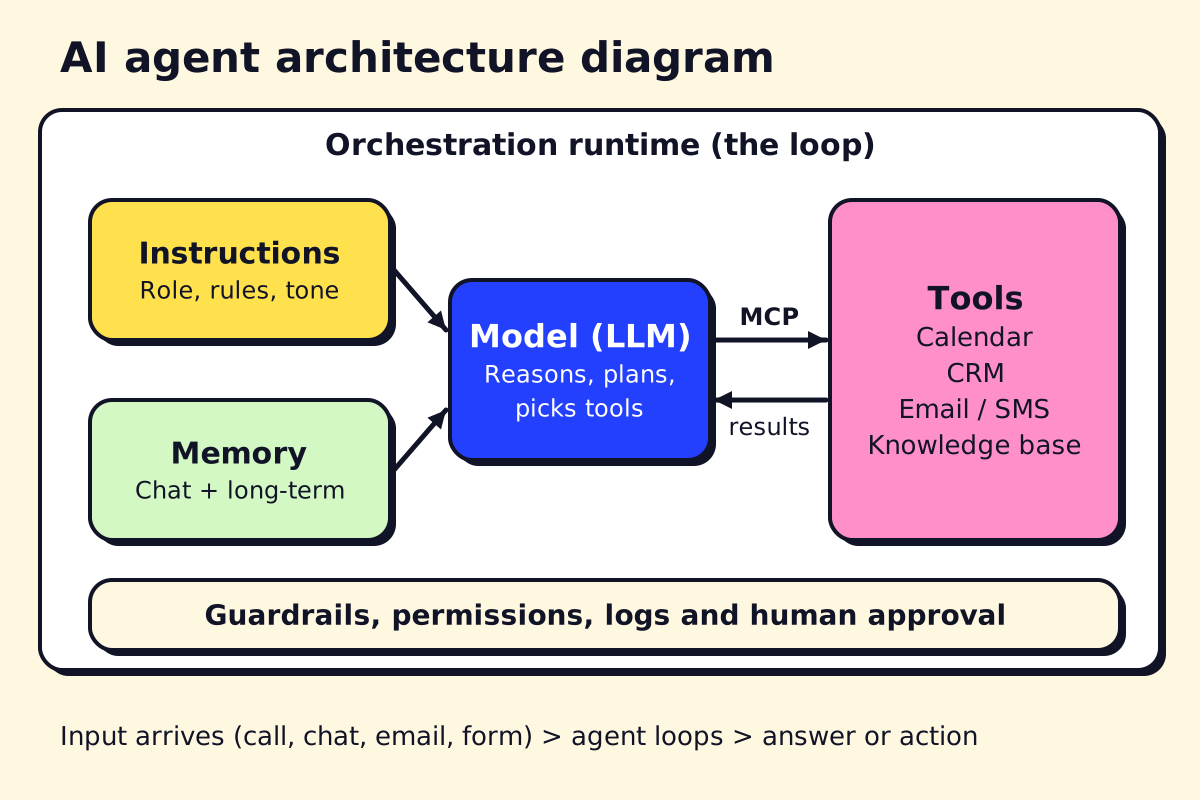 The parts every agent has, whether it is built in n8n or in Python.
Read the diagram from left to right. A request arrives (a call, a chat, an email, a new form). The runtime gives the model its instructions, the relevant memory and the list of tools. The model decides what to do; the runtime executes the tool call and hands back the result; the loop repeats until the job is done or a human is needed.
1. The model (the reasoning engine)
The large language model (LLM) reads the situation and decides the next step. Model choice is a trade-off between quality, speed and price. As of November 2026, Anthropic lists Claude Haiku 5.5 at $0.10 per million input tokens and Claude Sonnet 5.5 at $2 (Claude pricing), a 20x gap. Many production agents use a small, fast model for routine steps and a larger one only for hard decisions.
2. Instructions (the system prompt)
The agent’s job description: role, goal, business facts, allowed actions, hard limits and when to hand off. In practice, most quality problems trace back to vague instructions, not to the model.
3. Tools (how the agent acts)
Tools are functions the model can call: check a calendar, look up a customer, create an invoice, send an SMS. Each tool has a name, a description and typed inputs. The model chooses tools by reading those descriptions, so writing them well matters as much as writing the code behind them.
4. Memory
- Working memory: the current conversation and tool results.
- Knowledge: documents the agent searches when it needs facts (retrieval-augmented generation, or RAG, usually backed by a vector database).
- Long-term memory: customer history and preferences. For business agents this should live in your CRM or database and be read through tools, so there is one source of truth.
5. Planning and reasoning
Some agents plan the whole job first, then execute. Others decide one step at a time (the “ReAct” pattern: reason, act, observe). Newer models do much of this reasoning internally, so you rarely need to code a planner yourself. For long jobs, it still helps to have the agent write a short plan you can log and check.
6. Orchestration runtime
The runtime is the code or platform that runs the loop: passes context to the model, executes tool calls, retries failures, enforces step limits, manages handoffs and records traces. In no-code tools (n8n, Copilot Studio, Zapier Agents) the platform is the runtime. In code, it is the SDK: OpenAI Agents SDK, Claude Agent SDK, LangGraph or Google’s ADK.
7. Guardrails and observability
Not optional for anything customer-facing:
- Permissions: each agent gets its own credentials with the minimum access.
- Input and output checks: block emergencies, personal data leaks and prompt-injection attempts.
- Human approval for irreversible actions.
- Tracing and logs of every step and tool call, plus evaluations you re-run after each change.
Single-agent vs multi-agent architecture
Anthropic’s widely cited guide, Building effective agents, recommends starting with the simplest design that works and adding complexity only when it clearly improves results. We agree.
| Single agent | Multi-agent | |
|---|---|---|
| Structure | One agent, one set of tools | Orchestrator plus specialised agents |
| Good for | One clear job (booking, triage, FAQ) | Broad processes across departments |
| Testing | Simpler | Harder: failures can cascade |
| Cost | Lower | Higher: more model calls |
| Typical small-business fit | Most first projects | Once you have several working agents |
Common orchestration patterns
- Prompt chaining: fixed steps in order (extract details, then draft reply, then check tone).
- Routing: a classifier sends each request to the right specialist agent or workflow.
- Parallel work: several agents handle parts of a task at once and results are merged.
- Orchestrator and workers: a lead agent breaks down the job and delegates.
- Evaluator and optimizer: one agent drafts, another checks against criteria and requests fixes.
- Handoffs: an agent passes the whole conversation to another agent or a human (built into the OpenAI Agents SDK).
AI agent orchestration diagram
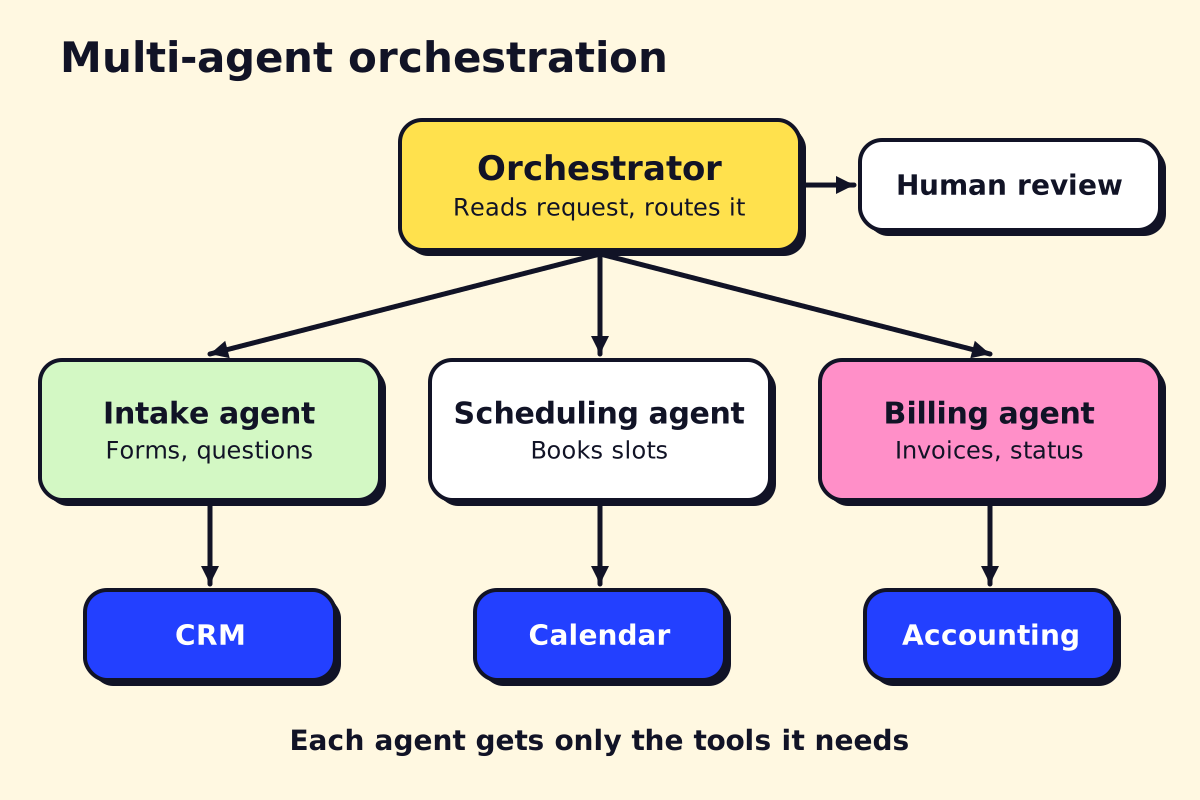 Each specialist agent only gets the tools for its own job.
In this example for a service business, the orchestrator reads each incoming request and routes it. The intake agent can only write to the CRM, the scheduling agent can only touch the calendar, and the billing agent can only read and create invoices. If the orchestrator is unsure, it sends the case to a person. Splitting permissions this way limits the damage any one mistake can do.
Where MCP and A2A fit
MCP (Model Context Protocol) standardises how agents connect to tools and data. Instead of writing a custom integration for every app and every agent framework, an app publishes an MCP server and any MCP-capable agent can use it. Anthropic introduced MCP in November 2024 and donated it to the Agentic AI Foundation, a Linux Foundation fund co-founded with Block and OpenAI, in December 2025. n8n, Copilot Studio, ChatGPT, Claude and the main SDKs all support it. The MCP documentation is the best starting point.
A2A (Agent2Agent) is a separate open protocol, started by Google, for agents from different vendors to talk to each other (a2a-protocol.org). In the diagram above, MCP is the line between an agent and its tools; A2A would be a line between your agent and someone else’s agent. Most small businesses need MCP now and A2A later, if at all.
Agentic AI architecture: the layers
When people talk about agentic AI architecture for a whole company, they usually mean these layers stacked on top of each other:
- Channels: phone, web chat, WhatsApp, email, Teams, internal apps.
- Orchestration: routing, handoffs, step limits, approvals.
- Agents: each with its own instructions, model and tools.
- Tools and data: CRM, calendar, accounting, documents, exposed through APIs or MCP.
- Governance: identity and permissions, logs, evaluations, cost tracking, data retention.
You don’t need all five on day one. A single booking agent touches all the layers in a small way; the architecture grows as you add agents.
Multimodal AI agents
Multimodal agents handle more than text:
- Voice: AI receptionists that answer calls in real time. Speed matters: long pauses feel broken on a phone call, so voice agents use fast speech models and keep tool calls short. See our guide to AI answering services.
- Images and documents: reading photos of damage for insurance or repair quotes, scanned invoices, IDs or forms. See document automation.
- Screens: “computer use” agents that operate a browser or desktop app when there is no API. Useful for older systems, but slower and more fragile than a proper integration.
Self-hosted AI agents
Self-hosting gives you control over data and costs, at the price of owning security and updates. Options range from light to heavy:
- Self-host the orchestration, call a hosted model. n8n Community Edition (hosting docs), LangGraph or either agent SDK on your own server, with API calls to OpenAI, Anthropic or Google. The most common setup.
- Self-host everything. Run open-weight models (such as Llama, Mistral or Qwen families) on your own GPUs or a private cloud. Makes sense for strict data rules or very high volume.
- Personal self-hosted agents like OpenClaw (below).
What is OpenClaw?
OpenClaw is an open-source AI agent you run on your own machine or server. A long-running “gateway” process connects the agent to chat apps such as WhatsApp, Telegram, Slack and Discord, so you message it like a colleague. It works with different model providers, keeps its memory locally, and gains abilities through community-built “skills”.
It became popular in early 2026 as a personal assistant for developers and tech-savvy owners. For business use, be careful: an agent with access to your email, files and shell can do real damage if a skill is malicious or the agent is tricked by a crafted message. Run it with limited accounts, review skills before installing them and keep it away from customer data until you have proper controls.
AI agent frameworks updates (2025 to 2026)
The tooling changed fast. The updates that matter if you are planning a build:
| When | Update | What it means |
|---|---|---|
| Oct 2025 | LangChain and LangGraph reach 1.0 | Stable APIs; LangChain’s create_agent replaces older prebuilt agents |
| Dec 2025 | MCP moves to the Agentic AI Foundation | Neutral governance for the main tool standard |
| Apr 2026 | Claude Managed Agents launches in beta | Hosted agent runtime at $0.08 per session-hour plus tokens |
| Apr 2026 | Vertex AI becomes Gemini Enterprise Agent Platform | Google’s agent tools, including Agent Builder, under one name |
| Apr 2026 | ChatGPT workspace agents launch | Shared, no-code team agents inside ChatGPT |
| Nov 30, 2026 | OpenAI Agent Builder shuts down | Migrate to the Agents SDK or workspace agents (OpenAI deprecations) |
The lesson: keep your business logic (instructions, tool definitions, test cases) in a form you can move. Platforms come and go; a clear spec and a good test set survive any migration.
A reference architecture for a small service business
A typical first agent we would design for a 10 to 50 person service company:
- Channel: phone and SMS (or WhatsApp) through a telephony provider.
- Runtime: n8n for the workflow and an AI Agent step, or a small Python service using an agent SDK.
- Model: a fast, low-cost model for conversation, a stronger one for edge cases.
- Tools: calendar, CRM and SMS, connected via APIs or MCP, each with its own limited credentials.
- Memory: conversation history plus a short knowledge base of services, areas and policies.
- Guardrails: emergency detection, human handoff, daily spend cap, full transcripts.
The how to build an AI agent guide walks through building something like this, and our best AI agents roundup covers the platforms. If you would rather have it designed and run for you, see our guide to AI agent development services, or ask opsmigo to sketch the architecture for your own workflow.
We build a free demo on your own services and hours.
FAQ
What are the main components of AI agent architecture?
A model (the LLM that reasons), instructions, tools (APIs and apps it can call), memory (conversation and stored knowledge) and an orchestration runtime that runs the plan-act-check loop. Guardrails and observability sit around all of them.
What is the difference between single-agent and multi-agent architecture?
A single agent handles a whole job with one set of instructions and tools. A multi-agent system splits the job between specialised agents, coordinated by an orchestrator or by handoffs. Multi-agent designs are easier to scale in scope but harder to test and more expensive to run.
What is OpenClaw?
OpenClaw is an open-source, self-hosted AI agent that runs on your own computer or server and talks to you through chat apps such as WhatsApp, Telegram and Slack. It works with different model providers and adds abilities through community 'skills'.
Can I self-host AI agents?
Yes. You can self-host the orchestration (n8n Community Edition, LangGraph, the OpenAI or Claude Agent SDKs, OpenClaw) and still call a hosted model, or run open-weight models on your own hardware for full control. Self-hosting means you own security and updates.
What is a multimodal AI agent?
A multimodal agent can take in and produce more than text: voice, images, scanned documents or video. Voice receptionists and agents that read photos of invoices or damage are common business examples.