- AI for customer service is best at repetitive questions, order and booking status, ticket sorting and drafting replies. It is weak at complaints, judgment calls and anything involving money disputes.
- Start with AI that helps your team (drafts, summaries, tagging) before putting a bot in front of customers.
- AI is shrinking some support work, but Gartner predicts half of the companies planning big service headcount cuts will drop those plans by 2027.
- Roll out in about 90 days: audit tickets, add agent assist, launch a bot on one channel, then expand.
AI for customer service works best on the repetitive part of support: answering common questions, checking order or booking status, sorting tickets and drafting replies for your team. It works badly on complaints, billing disputes and anything that needs judgment. The smart setup for most small and mid-sized businesses is AI on the first reply and the routine work, with people on everything that matters.
This guide covers what AI handles well, what to keep human, whether AI will replace customer service jobs, how to use ChatGPT safely, and a 90-day plan to roll it out.
How businesses use AI for customer service today
There are four main ways businesses use AI customer service tools. Most teams should adopt them roughly in this order.
- Agent assist. AI suggests replies, summarises long threads and pulls up the right help article while a person handles the ticket. Low risk, quick win.
- Ticket triage. AI reads incoming emails and forms, tags the topic and urgency, and routes them to the right person or queue.
- Self-service bots. A chatbot or AI agent answers customers directly in chat, email, WhatsApp or SMS, and hands off to a person when needed.
- Voice AI. An AI receptionist answers the phone, books appointments and takes messages. See our guide to the AI answering service for that side.
Generative AI is what changed things. Older bots followed scripts and broke when customers phrased things differently. Today’s AI understands free-form questions and writes answers from your own content. That makes bots useful, and it also means they can confidently say something wrong if your content is missing or outdated.
What AI handles well, and what to keep human
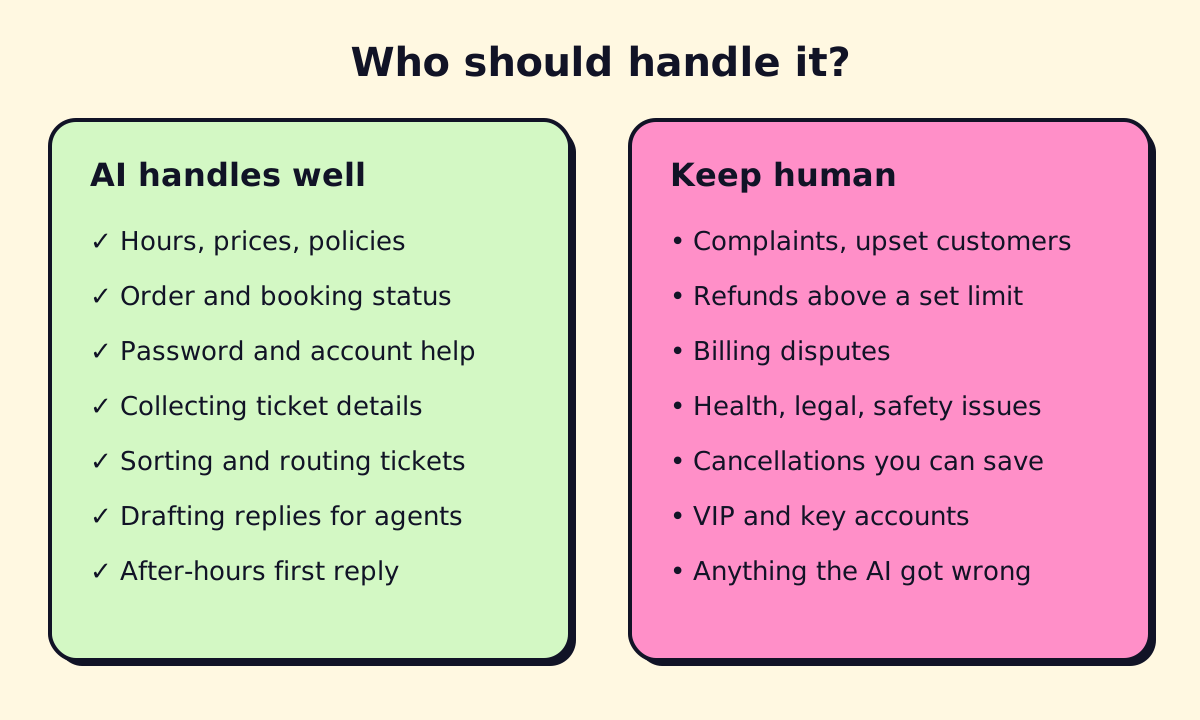
Give AI:
- Hours, locations, prices, policies and “how do I” questions
- Order, delivery or appointment status (when connected to the system that holds it)
- Password resets and simple account changes
- Collecting the details before a person takes over (account, issue, photos)
- Sorting, tagging and routing tickets
- First drafts of replies, for a person to check and send
- After-hours replies that set expectations (“we’ll call you at 8am”)
Keep human:
- Complaints and upset customers
- Refunds or credits above a limit you set
- Billing disputes and anything that could become a chargeback
- Health, legal or safety issues, which matter for clinics, law firms and property managers in particular
- Cancellations where a conversation could save the customer
- Your most valuable accounts
A useful rule: if a wrong answer would cost you more than the time saved, a person should handle it or at least approve it.
Will AI replace customer service?
Partly, and less than the headlines suggest. AI is absorbing the most repetitive questions, so the same team can handle more customers, and some companies are hiring fewer people for basic tiers.
But fully automated support has proved hard. In June 2025, Gartner predicted that by 2027, 50% of organizations that expected to significantly cut their customer service workforce will abandon those plans. Customers still want a person when things go wrong, and companies found the jump to “agentless” support harder than expected.
For a small business, the practical answer is that AI lets you stay small for longer. Your one or two support people spend less time on “what are your hours?” and more time on the conversations that keep customers.
Using ChatGPT for customer service
ChatGPT and similar assistants are useful for support teams in a few safe ways:
- Drafting replies. Paste the customer’s question (with personal details removed) and your policy, and ask for a friendly, short reply.
- Rewriting help articles in plain language, at a reading level customers understand.
- Summarising a long email thread before you call the customer.
- Finding patterns. Paste a week of anonymised ticket subjects and ask for the top 10 themes.
A prompt that works well:
You are a support agent for [business]. Using only the policy below, write a reply under 120 words to this customer. If the policy doesn’t cover the question, say you’ll check and get back to them. Policy: [paste]. Customer message: [paste].
Two cautions. First, use a business plan with data controls rather than a personal account when you handle customer data, and keep personal information out of prompts where you can. Second, for a customer-facing bot, don’t wire up a general chatbot to your website. Use a help desk or chatbot platform that answers only from your content, logs every conversation and hands off cleanly. We compare those in best chatbots for small business.
Automating customer support behind the scenes
A lot of support work isn’t the reply itself. It’s the admin around it. These automations are often worth more than a bot:
- Create tickets automatically from emails, web forms, chat handoffs and voicemails.
- Automate Jira ticket creation for IT or product issues: Jira Service Management can turn incoming emails into tickets, and its automation rules can set priority and assign owners. Zapier, Make or n8n can create issues from anywhere else.
- Auto-tag and route by topic, language or customer tier.
- Send status updates when an order ships, an appointment is confirmed or a ticket changes state.
- Close the loop: a short satisfaction survey after each resolved ticket, with low scores flagged to a manager.
If you use a CRM, see CRM workflow automation for recipes that connect support and sales records. For the tools that run these automations, our Zapier vs Make vs n8n comparison explains the trade-offs.
AI for customer success
Customer success is the proactive side: keeping customers happy and renewing. AI helps by summarising account history before a check-in call, flagging customers whose usage or ticket tone has dropped, and drafting check-in emails. It should prompt your team to act, not send the messages on its own.
Industry notes
- Banking and insurance. AI handles balance questions, card freezes, claim status and document collection. Regulators expect clear records and a way to reach a person; keep advice and claim decisions human.
- Telecom and utilities. Outage updates, plan questions and bill explanations are good AI tasks; cancellations and disputes are not.
- Clinics and dental offices. Booking, reminders and general questions only. No medical advice from a bot.
- Trades and property management. Capture the job or maintenance request with photos and address, then route by urgency. Emergencies go straight to a person on call.
A 90-day rollout plan
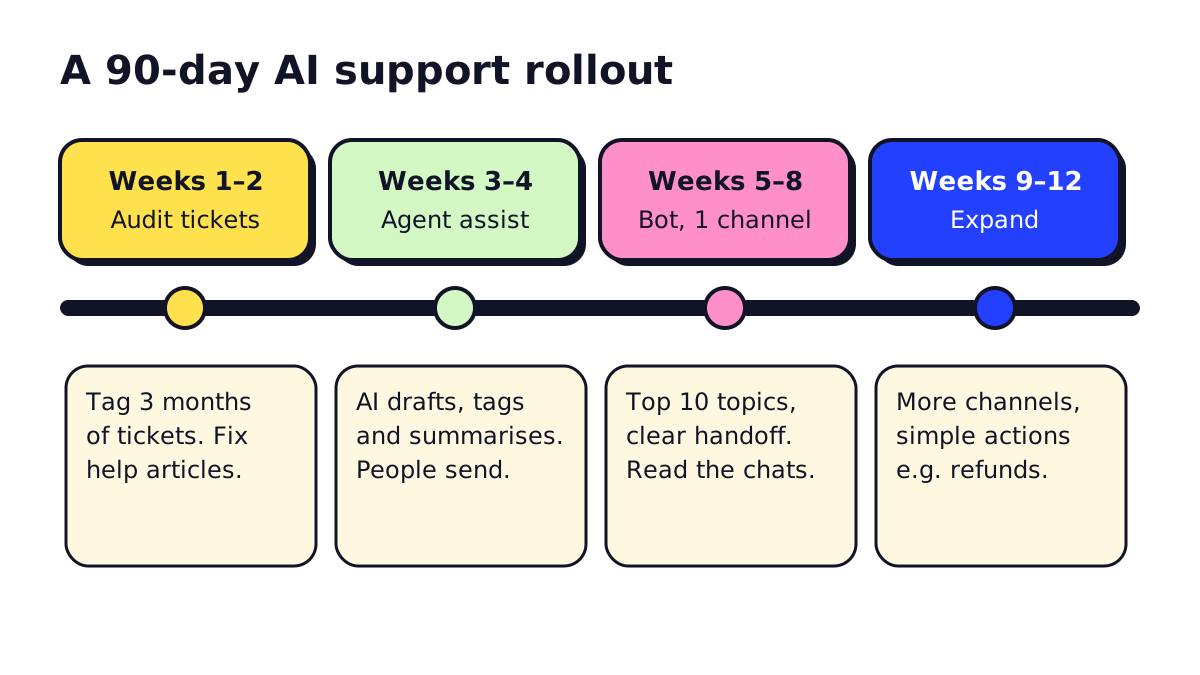
Weeks 1–2: audit. Export three months of tickets, emails and chat logs. Tag them by topic. Rewrite the help content for the top 15 topics so it’s complete and current.
Weeks 3–4: agent assist. Turn on AI drafting, summaries and tagging in your help desk. Your team keeps sending every reply. You learn where the AI gets things wrong without customers seeing it.
Weeks 5–8: bot on one channel. Put an AI bot on website chat (or email) for the top 10 topics only. Set clear handoff rules. Read every transcript for the first two weeks.
Weeks 9–12: expand. Add channels, more topics, and simple actions like booking changes or small refunds under a limit. Review monthly.
What to measure
- Resolution rate: questions fully answered without a person
- Handoff rate and reasons: each reason is a content gap or a rule to adjust
- Customer satisfaction after AI conversations vs human ones
- First response time, especially after hours
- Wrong answers found in weekly spot checks
Choosing an AI customer support solution
Start with the help desk you already have. Intercom, Zendesk, HubSpot, Gorgias and Freshdesk all have AI agents built in, priced per seat plus a fee per AI resolution. Check what counts as a “resolution” before you sign, and set a monthly spending cap.
If your support depends on data in several systems, or you need a bot on WhatsApp with bookings and CRM updates, you may need a custom build. Our guide to chatbot development services covers that. opsmigo sets up AI customer service for service businesses, from agent assist through to bots and phone AI, and we’re happy to tell you which parts are worth automating first.
We build a free demo on your own services and hours.
FAQ
Will AI replace customer service jobs?
AI is taking over the most repetitive questions, so teams need fewer people for that work. Complex, emotional and high-value conversations still need people, and Gartner predicts many companies that planned large cuts will reverse course by 2027.
How can AI help customer service?
AI answers common questions instantly at any hour, sorts and routes tickets, drafts replies for agents to approve, summarises long threads and spots trends in what customers ask about.
Can I use ChatGPT for customer service?
Yes, for drafting replies, rewriting help articles and summarising tickets, on a business plan with data controls. For a customer-facing bot, use a help desk or chatbot tool that answers from your own content and logs every conversation.
How do I automate Jira ticket creation?
Jira Service Management can create tickets from incoming emails and web forms, and its automation rules can set priority, assign owners and notify Slack. Tools like Zapier, Make or n8n can create Jira issues from other sources, such as a chatbot handoff.
What does generative AI add to customer service?
Older bots followed fixed scripts and broke when customers phrased things differently. Generative AI understands free-form questions and writes answers from your help content, which makes bots far more useful but also means you must test that they don't make things up.