- For most small businesses, Tidio is the easiest start: a free plan, website and social chat, and an AI agent (Lyro) you can add later.
- If you already use a help desk, turn on its AI first: Intercom Fin, Zendesk AI agents or HubSpot's Customer Agent. Watch the per-resolution fees.
- Shopify stores should try the free Shopify Inbox before paying, then look at Gorgias once ticket volume grows.
- A chatbot is only as good as the content you feed it. Spend your first week on FAQs and policies, not on picking colours.
The best chatbots for small business in 2026 are Tidio for most websites, Intercom, Zendesk or HubSpot if you already run a help desk, Chatbase or Botpress if you want to build your own AI bot, and Shopify Inbox or Gorgias for online stores. Which one fits depends less on the AI and more on where your customers message you and what you need the bot to do. Below you’ll find a comparison table with prices checked in November 2026, then how to pick and set one up.
The best chatbots for small business at a glance
Prices are the entry paid plan as listed on each vendor’s pricing page in November 2026. Many show the annual-billing price by default, so monthly billing costs more.
| Tool | Best for | Free option | Entry paid price | AI cost |
|---|---|---|---|---|
| Tidio | Small sites, all-round | 50 conversations/mo | Starter $24.17/mo | Lyro AI from $32.50/mo |
| Intercom | Growing support teams | Trial only | Essential from $29/seat/mo | Fin: $0.99 per outcome |
| Zendesk | Multi-channel help desk | Trial only | Suite Team $55/agent/mo (annual) | 5 resolutions/agent included, then $1.50–$2.00 |
| HubSpot | Businesses already on HubSpot CRM | Free for 2 users | Starter from $7–$20/seat/mo | Uses HubSpot Credits ($0.01 each) |
| Chatbase | Quick custom bot from your docs | 7-day trial | Hobby $32/mo (annual), 700 credits | Included in credits |
| Botpress | Flexible builds, many channels | 100 conversations/mo | Plus $150/mo (annual) | $0.10 AI usage per conversation included |
| Gorgias | Shopify and ecommerce | No | Starter $10/mo (50 tickets) | AI Agent $0.90–$1.00 per automated interaction |
| Shopify Inbox | Shopify stores starting out | Free | Free | Free AI sales associate |
ManyChat deserves a mention for Instagram, Facebook Messenger and WhatsApp. Its Pro plan is priced by contact count and third-party reviews disagree on whether AI is included or a separate add-on, so check manychat.com/pricing for your contact count before you commit.
Tidio: the easiest start for most small businesses
Tidio combines live chat, email, Messenger and Instagram in one inbox, with an AI agent called Lyro that answers from your FAQs. The free plan handles 50 conversations a month and 10 seats. Lyro’s free allowance is 50 AI conversations in total, which never refresh, so think of it as a trial.
Good for: service businesses, local shops and small online stores that want chat on the website in an hour. Watch out for: paid plans are priced by conversations, so a busy site moves up tiers quickly.
Intercom, Zendesk and HubSpot: if you already have a help desk
If your team already answers customers in a help desk, adding its built-in AI is usually smarter than bolting on a separate chatbot. The AI sees the same tickets, macros and help articles your team uses.
- Intercom charges per seat plus $0.99 for every conversation its Fin AI agent resolves. Fin is strong at answering from help articles, and you only pay when it actually closes the question.
- Zendesk includes a small number of automated resolutions per agent each month (5 on Suite Team, 10 on Suite Professional), then charges $1.50 each on a commitment or $2.00 pay-as-you-go.
- HubSpot makes sense when your contacts and deals already live in HubSpot. The free tools include a basic chatbot builder; the AI Customer Agent runs on HubSpot Credits, and Professional seats include 3,000 credits a month.
The per-resolution model is fair, but it adds up. 500 AI-resolved chats a month at $0.99 is about $495 on top of seats, so set a monthly cap in the billing settings.
Chatbase and Botpress: build your own AI chatbot
If you searched “how to create an AI chatbot” or “build your own AI chatbot”, these are the two to try.
Chatbase is the fastest route. You point it at your website or upload PDFs, choose the AI model, set instructions and paste a widget onto your site. It’s a good fit for a law firm, clinic or agency that wants a bot that answers from its own documents. There is no free plan, only a 7-day trial.
Botpress is a visual builder with more control: multi-step flows, variables, and connections to WhatsApp, Messenger, Telegram and your own APIs. The free plan includes 100 conversations a month. It has a steeper learning curve, but it’s the one we’d pick when the bot needs logic beyond answering questions.
Gorgias and Shopify Inbox: for online stores
Shopify Inbox is free, works inside your Shopify admin, and now includes an AI sales associate that learns from your catalogue and policies and can answer product and order questions. Start here.
Gorgias is a help desk built for ecommerce. Its AI Agent can look up orders, process simple changes and answer product questions, charged per automated interaction. It becomes worth it once you’re handling hundreds of tickets a month.
We go deeper on store use cases (order status, returns, product questions) in our guide to AI chatbots for ecommerce.
How to pick the right chatbot
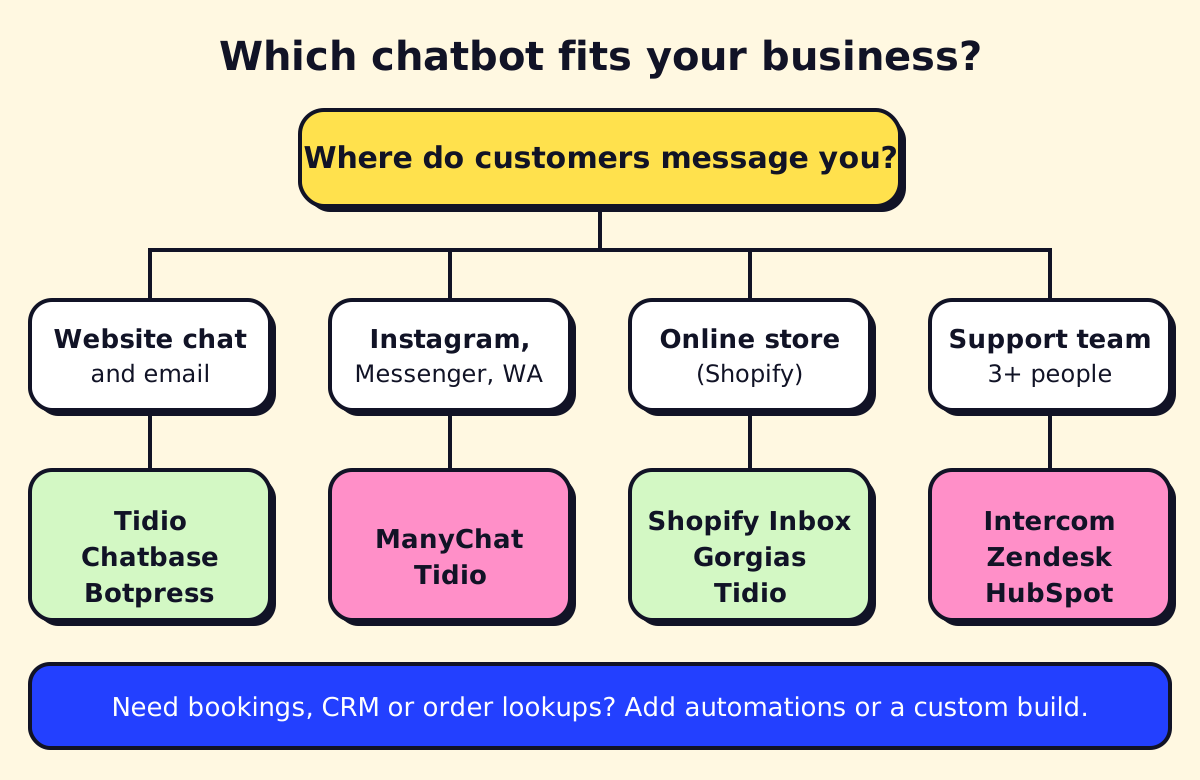
Answer these four questions and the choice usually makes itself:
- Where do customers message you? Website, Instagram, WhatsApp, SMS, or email? Pick a tool that covers your top two channels natively.
- What should the bot do? Answer questions only, or also book appointments, capture leads into a CRM, or look up orders? Booking and CRM tasks often need workflow automation behind the bot.
- How many conversations a month? Under 100, almost any free plan works. Over 1,000, compare per-conversation and per-resolution pricing carefully.
- Who will maintain it? Someone has to update the bot when prices, hours or policies change. Budget an hour a week.
AI chatbot features that matter (and ones that don’t)
Worth paying for:
- Answers from your own content, with sources you can check
- Clean handoff to a human, with the conversation history attached
- Lead capture into your CRM or email tool
- Business-hours rules (different behaviour after hours)
- Transcript search and a list of questions the bot couldn’t answer
- Multilingual answers if you serve English and French or Spanish customers
Not worth paying extra for: avatars, animated greetings, “personality” settings and sentiment dashboards you’ll never open.
Chatbots by industry
- Real estate. A real estate AI chatbot can qualify buyers (budget, area, timeline), answer listing questions and book showings. Pair it with your CRM. More in AI for real estate.
- Restaurants. Hours, menu, allergens, reservations and large-party enquiries. Most reservation systems have their own chat or integrate with Tidio and ManyChat.
- Clinics and dental offices. Keep the bot to scheduling and general questions. Don’t let it give medical advice, and check how the vendor handles health data.
- Trades (HVAC, plumbing, contractors). Capture the job, address and photos, then hand it to dispatch. Many calls still come by phone, so an AI answering service often pays off before a chat bot does.
- WhatsApp and SMS. If your customers text you, pick a tool with official WhatsApp Business API access (Botpress, Tidio, ManyChat, Zendesk and Intercom all offer it). WhatsApp charges per template message on top of the tool’s fee.
Set it up in a week
- Day 1: Export your last 100–200 customer questions from email and chat. Group them.
- Day 2: Write or update FAQ answers for the top 15 groups. This is the bot’s brain.
- Day 3: Install the tool, connect your website and inbox, load the FAQ content.
- Day 4: Set the handoff rule: when to pass the chat to a person and how they get notified.
- Day 5: Test with 30 real questions. Fix wrong answers by improving the content, not by arguing with the bot.
- Week 2 onward: Read transcripts weekly and add answers for anything the bot missed.
If you outgrow off-the-shelf tools, our guide to chatbot development services explains what a custom build costs. For a wider view of the software that helps small teams, see AI tools for small business. And if you’d like a hand choosing and setting one up, opsmigo does exactly that for service businesses.
We build a free demo on your own services and hours.
FAQ
What is the best free chatbot for a website?
Tidio's free plan covers 50 conversations a month and includes a one-time allowance of 50 AI conversations. Botpress has a free plan with 100 conversations, and HubSpot's free tools include a basic chatbot builder. Shopify stores can use Shopify Inbox at no cost.
What is an AI chatbot?
An AI chatbot is software that understands questions typed in plain language and replies in natural sentences. Business chatbots answer from your own content, such as your website, FAQs and policies, and hand the chat to a person when needed.
Can I build my own AI chatbot without coding?
Yes. Builders like Chatbase, Tidio and Botpress let you upload documents or point at your website, set the tone and paste a widget onto your site in an afternoon. You only need a developer when the bot must connect to systems like bookings or order databases.
How much does a small business chatbot cost per month?
As of November 2026, entry paid plans run from about $24 to $150 a month for single-business tools, while help desks charge per agent seat plus a fee of roughly $0.90 to $2.00 per AI-resolved conversation.
Are AI chatbots worth it for small businesses?
They are worth it when you get repeat questions every day or lose leads after hours. If you get a handful of messages a week, a clear FAQ page and fast email replies may serve you better.