- AI chatbot development services cover discovery, conversation design, the build, integrations, testing and ongoing tuning. The integrations are usually where the money goes.
- Published 2026 ranges for a custom build run from about $15,000 for a single-channel FAQ bot to $150,000 or more for compliance-grade enterprise bots, plus monthly running costs.
- Most small businesses should start with a platform bot ($0 to a few hundred dollars a month) and only pay for custom development when they need integrations, multiple channels or strict data rules.
- Choose a chatbot development company that shows live bots, explains its handoff to humans and puts post-launch support in writing.
AI chatbot development services design, build and run a chatbot that answers your customers in your own words, on your website, WhatsApp, SMS or inside your app. Published 2026 price guides put a custom build at roughly $15,000 for a simple FAQ bot and $60,000 to $150,000 for a bot that reads your documents and takes actions in other systems. Many small businesses don’t need custom work at all. A platform bot set up properly often does the job.
This guide covers what you get from a chatbot development company, what it costs, how a project runs, how enterprise and small-business projects differ, and how to choose who builds it.
What AI chatbot development services include
A good chatbot project is mostly about your business content and your systems, not the AI model. Here is what a full-service team should deliver:
- Discovery. Which questions customers ask most, which channels they use, what the bot is allowed to do and what it must never do.
- Conversation design. Greeting, tone, the questions it asks to qualify someone, and the exact moment it hands off to a person.
- Knowledge base setup. Loading your FAQs, policies, price lists and help articles so the bot answers from your content. The technical term is RAG (retrieval-augmented generation): the bot looks up the relevant passage first, then writes the answer.
- Integrations. Connecting the bot to your CRM, booking calendar, order system, help desk or phone line so it can do things, not only talk.
- Channels. Website widget, WhatsApp Business, Facebook Messenger, Instagram, SMS, Microsoft Teams or Slack for internal bots.
- Testing and guardrails. Running real customer questions through it, blocking off-topic answers, and checking it never makes up prices or policies.
- Launch and tuning. Reading transcripts weekly, filling gaps in the knowledge base and adjusting handoff rules.
The last step is the one most often left out of quotes. A bot without someone reading its conversations gets worse over time, because your prices, hours and policies change and nobody tells the bot.
If your bot needs to take multi-step actions on its own (rebooking an appointment, issuing a refund, updating a record), you are closer to an AI agent than a chatbot. Our guide to AI agent development services covers that kind of build.
The chatbot development process, step by step
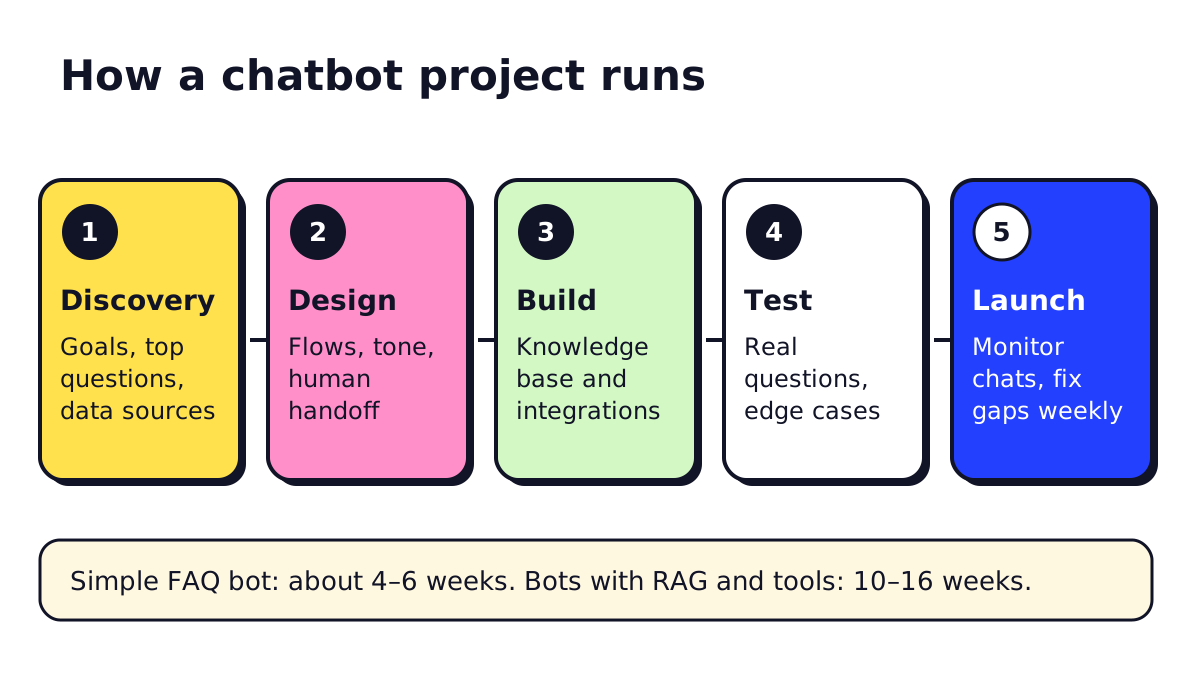 Timelines from the Groovy Web 2026 US guide cited below.
- Discovery (1–2 weeks). Pull your last few hundred support emails, chats or call notes. Sort them into question types. The top 10 types usually cover most of the volume and become the bot’s first job.
- Design (1–2 weeks). Write sample conversations for each question type, including what happens when the customer is angry, confused or asks for a human.
- Build (2–8 weeks). Set up the bot platform or custom code, load your knowledge base and connect integrations. Integrations take the longest.
- Test (1–2 weeks). Run real past questions through the bot. Have staff try to break it. Check every answer that involves money, dates or legal terms.
- Launch and improve (ongoing). Start on one channel or with a share of traffic, read transcripts every week and expand once answers are reliable.
AI chatbot pricing: what development costs in 2026
Chatbot development companies rarely publish fixed prices, so the most useful numbers come from agency cost guides. Two published in 2026 line up closely:
| Type of bot | Build cost | Monthly running cost | Timeline |
|---|---|---|---|
| Single-channel FAQ bot | $15,000–$30,000 | $300–$1,500 | 4–6 weeks |
| Multi-channel AI bot + CRM | $30,000–$60,000 | $1,000–$4,000 | 6–10 weeks |
| Bot with RAG and tool use | $60,000–$150,000 | $3,000–$12,000 | 10–16 weeks |
| Enterprise, compliance-grade | $150,000–$300,000 | $8,000–$25,000 | 14–22 weeks |
Source: Groovy Web, custom chatbot development US guide, checked November 2026.
A second guide from Monocubed gives a wider band: $5,000–$30,000 for rule-based or FAQ bots, $30,000–$150,000 for AI-powered bots, and $150,000–$500,000+ for enterprise agentic systems. It puts yearly maintenance at 15–20% of the build cost.
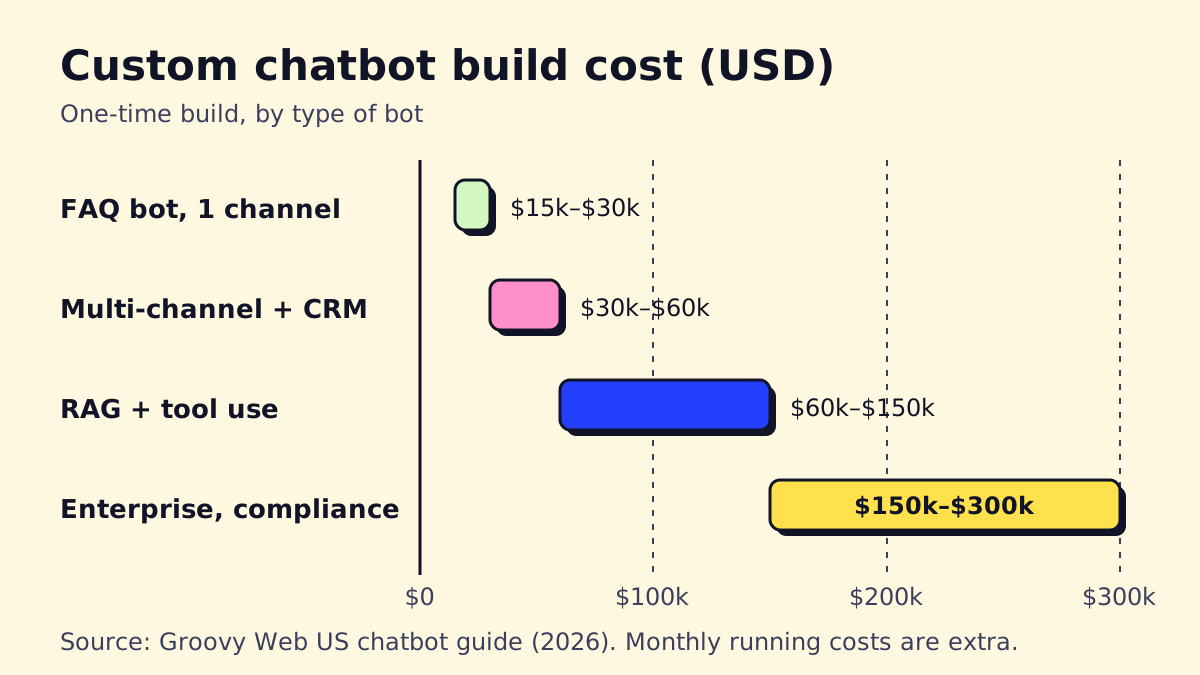
These are agency figures, and agencies have a reason to quote high. Treat them as the price of fully custom code. Many small-business needs can be met far cheaper on a platform, which is the next section.
What actually drives the price
- Integrations. Each system the bot reads from or writes to (CRM, booking, order database, EHR) adds design, build and testing time.
- Channels. Every extra channel has its own rules. WhatsApp, for example, charges per message template and requires approved templates for business-initiated messages.
- Compliance. Health, finance and legal data bring requirements like HIPAA in the US or PIPEDA in Canada, which mean audit logs, access controls and vendor agreements.
- Languages. English plus French or Spanish means two knowledge bases to maintain and test.
- Model usage. You pay the AI provider per message. Monocubed’s estimate is about $25 a month for 5,000 conversations on a small model, rising into the thousands at high volume on larger models.
Enterprise AI chatbot vs small-business chatbot
The phrase “enterprise AI chatbot” covers a very different project from a chatbot for a dental office or an HVAC company.
| Small business | Enterprise | |
|---|---|---|
| Typical goal | Answer FAQs, book jobs, capture leads after hours | Deflect support volume, IT/HR service desk, internal knowledge |
| Usual build | Platform bot, configured and connected | Custom stack or enterprise platform |
| Integrations | 1–3 (calendar, CRM, email) | Many (SSO, ticketing, ERP, data warehouse) |
| Security asks | Basic privacy policy, data retention | SSO, audit logs, SOC 2 reports, data residency |
| Who maintains it | Owner or office manager, with agency support | Internal team plus vendor |
Enterprise buyers also look at internal uses: a chatbot for HR services that answers benefits and leave questions, or a chatbot for the IT service desk that resets passwords and opens tickets. Financial services firms tend to want bots that never give advice and log every answer. Those requirements are why enterprise conversational AI projects land at the top of the price table.
For a small business, a smart setup is usually a platform bot such as Tidio, Intercom or HubSpot plus a few automations. We compare those in best chatbots for small business.
Customer service AI chatbots: where they earn their keep
Most chatbots are bought for customer service. They are good at:
- Opening hours, location, service area, pricing ranges and policies
- Order and booking status, when connected to the system that holds it
- Collecting details before a person calls back (name, address, issue, photos)
- Answering after hours, when nobody is at the desk
They are bad at complaints, anything that needs judgment about money, and situations where the customer is upset. In January 2024, parcel firm DPD switched off part of its chat assistant after a customer got it to swear and call the company the worst delivery firm in the world. The lesson from stories like that is simple: test what the bot does when someone tries to push it off-script, and keep a human escalation path visible.
For a fuller picture of where AI fits in a support team, see our guide to AI for customer service. Shops selling online should also read AI chatbots for ecommerce, which covers order-status and returns bots.
Build, buy or hire: how to choose a chatbot platform or company
Start with the question “what does the bot need to do?”:
- Only answer questions from my website and FAQs. Use a builder. Set it up yourself or pay someone for a few days of setup.
- Answer questions and book appointments or capture leads into my CRM. A builder plus integrations, often via Zapier, Make or n8n. This is where a small agency helps.
- Look up orders, accounts or records, act across several systems, or meet compliance rules. Hire an AI chatbot development company or developer.
Questions to ask a chatbot development company
- Can you show me two bots you built that are live today, and let me try them?
- What happens when the bot doesn’t know the answer? Show me the handoff.
- Who owns the knowledge base, the prompts and the code if we stop working together?
- Which AI model do you use, where is our data stored, and is it used for training?
- What does post-launch support cost per month, and what does it include?
- How will we measure success? (Look for resolution rate, handoff rate and customer satisfaction, not “messages handled”.)
- For US-based work: do you sign a BAA for health data? For Canadian clients: how do you handle PIPEDA and provincial privacy laws?
Red flags
- A fixed quote without seeing your data or support history
- Promises of “100% automation” or no human handoff
- No plan for who updates the bot when your prices or policies change
- Lock-in: you can’t export your content or transcripts
How to integrate a chatbot into your website
On most platforms this is the easy part. You copy a short script from the chatbot dashboard and paste it into your site’s footer, or install the platform’s plugin for WordPress, Shopify, Wix or Squarespace. A custom bot works the same way: a chat widget on the page talks to the bot’s server.
What takes thought is placement. Show the widget on pages where people get stuck (pricing, booking, contact), and turn off auto-pop-ups on blog pages where they annoy readers. Make sure the widget works on phones and doesn’t cover your “Call now” button.
Is custom chatbot development worth it?
It’s worth it when the bot replaces real, repeated work: hundreds of order-status questions a week, bookings that today need a phone call, or internal questions that pull staff away from paying work. It’s rarely worth it to answer twenty questions a month that a good FAQ page could handle.
If you’re weighing it up, our step-by-step guide to building an AI agent shows what’s involved if you want to try a version yourself first. And if you’d rather have someone scope it with you, opsmigo builds chatbots and AI agents for service businesses and can tell you honestly whether a platform bot would do.
We build a free demo on your own services and hours.
FAQ
How much does it cost to develop a chatbot?
Agency guides published in 2026 put a custom single-channel FAQ bot at roughly $5,000 to $30,000 and an LLM bot with integrations at $30,000 to $150,000. Enterprise and compliance-grade bots run $150,000 to $300,000 or more. Monthly hosting, model usage and maintenance are extra.
How long does chatbot development take?
A simple FAQ bot on one channel usually takes 4 to 6 weeks. A bot that reads your documents and takes actions in other systems typically takes 10 to 16 weeks, and enterprise projects can take several months.
What is a customer service chatbot?
A customer service chatbot is software that answers customer questions in chat, on your website, WhatsApp, SMS or social media. AI versions understand free-form questions, answer from your own help content and pass the conversation to a person when they can't help.
How do I integrate a chatbot into my website?
Most chatbot platforms give you a short JavaScript snippet to paste before the closing body tag, or a plugin for WordPress, Shopify or Wix. A custom bot is added the same way, with a chat widget that talks to the bot's server.
Should I hire a chatbot development company or use a builder?
Use a builder if your bot only needs to answer questions from your website and FAQs. Hire a developer when the bot must look up orders or bookings in your systems, work on several channels, or meet rules like HIPAA or PIPEDA.