- Start your ecommerce chatbot with order status. 'Where is my order?' is the most repetitive question in most stores, and the bot can answer it from data you already have.
- Product Q&A, returns and size or fit questions come next. Upsells work best as suggestions inside a helpful answer, not pop-ups.
- On Shopify, try the free Shopify Inbox first; move to Gorgias, Tidio, Zendesk or Intercom when volume or channels grow.
- Track resolution rate, handoff rate, wrong answers, CSAT and orders after chat. Messages handled tells you nothing.
An AI chatbot for ecommerce answers shoppers in chat around the clock: where their order is, whether a product fits or is in stock, how to return something, and what goes well with what’s in their cart. The best ones connect to your store, so they answer from real order and product data instead of guessing. If you run Shopify, you can start free with Shopify Inbox and grow into a help desk such as Gorgias later.
This guide walks through the use cases worth automating, your Shopify chatbot options, how to roll one out and the metrics that show whether it’s working.
What an AI chatbot for ecommerce should handle
Not every question deserves a bot. These four cover most of the value for a typical online store.
1. Order status (“Where is my order?”)
This is the first job to give your chatbot. The question is repetitive, the answer lives in your store and carrier data, and customers are happy with a fast, accurate reply.
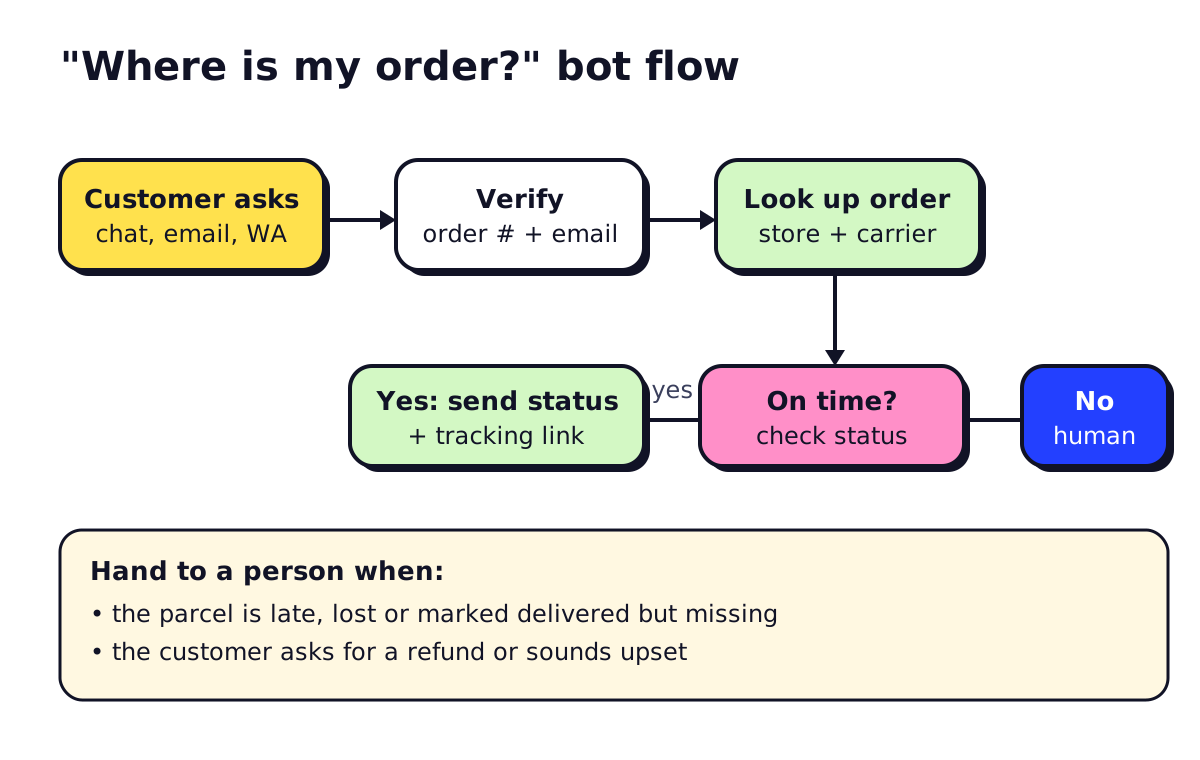
The bot should verify the customer (order number plus email is the usual check), look up the order, and reply with status and the tracking link. If the parcel is late, lost or “delivered” but missing, it hands the chat to a person with the order details attached.
2. Product questions
Sizing, materials, compatibility, ingredients, “will this fit my model X?”. The bot answers from your product pages, so the quality of your product descriptions sets the ceiling. If the answer isn’t on the page, add it to the page, not only to the bot. That helps search and shoppers who never open chat.
3. Returns and exchanges
A returns bot checks the order date against your policy, asks the reason, collects photos for damage claims and starts the return in your returns app or opens a ticket. Set a rule: refunds above a certain amount, or repeat returners, go to a person.
4. Recommendations and upsells
Conversational AI for retail works best when it helps first and sells second. “That jacket runs small, most people size up. It pairs with these gloves if you’re in a cold climate” converts better and annoys less than a discount pop-up. Keep suggestions to one per answer.
Other useful jobs
- Pre-purchase questions about shipping costs and delivery times to Canada or the US
- Discount and promo questions, so codes are explained correctly
- Wholesale or bulk enquiries, captured as leads for a person to follow up
- Abandoned cart follow-up over email, SMS or WhatsApp (only with consent; see our AI for sales guide for CAN-SPAM and CASL basics)
Shopify AI chatbot options
| Tool | What it does well | Starting price (Nov 2026) |
|---|---|---|
| Shopify Inbox | Free chat in Shopify admin; AI sales associate trained on your catalogue and policies | Free |
| Gorgias | Ecommerce help desk; AI Agent can look up and change orders | $10/mo for 50 tickets; AI Agent $0.90–$1.00 per automated interaction |
| Tidio | Chat plus Messenger and Instagram; Lyro AI agent | Free plan; Starter $24.17/mo; Lyro from $32.50/mo |
| Zendesk | Multi-channel help desk with Shopify integration | Suite Team $55/agent/mo annual |
| Intercom | Fin AI agent, strong help-article answers | From $29/seat/mo plus $0.99 per Fin outcome |
Prices come from each vendor’s pricing page in November 2026. Several show annual-billing prices by default.
Our take: start with Shopify Inbox. When you have more than one person answering customers, or you sell on more than Shopify, look at Gorgias (Shopify-first) or Tidio (simpler, cheaper). Choose Zendesk or Intercom if you also run complex B2B support. Our full comparison of the best chatbots for small business covers non-ecommerce options too.
If your store runs on WooCommerce, BigCommerce or a custom platform, the same tools mostly apply. Check that the integration reads orders, not only customer names.
WhatsApp chatbots for ecommerce
If your customers prefer WhatsApp, a bot there can send order confirmations, shipping updates and answer support questions. You’ll need the WhatsApp Business Platform through a provider such as Zendesk, Tidio, Botpress or a dedicated WhatsApp tool. Meta charges per template message, and the rates vary by country and message type; see Meta’s WhatsApp pricing page. Customers have to opt in before you message them first.
Using ChatGPT for ecommerce (behind the scenes)
ChatGPT and similar assistants are useful for the work that feeds your chatbot:
- Drafting clear product descriptions with sizing and care details
- Turning a messy returns policy into plain-language FAQ answers
- Writing first drafts of support macros in your brand voice
- Summarising a week of chat transcripts into “top 10 unanswered questions”
Don’t paste customer personal data into a consumer AI account. Use a business plan with data controls, or the AI features inside your help desk.
How to roll out an ecommerce chatbot
- Pull your last 3 months of support tickets and tag them by topic. The top topics are your bot’s job list.
- Fix your content first. Shipping page, returns policy, size guides and product FAQs. The bot can’t be better than these.
- Connect the store. Without order lookup, the bot can’t answer the most common question.
- Set handoff rules. Late or lost parcels, refund requests over a limit, angry customers, and anything about payment problems go to a person.
- Launch on one channel, usually website chat, and read every transcript for the first two weeks.
- Add channels and tasks (email, Instagram, WhatsApp, returns) once answers are reliable.
If your support also involves phone calls, an AI answering service can take order-status and returns calls with the same data.
Metrics to track
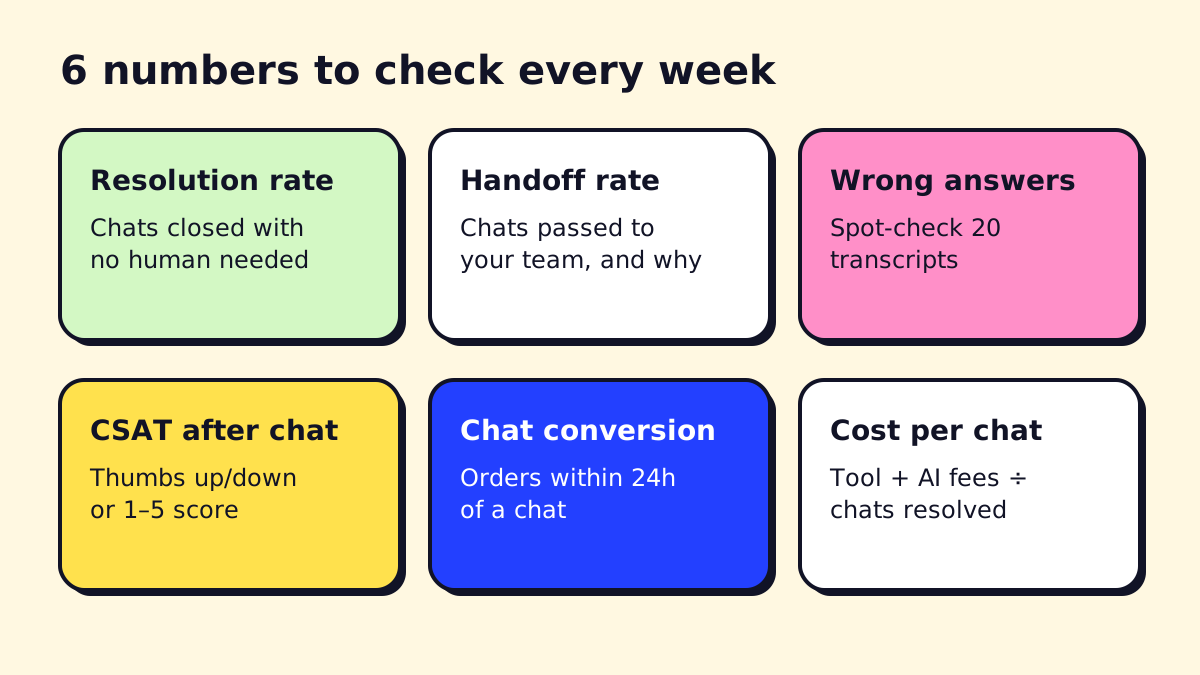
- Resolution rate. Share of chats closed without a person. Check that “resolved” means the customer got an answer, not that they gave up.
- Handoff rate and reasons. Each reason is either a content gap to fix or a case that should stay human.
- Wrong answers. Spot-check 20 transcripts a week. One confidently wrong shipping date does more harm than ten slow replies.
- CSAT after chat. A simple thumbs up/down at the end is enough.
- Chat conversion. Orders placed within 24 hours of a pre-sale chat, compared with similar visitors who didn’t chat.
- Cost per resolved chat. Tool fee plus per-resolution AI fees, divided by resolved chats. Compare it with what a person costs for the same work.
Avoid vanity numbers like “messages handled” or “conversations started”. They go up when the bot is confusing people.
What not to automate
Chargebacks and fraud checks, high-value refunds, complaints about damaged goods that may need goodwill gestures, and anything involving a customer’s health or safety. A bot can gather the details, but a person should decide.
Next steps
If you want the bot to do more than answer, such as editing orders, triggering replacements or syncing with your ERP, you’re looking at a custom build or an AI agent. Our guide to chatbot development services covers what that costs, and AI for customer service covers how to split work between the bot and your team. opsmigo sets up ecommerce chatbots and the automations behind them if you’d rather not wire it up yourself.
We build a free demo on your own services and hours.
FAQ
What is the best chatbot for ecommerce?
For Shopify stores starting out, Shopify Inbox is free and includes an AI sales associate. Stores with a support team often move to Gorgias, which is built for ecommerce and can look up and edit orders, or to Tidio, Zendesk or Intercom if they sell on several platforms.
Can a chatbot process returns?
Yes, if it's connected to your store and returns app. The bot checks the order date against your policy, collects the reason and photos, and creates the return or a ticket. Keep refunds above a set amount for a person to approve.
How do I use ChatGPT for ecommerce?
ChatGPT is useful behind the scenes for drafting product descriptions, FAQ answers, email replies and return policy wording. For customer-facing chat, use a chatbot tool that connects to your store data so answers about stock and orders are accurate.
Is a WhatsApp chatbot good for ecommerce?
It works well for order updates and support if your customers already message you on WhatsApp, for example when you sell to Latin America or Europe. You need the WhatsApp Business Platform through a provider, and Meta charges per template message.
How much does an ecommerce chatbot cost?
Shopify Inbox is free. As of November 2026, Gorgias starts at $10 a month for 50 tickets with AI Agent at about $0.90 to $1.00 per automated interaction, and Tidio's paid plans start at $24.17 a month.