- The biggest win from generative AI for sales in a small business is speed: replying to new leads in minutes, qualifying them and booking a call while they're still interested.
- Use AI to research, draft and summarise. Keep a person on pricing, negotiation and anything sent in bulk under your name.
- AI appointment setters work well on inbound leads (chat, forms, missed calls). Outbound AI voice calls need prior consent under US telemarketing rules.
- Cold email is legal in the US if you follow CAN-SPAM, but Canada's CASL generally requires consent first. LinkedIn bans automation tools outright.
Generative AI for sales helps a small business reply to every lead fast, qualify it, book the call and follow up without things slipping, while you keep control of the conversations that close deals. In practice that means AI chat and SMS assistants that answer new enquiries, ChatGPT-style tools that research and draft, and automations that log everything in your CRM. Used carelessly, it also means spammy outreach that breaks the law, so this guide covers the rules too.
Here’s how to use AI for sales and lead generation, which tasks to hand over, prompts that work, and how to automate outreach without breaking CAN-SPAM or Canada’s CASL.
How to use generative AI for sales: where it helps
For most service businesses, sales isn’t a big outbound team. It’s an owner or a couple of people juggling enquiries between jobs. The leak is usually in the first hour: a form comes in, nobody replies until tomorrow, and the customer has already booked someone else.
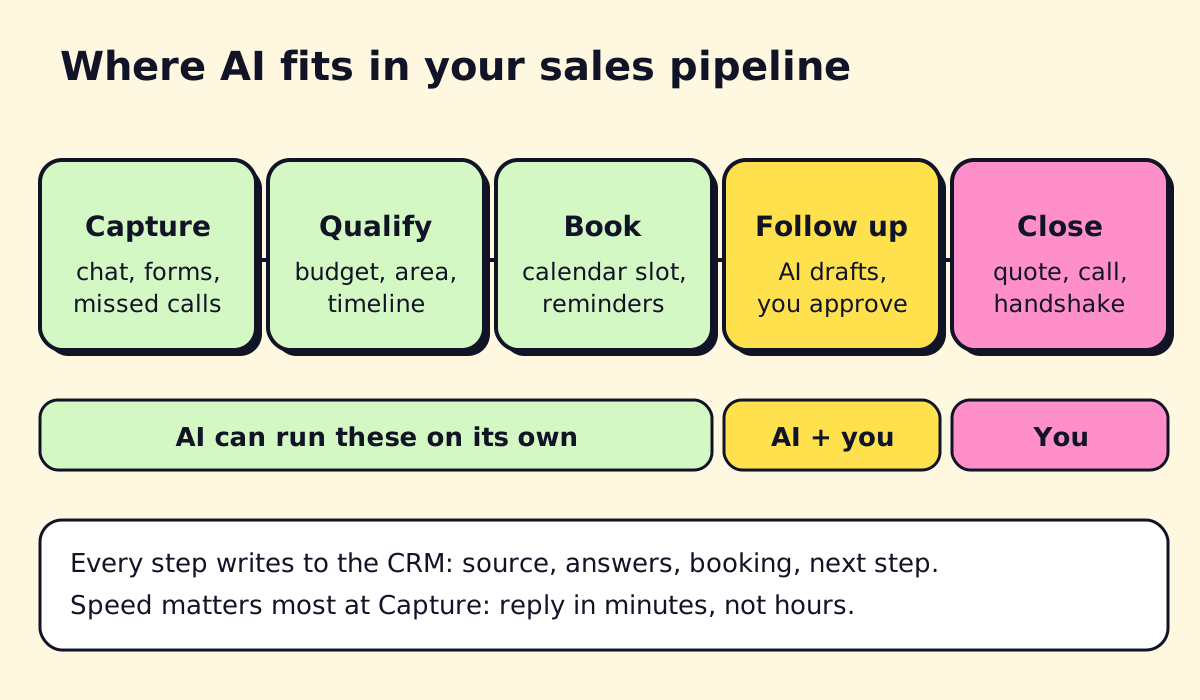
AI helps most at these points:
- Capture. Answer chat, forms, texts and missed calls instantly, any hour.
- Qualify. Ask the questions you’d ask (budget, location, timeline, type of job) and score the lead.
- Book. Offer real calendar slots and send reminders.
- Follow up. Draft the follow-up email or text, personalised from what the lead said, for you to approve.
- Admin. Summarise calls, update the CRM, write proposals from templates.
Closing stays with you. Pricing, negotiation and trust-building are where people still win.
AI lead generation: inbound first
“AI lead generation” gets sold as tools that find thousands of prospects for you. For a local or service business, the better return almost always comes from converting the leads you already get.
Inbound AI lead generation:
- A website chatbot that answers questions and asks for contact details at the right moment (see best chatbots for small business)
- An SMS reply to every form fill within a minute
- An AI answering service that picks up missed calls and books jobs
- Automated lead routing so the right person gets notified immediately
Outbound AI lead generation:
- Building target lists from public sources and data tools (Apollo, LinkedIn Sales Navigator, industry directories)
- Enriching records with company size, website and role
- Researching each prospect before you write to them
- Drafting first-touch emails that reference something real about the prospect
Real estate is a good example. AI for real estate leads typically means instant replies to portal enquiries, a few qualifying questions (buying or selling, area, price range, pre-approved?), and a booked call or showing. We cover the details in AI for real estate.
AI appointment setters
An AI appointment setter replies to a lead, qualifies them and books a meeting on your calendar. There are three kinds:
| Type | Where it works | Watch out for |
|---|---|---|
| Chat setter | Website, Instagram, Facebook, WhatsApp | Needs clear handoff for complex questions |
| SMS setter | Form fills, missed calls, old leads who opted in | Texting rules: consent and opt-out (“reply STOP”) |
| Voice setter | Inbound calls, call-backs requested by the lead | Outbound AI calls need prior consent in the US |
On voice: in February 2024 the FCC ruled that AI-generated voices count as “artificial” voices under the Telephone Consumer Protection Act, so outbound AI calls to cell phones need the same prior consent as robocalls (Cooley summary of the FCC ruling). AI for cold calling, in the sense of an AI dialling strangers, is a legal minefield. AI that calls back people who asked you to call is fine.
ChatGPT for sales: prompts that work
ChatGPT, Claude and similar assistants are useful sales assistants if you give them context. A business plan keeps your data out of model training; ChatGPT Business, for example, is $20 per user per month billed annually as of November 2026 (OpenAI help center).
Prospect research
Here is the public website text of [company]. Summarise in 5 bullets what they do, who their customers are, and 2 likely operational problems a [your service] provider could solve. Flag anything you’re guessing.
First-touch email
Write a 90-word email to [name], [role] at [company]. Reference [specific thing from their site or a recent post]. Offer [one specific outcome]. One question as the call to action. No flattery, no “I hope this email finds you well”.
Follow-up after no reply
Write a 50-word follow-up to this email: [paste]. Add one new useful point, not a “just checking in”.
Objection prep
I’m selling [service] at [price] to [type of customer]. List the 6 most likely objections and a short, honest answer to each.
Call summary to CRM
From this call transcript, give me: budget, decision maker, timeline, main problem, next step with date, and a 2-sentence summary for the CRM. Transcript: [paste].
Proposal draft
Using this template [paste] and these call notes [paste], draft a proposal. Keep my pricing exactly as written. Mark anything you’re unsure about with [CHECK].
Always read before sending. AI will invent details about a prospect if you let it, and nothing kills a cold email faster than a wrong fact about the reader’s business.
How to automate cold outreach responsibly
Cold email can work for B2B services. It also gets businesses blacklisted and fined when done at scale without care. Here are the rules that matter for US and Canadian senders.
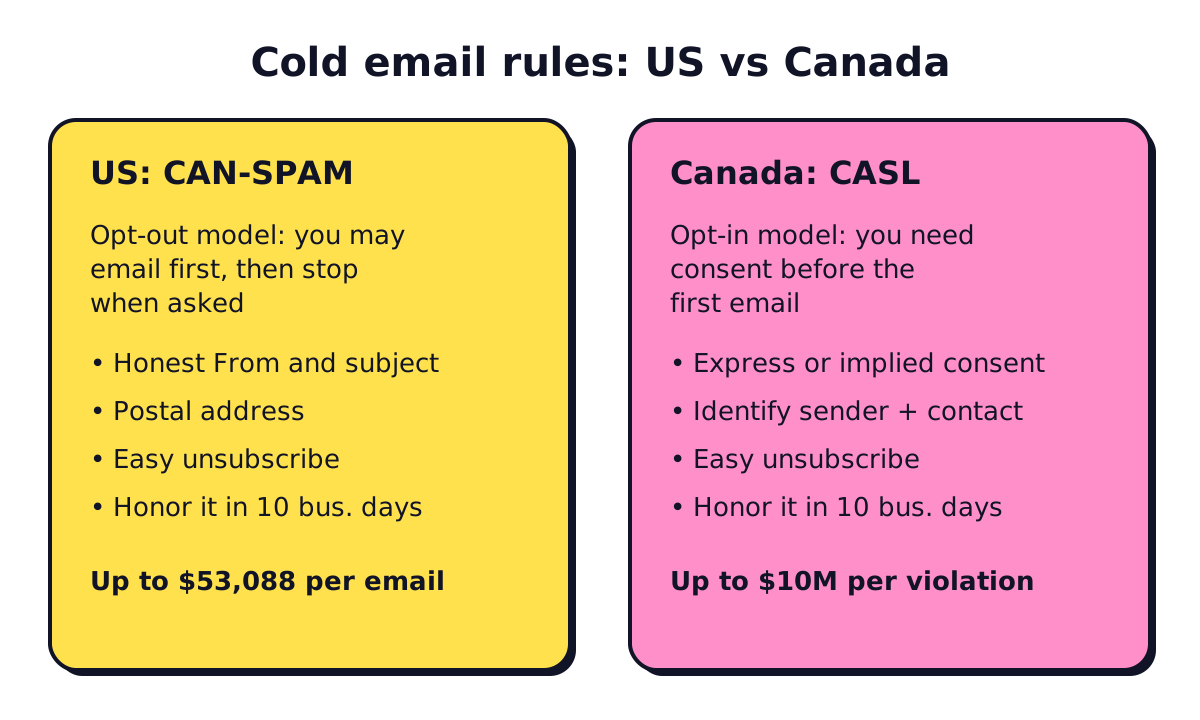
United States: CAN-SPAM
The FTC’s CAN-SPAM compliance guide sets out the rules for commercial email, including B2B:
- Honest “From”, “Reply-To” and subject lines
- Identify the message as an ad where required
- Include a valid physical postal address
- Give a clear way to opt out, and honor it within 10 business days
- You stay responsible even if an agency or tool sends for you
Penalties are up to $53,088 per violating email, per the FTC guide (checked November 2026).
Canada: CASL
Canada’s Anti-Spam Legislation is stricter. It generally requires consent before you send a commercial electronic message, express (they said yes) or implied. Implied consent from an existing business relationship typically lasts two years from a purchase, and the window after a simple enquiry is much shorter. Every message must identify you, give contact details and include an unsubscribe that works within 10 business days. Maximum penalties are $10 million per violation for businesses and $1 million for individuals.
In practice: don’t run cold email campaigns to Canadian addresses scraped from the web. Use inbound, referrals, events and conversations that create consent.
LinkedIn automation
People search “how to automate LinkedIn outreach” a lot. LinkedIn’s rules on prohibited software ban bots and browser extensions that automate actions like connection requests and messages, and accounts that use them risk restriction. Use AI to research and draft; send by hand.
A responsible outreach setup
- Send from a separate domain set up for outreach, with SPF, DKIM and DMARC configured.
- Keep volumes low per inbox and warm new inboxes up gradually.
- Verify addresses before sending to keep bounces low.
- Personalise from real research, not a merge field and a compliment.
- Stop the sequence the moment someone replies, and honor unsubscribes everywhere.
- Log every send and opt-out in your CRM.
AI tools for sales reps
Group tools by job rather than chasing a “best AI tool” list:
| Job | Examples |
|---|---|
| Drafting, research, summaries | ChatGPT, Claude, Microsoft Copilot |
| Prospect data and sequences | Apollo, LinkedIn Sales Navigator (manual use) |
| CRM with built-in AI | HubSpot, Pipedrive, Zoho CRM |
| Call notes and summaries | Built-in AI in Zoom, Teams or Google Meet, or your CRM’s call tool |
| Connecting it all | Zapier, Make, n8n |
Sales workflow automation (moving a lead from form to CRM to calendar to follow-up) is usually where the hours are saved. We show specific recipes in CRM workflow automation and broader ones in marketing automation for small business.
A simple AI sales setup for a service business
- Website chat and form, both replying within a minute (chat via a bot, forms via SMS or email).
- Qualifying questions that match how you price jobs.
- A booking link with your real availability.
- Every lead, answer and booking written into your CRM automatically.
- AI-drafted follow-ups at day 1, day 3 and day 7, approved by you.
- A weekly review of lost leads: why did they go cold?
You can build most of this with off-the-shelf tools and a Zapier, Make or n8n account. If you’d rather have it set up and tested for you, that’s the kind of work opsmigo does for service businesses.
We build a free demo on your own services and hours.
FAQ
How can I use ChatGPT for sales?
Use it to research prospects from public information, draft personalised emails and follow-ups, prepare for calls with likely objections, summarise call notes and write proposals. Always check facts and edit the tone before anything goes out.
What is an AI appointment setter?
An AI appointment setter is a chatbot, SMS assistant or voice agent that replies to new leads, asks qualifying questions and books a meeting on your calendar. It works best on inbound leads who already asked to hear from you.
Is it legal to automate cold emails?
In the US, CAN-SPAM allows commercial email without prior consent if you use honest headers and subject lines, include a postal address and honor unsubscribes within 10 business days. In Canada, CASL generally requires express or implied consent before you send, so cold email to Canadian contacts is much riskier.
Can I automate LinkedIn prospecting?
LinkedIn's rules prohibit bots, browser extensions and third-party software that automate actions such as sending connection requests or messages, and accounts that use them risk restriction. Use AI to research and draft, then send manually.
Is there free AI lead generation software?
Several tools have free tiers, such as HubSpot's free CRM with forms and a chatbot builder, Apollo's free plan for prospect data, and the free versions of ChatGPT or Claude for drafting. Free tiers are fine for testing; expect to pay once volume grows.