- CRM workflow automation runs a set of actions when something happens in your CRM, such as a new lead, a stage change or a date. It replaces the reminders and copy-paste your team does by hand.
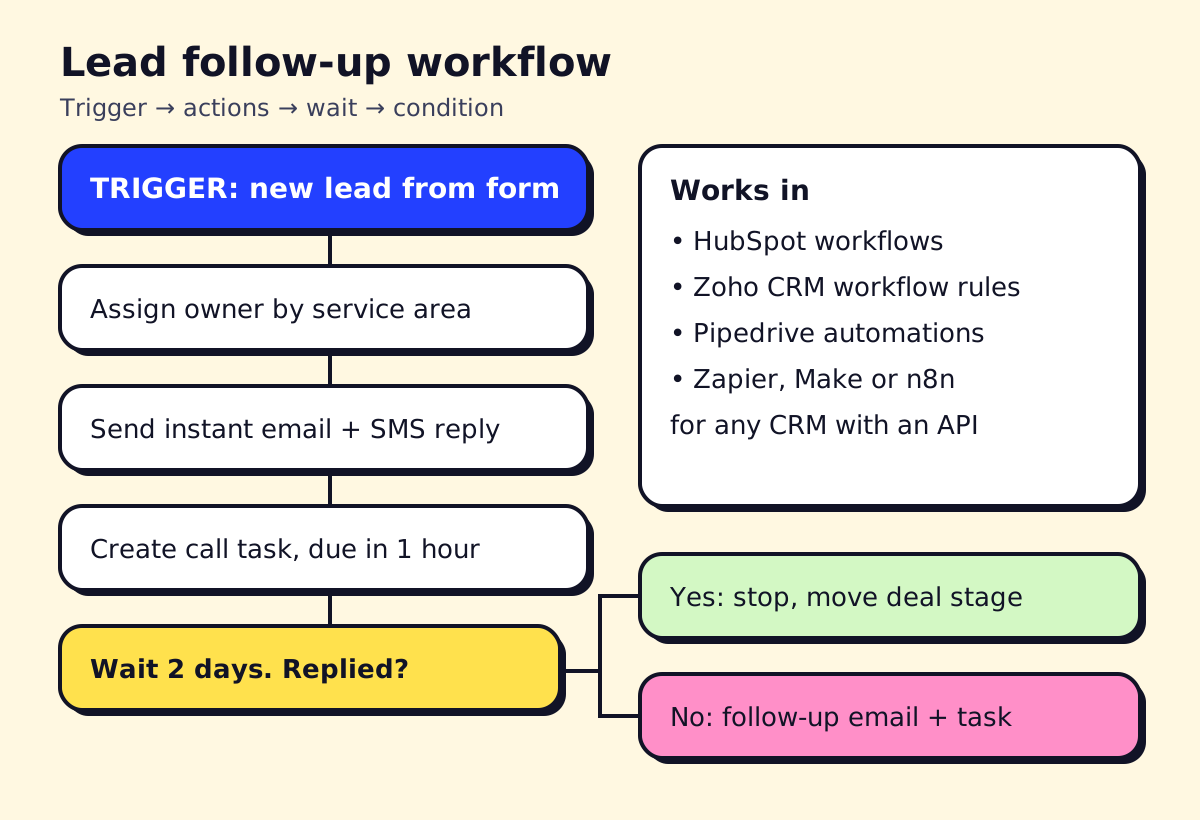
- Start with lead follow-up: instant reply, owner assignment, a call task and a follow-up if there's no reply. It's the recipe that most often pays for itself.
- HubSpot Starter includes up to 50 workflows, Zoho CRM has workflow rules even on its free edition, and Pipedrive automations start on the Growth plan (as of November 2026).
- When your CRM's built-in automation can't reach another app, connect it with Zapier, Make or n8n.
CRM workflow automation means your CRM does the routine follow-up for you: when a lead comes in, a deal changes stage or a date arrives, it sends the email, assigns the owner, creates the task or updates the record automatically. For a small team, the first workflows to build are lead follow-up, deal-stage tasks and reminders that stop deals going quiet. Below are 12 recipes you can build in HubSpot, Zoho CRM, Pipedrive, Salesforce or any CRM connected to Zapier or n8n.
What is workflow automation in CRM?
Every CRM workflow has the same three parts:
- Trigger. What starts it: a new contact, a form fill, a deal moving to “Proposal sent”, a date field (renewal in 30 days), an email reply.
- Conditions. Filters that decide whether it continues: lead source is “website”, deal value is over $5,000, province is Quebec.
- Actions. What happens: send an email or SMS, create a task, assign an owner, update a field, notify Slack or Teams, wait, branch.
The point isn’t to remove people from sales. It’s to make sure the boring steps happen every time, so your team spends its hours on conversations.
How CRM workflow automation helps
- Speed to lead. New enquiries get a reply in seconds, not when someone checks the inbox.
- No forgotten deals. Every open deal has a next step and a due date.
- Cleaner data. Fields get filled, duplicates get flagged, stages stay accurate.
- Fair routing. Leads go to the right person by territory, service or round robin.
- Better reporting. When steps are automated, the data in your reports is actually complete.
12 CRM workflow automation examples
| # | Trigger | Actions | Good for |
|---|---|---|---|
| 1 | New web form lead | Assign owner, send instant reply, create call task due in 1 hour | Every service business |
| 2 | No reply after 2 days | Send follow-up email, create second call task | Lead follow-up |
| 3 | Missed call from a new number | Create contact, send SMS “sorry we missed you”, notify owner | Trades, clinics |
| 4 | Deal moves to “Quote sent” | Wait 3 days; if still open, send check-in and task | Contractors, agencies |
| 5 | Deal marked “Won” | Create onboarding tasks, notify ops, send welcome email | Agencies, accounting |
| 6 | Deal marked “Lost” | Ask for loss reason; add to 90-day nurture list | Everyone |
| 7 | Deal idle 14 days | Notify owner and manager | Longer sales cycles |
| 8 | Renewal date in 30 days | Create renewal task, draft renewal email | Property managers, MSPs |
| 9 | Appointment booked | Update stage, send confirmation and reminder | Clinics, real estate |
| 10 | Contact has no email or phone | Flag record, assign data-cleanup task | Data quality |
| 11 | High-value lead (score or deal size) | Alert in Slack or Teams, assign senior rep | B2B services |
| 12 | Support ticket from a customer with open deal | Notify deal owner | Teams with sales and support |
A moving company is a good example of the email side: recipe 1 sends the quote request confirmation, recipe 4 follows up on the quote, and recipe 9 confirms the moving date with reminders a week and a day before. Any CRM with email automation handles this.
HubSpot workflow automation
HubSpot’s visual workflow builder is the easiest to learn. As of November 2026, its Sales Hub pricing page lists:
- Starter: up to 50 workflows, with restricted triggers and actions
- Professional: up to 300 fully customisable workflows, plus sequences for one-to-one sales emails
- Enterprise: up to 1,000 workflows
Starter is enough for recipes 1, 5, 6 and 9. Branching on replies, lead scoring and multi-step sequences generally need Professional. HubSpot also has AI features that can draft emails and summarise records, paid for with HubSpot Credits on higher tiers.
Zoho CRM workflow automation
Zoho CRM includes workflow rules on every edition, including the free one for up to three users. Zoho’s edition comparison lists 10 rules per module on Free (5 active) and 30 per module on Standard (15 active), with higher limits on Professional and above. Scheduled actions (send something X days later) aren’t included in Free.
Zoho is strong value if you’re willing to spend time in the settings. Workflow rules can send emails, create tasks, update fields, call webhooks and run custom functions. Blueprints add guided, step-by-step processes for things like onboarding.
Pipedrive workflow automation
Pipedrive’s automations are built around the deal pipeline. According to Pipedrive’s support docs, workflow automation is available on the Growth plan and higher. Triggers can be events (a deal, person, activity, lead or organisation added, updated or deleted) or dates. Actions include creating or updating records and activities, sending email from your synced address, sending webhooks, and posting to Slack, Microsoft Teams, Trello or Asana.
Pipedrive workflow automation examples that work well: recipe 4 (quote follow-up), recipe 7 (idle deal alert) and recipe 5 (won deal handoff to Asana or Trello).
Salesforce workflow automation
If you’re on Salesforce, build automation with Flow Builder. Salesforce ended support for Workflow Rules and Process Builder on December 31, 2025 (Salesforce Ben). Old rules may still run, but bugs won’t be fixed. If your org still has them, use the Migrate to Flow tool and test each one, since complex rules don’t always convert cleanly.
Flows are powerful, and they are also where small teams get into trouble: too many overlapping Flows on the same object, nobody documenting them, and records updating in surprising ways. Keep a simple list of every Flow, its trigger and its owner. Salesforce’s AI features and test-automation tools are a bigger topic, usually worth an admin or partner.
Connecting any CRM with Zapier, Make or n8n
Built-in automation covers what happens inside the CRM. When the workflow needs to touch another app (your booking system, accounting software, WhatsApp, a spreadsheet, an AI model), use an integration tool:
- Zapier: the most connectors and the easiest to start with. See Zapier pricing.
- Make: visual, cheaper per operation for multi-step scenarios.
- n8n: open-source, can be self-hosted, good for complex logic and AI steps. See n8n pricing and n8n workflow examples.
Typical “into the CRM” recipes:
- Calendly or Cal.com booking → create or update contact and deal, set stage “Meeting booked”
- Facebook or Google lead ads → create lead, run recipe 1
- Website chatbot conversation → create contact with transcript attached (pairs well with the bots in best chatbots for small business)
- Invoice paid in QuickBooks or Xero → mark deal “Paid”, trigger onboarding
- New lead → AI step summarises the enquiry and suggests a priority → write to a CRM field
Our Zapier vs Make vs n8n comparison covers which one to pick.
Best CRM for automation: a quick guide
| CRM | Automation strength | Watch out for |
|---|---|---|
| HubSpot | Easiest visual builder, strong email and sequences | Real power starts on Professional, with onboarding fees |
| Zoho CRM | Most automation per dollar, rules even on Free | More settings to learn, interface is busier |
| Pipedrive | Simple, deal-focused automations | No automation on the entry plan |
| Salesforce | Most powerful (Flow) | Needs an admin; easy to over-build |
For marketing automation (newsletters, drip campaigns, lead nurturing), HubSpot and Zoho both have marketing tools that share the CRM data. We cover that side in marketing automation for small business.
How to automate follow-up emails without being annoying
- Send the first reply instantly, and make it useful (what happens next, when you’ll call, a link to book).
- Stop the sequence as soon as the contact replies or books.
- Space follow-ups out: day 2, day 5, day 10 is plenty.
- Personalise from fields you actually collected, not “Hi {FirstName}” with a blank.
- Include an unsubscribe link in marketing emails and follow CAN-SPAM in the US and CASL in Canada. Our AI for sales guide covers the rules.
- If you send from Outlook, the same logic works with Outlook’s scheduling plus a CRM add-in, or with Power Automate.
Getting started
Pick one recipe, usually recipe 1, build it, and watch it for two weeks before adding the next. Name every workflow clearly (“Lead: web form → instant reply”), write down what it does, and review them all once a quarter. Automations nobody understands are worse than none.
If your CRM, phone system and booking tool don’t talk to each other yet, that’s the kind of workflow automation opsmigo sets up for service businesses.
We build a free demo on your own services and hours.
FAQ
What is workflow automation in CRM?
It's a rule inside your CRM that watches for a trigger, like a new contact, a deal moving stage or a date arriving, and then runs actions such as sending an email, creating a task, updating a field or notifying someone. It keeps follow-up consistent without anyone having to remember.
How does workflow automation help a CRM?
It makes sure every lead gets a fast reply, every deal has a next step, and records stay complete. Salespeople spend less time on data entry and reminders, and managers get reliable data for reports.
What is the best CRM for automation?
For small teams, HubSpot has the most approachable workflow builder, Zoho CRM gives the most automation per dollar, and Pipedrive's automations are simple and deal-focused. Salesforce is the most powerful but needs an admin to build and maintain Flows.
How do I automate follow-up emails?
Create a workflow triggered by a new lead or a deal stage, send a first email immediately, wait a few days, check whether the contact replied or the deal moved, and send a second email only if not. Most CRMs and Outlook add-ins support this; make sure every marketing email has an unsubscribe link.
Can I automate Salesforce without Workflow Rules?
Yes. Salesforce ended support for Workflow Rules and Process Builder on December 31, 2025, and Flow Builder is the replacement. Existing rules may still run, but new automation should be built as Flows.