- Marketing automation for small business means messages that send themselves when a customer does something: fills a form, books, buys or goes quiet.
- Set up five flows first: speed-to-lead, welcome series, quote follow-up, review request and win-back.
- A starter stack (email platform, automation tool, AI assistant, social scheduler) costs roughly $0 to $85 a month at list prices as of November 2026.
- Get consent first: CAN-SPAM and CASL apply to email, and the TCPA applies to marketing texts in the US.
Marketing automation for small business means setting up messages and tasks that run on their own when a customer does something: fills out a form, books an appointment, buys, leaves a quote unanswered or goes quiet for months. Start with five flows (speed-to-lead, welcome series, quote follow-up, review request and win-back), run them on one email platform plus an automation tool if needed, and expect to pay roughly $0 to $85 a month at list prices for a starter setup.
This guide covers the flows to set up first, marketing automation software compared, what it costs, how to automate email and social media posts, and examples by industry.
What marketing automation for small business actually does
Every automation has the same shape: a trigger (something happens), optional conditions (only if…), and actions (send, tag, create a task, update a record).
- Trigger: someone fills out the quote form. Action: text and email them within a minute, notify the owner, create a deal in the CRM.
- Trigger: a job is marked complete. Condition: the customer hasn’t left a review. Action: send a review request two days later.
- Trigger: a customer hasn’t booked in six months. Action: send a check-in with a reason to come back.
The point isn’t to send more email. It’s to stop leads and customers falling through the cracks when you’re busy.
The five flows to set up first
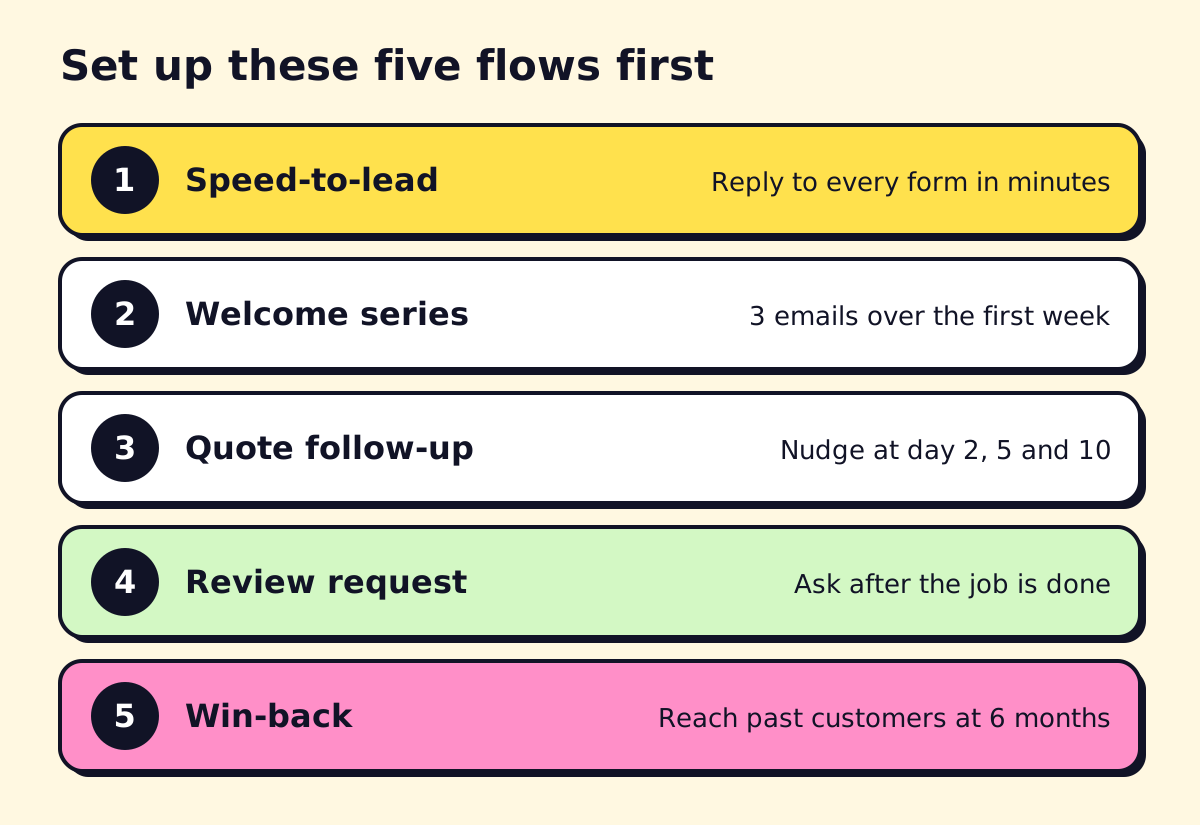 In this order. Each one pays for the next.
1. Speed-to-lead
Trigger: a new web form, chat, missed call or portal lead. Actions: an instant text and email that confirms you got the request and offers a booking link; an alert to whoever handles leads; a new record in your CRM.
This is first because a fast first reply makes a lead much more likely to book with you instead of the next business they contacted. Our guide to AI for sales and lead generation covers AI assistants that also qualify the lead and book the appointment.
2. Welcome series
Trigger: a new subscriber or a new customer. Actions: three emails over about a week: what to expect plus one useful tip, your most common customer problem and how you solve it, and a clear offer or next step.
3. Quote or booking follow-up
Trigger: a quote is sent, or a booking page is visited without a booking. Actions: short follow-ups on day 2, day 5 and day 10. Stop the sequence as soon as they reply or book. Many service businesses lose more revenue to unanswered quotes than to lack of leads.
4. Review request
Trigger: a job is completed, an order is delivered or an appointment ends. Actions: one request a day or two later, with a direct link to your Google Business Profile. One reminder, then stop. Ask every customer, not just the happy ones; selectively asking only satisfied customers can create problems under FTC rules on reviews.
5. Win-back
Trigger: no purchase or booking in a set period (six months for most services, shorter for retail). Actions: a check-in with a reason to return: seasonal maintenance, a new service, a reminder that it’s time.
Once these run, add birthday or anniversary emails, abandoned-cart flows for online stores, and re-engagement for subscribers who stopped opening.
Marketing automation software for small business compared
| Tool | Best for | Free plan | Paid entry point (Nov 2026) |
|---|---|---|---|
| HubSpot | Service and B2B businesses wanting CRM plus email | Yes (free CRM and basic email) | Marketing Hub Starter listed at $20 per seat/mo; Professional $800/mo plus a $3,000 onboarding fee (HubSpot) |
| Mailchimp | Newsletters and simple flows | Up to 250 contacts, no automated flows | Paid plans priced by contact count (Mailchimp) |
| Klaviyo | Online stores, email plus SMS | Up to 250 active profiles and 500 email sends/mo | Priced by profile count (Klaviyo) |
| Zapier, Make, n8n | Connecting forms, CRM, calendar and email | Yes | Zapier Professional $29.99/mo monthly or $19.99/mo annually (Zapier) |
| Buffer | Scheduling social posts | 3 channels, 10 scheduled posts each | Essentials $5 per channel/mo (Buffer) |
Other strong options: ActiveCampaign and Brevo for email automation, Kommo or GoHighLevel for agencies and lead-heavy service businesses, and the built-in marketing features of booking and field-service platforms (Jobber, Housecall Pro, Mindbody), which may cover the first flows without another tool.
Which one should you pick?
- You book appointments or send quotes: start with what your booking or field-service software includes, then add HubSpot or an automation tool for the gaps.
- You sell online: Klaviyo or your store platform’s email tool.
- You mainly send a newsletter: Mailchimp or Brevo.
- Your tools don’t talk to each other: an automation platform. Our Zapier vs Make vs n8n comparison helps you choose.
What marketing automation costs
Here’s a realistic starter stack at list prices, billed monthly:
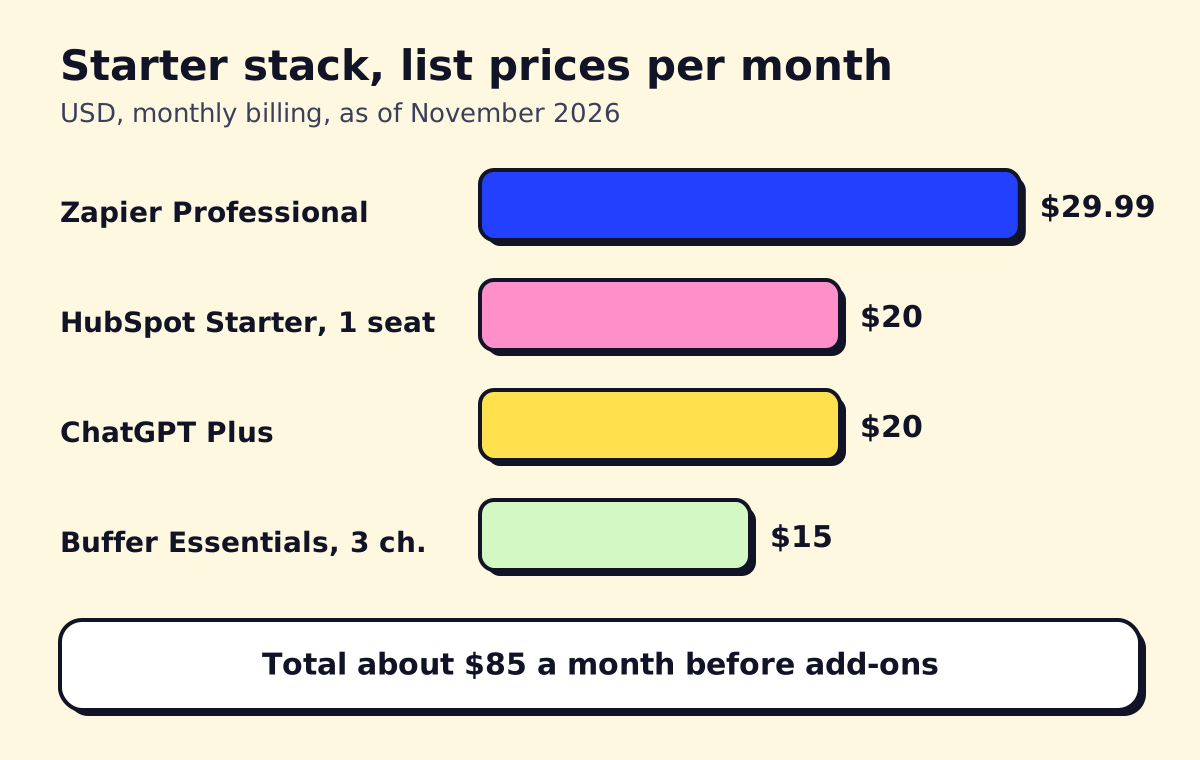 Sources: Zapier, HubSpot, OpenAI and Buffer pricing pages, November 2026. Annual billing and promotions are lower.
| Stage | Typical setup | Monthly software cost |
|---|---|---|
| Testing | Free plans: Mailchimp or Klaviyo, Buffer, HubSpot CRM, ChatGPT | $0 |
| Starter | Email platform, Zapier, AI assistant, social scheduler | About $50 to $100 |
| Growing | All-in-one platform with advanced automation | From $800 (HubSpot Professional, plus onboarding) |
Software is usually the smaller cost. The bigger one is setup time: cleaning the contact list, writing the emails and testing every trigger. Budget a weekend for the first three flows if you do it yourself.
How to automate email marketing
- Clean your list. Remove anyone who didn’t agree to hear from you. Import past customers with a note of when and how they opted in.
- Connect your sources. Website forms, booking tool, store and CRM should all feed one email platform.
- Tag by what people did, not just who they are: requested a quote, booked, bought, attended.
- Build the five flows above, starting with speed-to-lead.
- Write the emails short and plain. AI can draft them; our AI marketing tools guide has prompts for welcome and follow-up emails.
- Test with your own email address and a colleague’s before switching on.
- Review monthly: open and click rates for each email, replies, bookings and unsubscribes.
How to automate social media posts
Social media automation should mean scheduling, not robots replying to people.
- Meta Business Suite schedules Facebook and Instagram posts at no cost.
- Buffer’s free plan covers three channels with 10 scheduled posts each.
- Batch your writing. Write a month of posts in one sitting (AI helps with repurposing), add images in Canva and schedule them all.
- Automate the hand-offs: a new blog post or a new five-star review can trigger a draft social post for you to approve.
- Keep replies human. Answer comments and DMs yourself, or use an AI assistant that drafts replies for a person to send.
Marketing automation by industry
| Industry | Flows that matter most |
|---|---|
| Real estate and realtors | Instant lead reply, long-term nurture with listing alerts, closing anniversaries. See AI for real estate. |
| Law firms | Intake follow-up, consultation reminders, document request reminders, review requests after a matter closes |
| Financial services and advisors | Meeting reminders, annual review scheduling, educational newsletters. Check your compliance and archiving rules first. |
| Insurance agencies | Renewal reminders at 90/60/30 days, cross-sell checks, claims follow-up and review requests |
| Ecommerce | Welcome, abandoned cart, post-purchase, win-back, SMS for shipping updates (with consent) |
| Restaurants | Reservation reminders, birthday offers, review requests, slow-night promotions |
| Nonprofits | Donation receipts and thank-yous, event reminders, monthly donor updates |
| Recruiters and staffing | Candidate nurture, job alerts, client check-ins |
| Manufacturing and B2B | Quote follow-up, reorder reminders, trade-show lead nurture |
| SaaS and apps | Onboarding emails tied to product usage, trial-ending reminders, feature announcements |
SMS marketing automation strategies for ecommerce
SMS works best for time-sensitive messages: shipping updates, back-in-stock alerts and short-window offers. In the US, marketing texts need prior express written consent under the TCPA, plus clear opt-out instructions. Keep SMS to a few messages a month so people don’t unsubscribe.
Rules to follow
- CAN-SPAM (US): honest subject lines and sender info, your physical address, and a working unsubscribe honored within 10 business days (FTC guide).
- CASL (Canada): consent before sending commercial email or texts, identification and an unsubscribe in every message (CRTC).
- TCPA (US texts and calls): written consent for marketing texts and autodialed or AI-voice calls.
DIY or hire a marketing automation agency?
Do it yourself if you have one email platform, a website form and a few hours a week. Hire a marketing automation implementation agency when:
- Your leads come from several places (website, ads, phone, portals) and none of them talk to your CRM
- The flows depend on data in your booking, billing or field-service software
- Your contact list is messy and you’re not sure who has opted in
- You want AI to reply to and qualify leads, not just send emails
A good agency leaves you with documented flows, accounts in your name and a dashboard you understand. opsmigo builds these systems for small service businesses, and our CRM workflow automation guide shows the kind of setup we mean.
We build a free demo on your own services and hours.
FAQ
What is the best marketing automation software for small business?
It depends on where your customers are. HubSpot suits service and B2B businesses that want a CRM and email in one place, Klaviyo suits online stores, and Mailchimp suits simple newsletters with a few flows.
How much does marketing automation cost for a small business?
You can start free on Mailchimp, Klaviyo, HubSpot or Buffer free plans. A typical paid starter stack runs about $50 to $100 a month at list prices, and an all-in-one platform like HubSpot Marketing Hub Professional starts at $800 a month plus onboarding.
How do I automate social media posts for free?
Meta Business Suite schedules Facebook and Instagram posts at no cost, and Buffer's free plan schedules up to 10 posts per channel on three channels. Write the posts in one batch each week or month and schedule them together.
Do I need a marketing automation agency?
Not to start. Most small businesses can set up the first three flows themselves in a weekend. An agency or implementation partner is worth it when you need several tools connected, a CRM cleaned up, or flows that depend on data from your booking or billing system.
What's the difference between marketing automation and a CRM?
A CRM stores your contacts and deals. Marketing automation sends messages and updates records based on triggers. Many tools now do both, and the automation is only as good as the contact data in the CRM.