- Choose AI tools by job. Most small businesses need one general assistant, the AI already inside their existing software, and one automation tool.
- A business assistant costs about $14 to $25 per user per month at November 2026 list prices. A solo owner can start on free plans or spend about $20 a month.
- If AI touches client data, use a business plan and read its data terms. OpenAI, for example, says it doesn't train on ChatGPT Business data by default.
- The biggest gains usually come from a single repeated task: missed calls, slow follow-up, or copying data between apps. Fix one, measure it, then add the next.
The best AI tools for business depend on the job you need done. For most small businesses, that means one general assistant (ChatGPT, Claude, Gemini or Microsoft Copilot), the AI already built into your bookkeeping and marketing software, and one automation tool such as Zapier, Make or n8n. Add an AI receptionist if missed calls cost you work. You can test almost all of this on free plans before paying.
This guide sorts the options by job, with a comparison table, November 2026 prices, ChatGPT prompts and custom instructions you can copy, a starter stack by business type and a 30-day rollout plan.
You won’t be late to this. The US Census Bureau reported that 19.8% of US businesses used AI as of May 3, 2026. That rate was 37% among firms with 250 or more employees and under 20% among those with four or fewer.
Best AI tools for business: comparison by job
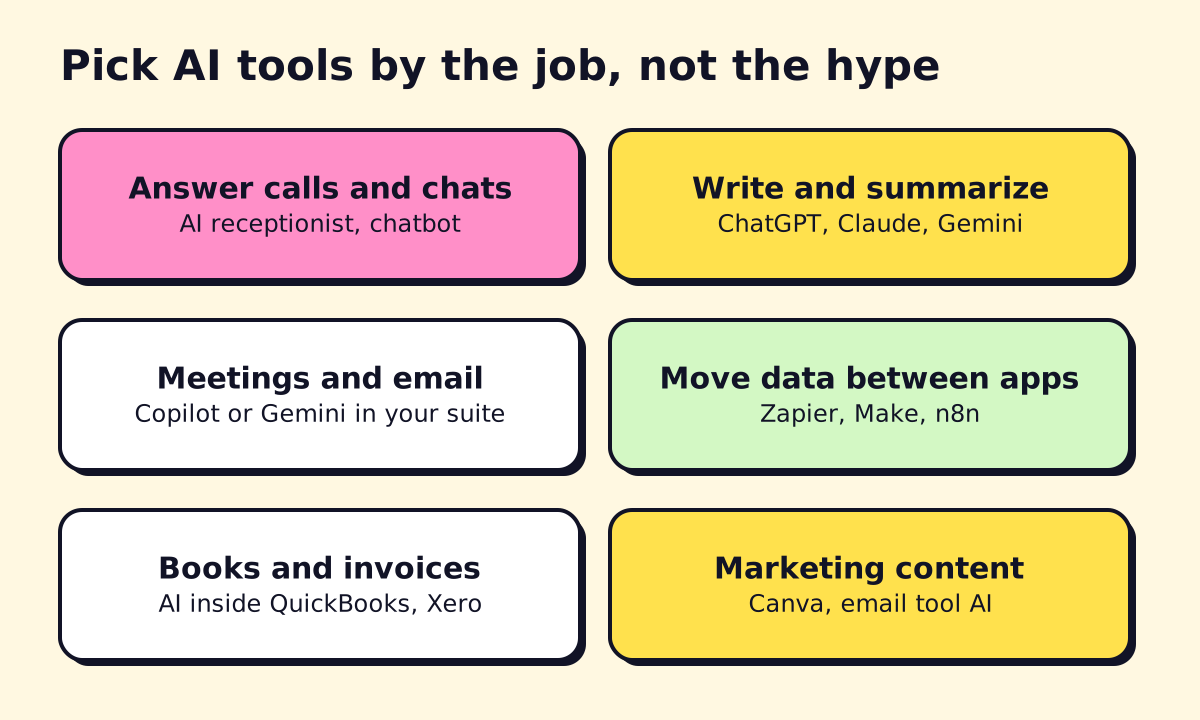 Start with the job that costs you the most time or money.
Prices are list prices checked in November 2026 and can change, so confirm them on each vendor’s page.
| Job | Good picks | Free option | Paid entry point |
|---|---|---|---|
| Answer calls and chats | AI receptionist or chatbot | Some chatbot free tiers | Varies by volume; see the section below |
| Write, research, analyze | ChatGPT, Claude, Gemini | Free tiers of all three | ChatGPT Plus $20/mo; Claude Pro $20/mo or $17/mo billed annually |
| Email, documents, meetings in your suite | Microsoft Copilot, Gemini | Copilot Chat with eligible Microsoft 365 plans | Copilot Business $21/user/mo annually, on top of Microsoft 365 |
| Meeting notes | Fathom | Fathom Free | Team $15/user/mo annually (2-user minimum) |
| Connect your apps | Zapier, Make, n8n | Zapier 100 tasks/mo | Zapier Professional $19.99/mo annually or $29.99 monthly |
| Bookkeeping | QuickBooks, Xero | QuickBooks free tier for one user | QuickBooks Simple Start $38/mo; Xero Early $27/mo |
| Bills and approvals | BILL | None listed | BILL Essentials $49/user/mo |
| Marketing content | Canva, your email platform’s AI | Canva Free | Check Canva’s pricing page |
AI business solutions: the four kinds
“AI business solutions” can mean anything from a $20 chatbot to a six-figure project. It helps to split them into four kinds, ordered by cost and effort:
- Assistants you open and ask: ChatGPT, Claude, Gemini, Copilot. Setup takes minutes, and results depend on who uses them.
- AI inside software you already pay for: QuickBooks, Xero, Canva and most email platforms now include AI. Turn it on before buying anything new.
- Automations with an AI step: a workflow reads an email, drafts a reply and updates the CRM. This is where repeated work actually disappears.
- Custom agents: an AI receptionist or a WhatsApp agent connected to your calendar and systems. These cost the most and can pay back the most, when volume justifies them.
Most small businesses should work through that list from the top. Skipping straight to custom work usually means paying to automate a process nobody has written down.
Best AI for small business, by job
General AI assistant for business
An assistant is the best first purchase because it helps with almost everything: drafting, summarizing, research and analyzing files. Choose by where your work already lives.
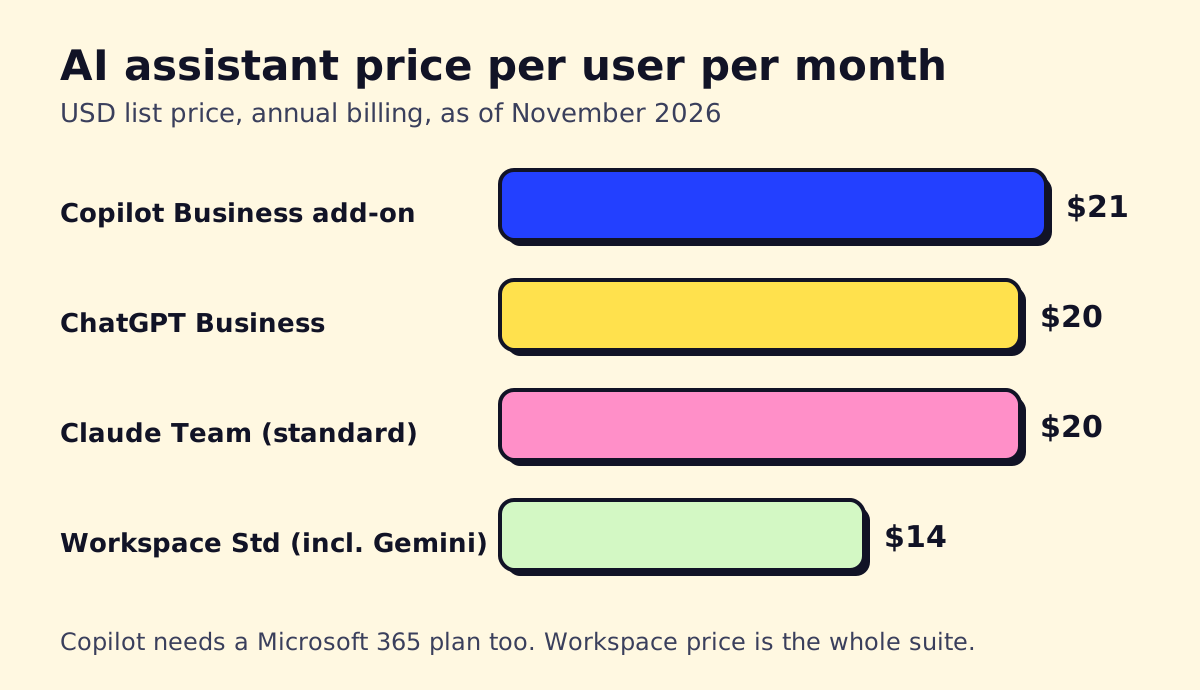 Team prices on annual billing. Copilot is added to a Microsoft 365 plan, while the Workspace price covers the whole suite.
| Assistant | Best if | Team price (Nov 2026) |
|---|---|---|
| Microsoft Copilot | You use Outlook, Word, Excel and Teams | Copilot Business add-on $21/user/mo annually or $25.20 monthly; first-year promo of $18 through December 31, 2026 for eligible customers |
| Gemini | You use Gmail and Google Docs | Included in Workspace; Business Standard was about $14/user/mo annually in US dollars, per a third-party price tracker |
| ChatGPT | You want the broadest general tool | ChatGPT Business $20/user/mo annually or $25 monthly |
| Claude | You work with long documents and careful writing | Claude Team $20/seat/mo annually or $25 monthly |
Canadian readers will see local prices on these pages. Google’s Canadian page, for example, lists Business Standard at CA$18.40 per user per month on flexible billing.
Try two with the same real task before you commit: one messy email thread and one document. For Microsoft shops, our Copilot for Microsoft 365 guide covers licensing in detail.
AI for answering calls and customer chats
If you run a clinic, a law office or a home service company, a missed call can be a lost job. An AI receptionist answers around the clock, handles common questions, books appointments and sends you a summary. A website chatbot does the same in text. This job has the most direct return, since you can count recovered calls. Read about where it fails in our AI answering service guide before you buy.
Best AI for business writing
Any of the main assistants handles proposals, emails and policies well if you give it examples of your own writing. The usual failure is generic output from a generic request. Paste a past proposal you liked, describe the client, and ask for a draft in that style. Then edit it, because AI can invent details with complete confidence.
AI meeting notes and email
- AI assistant for Outlook: Copilot drafts and summarizes email inside Outlook, with the features depending on your plan. Gemini does the same in Gmail.
- Meeting notes: Fathom records and summarizes calls and has a free plan. Tell participants you’re recording, and check your local consent rules.
AI for marketing and content
Use an assistant for copy and Canva for design, then use the AI inside your email platform for subject lines and segmentation. Our AI marketing tools guide has prompts and tool picks by job.
AI tools for YouTube automation are useful for editing and repurposing. Tools such as Descript and Opus Clip can cut long recordings into shorter clips. Be wary of “fully automated channel” promises, since generic content rarely builds trust with buyers of a local service.
AI for bookkeeping and accounts payable
Start with the AI in your accounting software. According to QuickBooks’ pricing page, its plans add AI features as you move up: expense categorization from Simple Start, bookkeeping cleanup from Essentials ($85/mo) and anomaly detection from Plus ($140/mo). Xero includes smart document capture on all plans and auto-reconciliation from Growing ($59/mo), or as an option on Early.
For AP automation software for small business, BILL handles bill intake, approvals and payments, at $49 to $89 per user per month for its standard plans. Our document workflow automation guide explains how invoice extraction works and how to check its accuracy. Keep a person approving payments, especially when a vendor’s bank details change.
AI tools for business analysts and operations
AI for business analysts mostly means faster work on data you already have. Upload an export to ChatGPT or Claude and ask what changed and why it might have changed. Inside spreadsheets, see our guide to the best AI tools for Excel.
Three practical uses:
- AI for customer segmentation: export customers with purchase dates and totals (remove names), then ask for groups by recency, frequency and spend, with a suggested message for each.
- AI for operations: have it turn a recorded walkthrough into a written procedure, or summarize a month of support tickets into top issues.
- AI tools for business development: research a target company, draft a first outreach and prepare for a sales call. Check every fact before sending it.
AI tools for automation
This is where AI saves hours instead of minutes. Automation software for small business connects your form, inbox, CRM and calendar, and can add an AI step to read or write text.
| Tool | Best for | Free | Paid entry (Nov 2026) |
|---|---|---|---|
| Zapier | Fast setup, widest app list | 100 tasks/mo | $19.99/mo annually, 750 tasks |
| Make | Visual flows, lower cost at volume | 1,000 credits/mo | About $9 to $10.59/mo for 10,000 credits, per third-party checks by Jet Admin and Latenode |
| n8n | Technical teams, self-hosting | Community Edition software is free to self-host | Starter from €20/mo annually, 2,500 executions |
If you’re deciding between them, read our Zapier vs Make vs n8n comparison. To automate your small business without creating a mess, write the process down first, automate one path, and send anything unusual to a person.
AI for business plans, ideas and names
Best AI for a business plan: ChatGPT, Claude or Gemini can all draft one if you supply the numbers. A specialist tool such as LivePlan adds structured financial forecasts. Treat market sizes and statistics from a chatbot as leads to verify, since assistants can make up sources.
Prompts for this job are in the table below. AI name generators for business are good for volume: ask for 30 names in a specific style, then check trademarks, domains and social handles yourself. AI can’t confirm that a name is legally available.
Best AI tools for startups and entrepreneurs
Solo founders get a lot from a small setup: one paid assistant for writing and research, a free meeting recorder, Canva for design and Zapier or Make for connecting forms to a CRM. Pay for a second assistant only when you can name what the first one fails at. Workflow automation startups and other technical teams can often save money with self-hosted n8n, as long as someone owns its maintenance.
Best AI tools for productivity
The best AI apps for productivity are usually the ones already on your device. Here’s how to use AI for productivity without adding another app to check:
- Clear the inbox: ask for a summary of a long thread and a draft reply.
- Plan the week: paste your task list and calendar commitments, then ask for a realistic priority order.
- Start hard tasks: ask for an outline or a first step when a blank page is the obstacle.
- Recap meetings: turn notes into decisions, owners and dates.
AI assistant by device
- AI assistant for PC: Copilot comes with Windows, and ChatGPT and Claude have desktop apps.
- Best AI assistant for Android: Gemini is built for Android, and ChatGPT, Claude and Copilot all have apps. Try them with your own voice notes.
- AI assistant for Linux: the browser versions are the simple route. Check each vendor’s download page, because desktop support changes.
- AI assistant for ADHD: many people use an assistant to break a task into small steps, draft the message they’re avoiding or set a plan for the next 30 minutes. It’s a useful support tool, not a replacement for professional care.
Using ChatGPT for business
What can ChatGPT do for my business?
These business use cases for ChatGPT are safe to try first, since a person reviews the result:
- Drafting quotes, proposals, job descriptions and policies
- Turning call notes into a follow-up email
- Rewriting technical answers in plain language
- Summarizing long contracts or reports for a first read (not as legal advice)
- Analyzing a spreadsheet you’ve stripped of personal data
Can you use ChatGPT for business? Yes, but match the plan to the data. OpenAI says it doesn’t train on ChatGPT Business data by default. ChatGPT Enterprise adds larger-organization controls, with custom pricing, and is rarely needed by a team under 50.
ChatGPT custom instructions
Custom instructions tell ChatGPT how to behave in every chat, so you stop repeating yourself. You’ll find them under Settings and Personalization, though menu names can change. An example you can adapt:
I run a 6-person HVAC company in Ontario. Customers are homeowners.
Write in plain English, short sentences, no hype.
Use Canadian spelling and prices in CAD.
If you don't know a fact, say so. Don't invent numbers or sources.
When I ask for an email, give me one version under 120 words.
Best ChatGPT prompts for business
These work in Claude and Gemini too. Replace the brackets with real details.
| Task | Prompt |
|---|---|
| Business ideas | “I have [skills] and [budget] in [city]. Suggest 10 service business ideas. For each, list the first customer and the main risk.” |
| Business plan | “Act as a skeptical lender. Ask me 15 questions about [business], one at a time, then draft a plan from my answers. Mark every assumption.” |
| Starting a business | “Make a 90-day launch checklist for a [business] in [state or province]. Flag anything I should confirm with an accountant or lawyer.” |
| Follow-up | “Write a short follow-up to this quote. They said: [objection]. Offer one next step.” |
| Proofreading | “Proofread this. Fix errors only, keep my voice and list what you changed.” |
| Productivity | “Here are my tasks and deadlines: [list]. Pick the top three for today and explain what can wait.” |
| Reviews | “Here are 50 customer reviews. Group the complaints and suggest three process changes.” |
| Hiring | “Write a job post for [role] based on these duties: [list]. Avoid inflated language.” |
How to make your own AI assistant for free
You can create a reusable assistant loaded with your instructions and documents:
- Gemini Gems: Google opened Gems to free users, so this is the easiest free route.
- Claude Projects: keep instructions and files together for a piece of work. Check the file limits on your plan.
- Custom GPTs: OpenAI is retiring custom GPTs, so don’t start new work there. We cover the alternatives in our guide to the best AI agents.
Upload your service list, FAQ and pricing rules, then test it with the 10 questions customers ask most. Don’t upload anything confidential to a free plan.
Automating ChatGPT and other uses
To automate ChatGPT in a business process, connect it through Zapier, Make or n8n, so that a new form entry produces a draft reply for approval. ChatGPT agent can also carry out multi-step tasks, but watch what it does when real accounts are involved.
Two narrower uses come up often. ChatGPT for test automation is useful for developers, who can ask it to write test scripts and then review them. ChatGPT for Amazon sellers helps with listings and review analysis, but also look at Amazon’s own Seller Assistant, which launched as Project Amelia inside Seller Central.
Benefits of AI for business, without the hype
What can AI do for a business? Realistically, it can offer:
- Faster response, including after hours.
- Less retyping between email, documents and systems.
- Better first drafts for people who dislike writing.
- More use of data you already collect but never read.
What it won’t do: fix a process nobody follows, guarantee accuracy or replace judgment on pricing, legal and medical questions. Be skeptical of any tool promising a specific percentage of time saved without showing how it was measured. Measure your own instead.
Starter stack: what to buy first
| Business | Stack | Approx. monthly cost (Nov 2026) |
|---|---|---|
| Solo owner | One assistant, Fathom Free, Canva Free, Zapier Free | $0 to $20 |
| 5 people on Google Workspace | Business Standard with Gemini (5 × $14 = $70), Zapier Professional ($19.99) | About $90, including your email and office suite |
| 5 people on Microsoft 365 | Copilot Business (5 × $21 = $105), Zapier Professional ($19.99) | About $125, on top of your Microsoft 365 plan |
| Service business with phone leads | One of the above, plus an AI receptionist | Add the receptionist’s quote and compare with the jobs you recover |
These use annual-billing list prices and exclude tax. Your bookkeeping software is extra if you don’t already have it.
How can I use AI for my business? A 30-day plan
- Week 1: pick one problem. Log the tasks that repeat for a week. Choose one with a number attached, such as missed calls or hours spent on quotes.
- Week 2: test with real work. Run the task through two tools side by side. Remove client data unless you’re on an approved business plan.
- Week 3: write the rules. Decide what AI can do alone, what a person must check and what it should never touch. Our AI governance guide has a usage policy to adapt.
- Week 4: measure and decide. Compare time or results with week 1. Keep it, change it or drop it, and only then start on the next problem.
For a more structured background, Wharton’s AI for Business specialization on Coursera is a beginner-level, four-course series covering fundamentals, applications and governance. You don’t need it to start, but it suits owners who want the strategy side.
Mistakes to avoid
- Buying five tools at once. Nobody learns any of them, and you pay for all of them.
- Pasting client data into personal accounts. Set a rule before someone does it.
- Publishing without review. AI can get facts, prices and citations wrong.
- Automating a broken process. You’ll only produce mistakes faster.
- Having no owner. Each tool or workflow needs one named person who checks it.
If you’ve found the job worth automating and want it connected to your phones, CRM or inbox, opsmigo can build it with you.
We build a free demo on your own services and hours.
FAQ
What is the best AI tool for a small business?
There's no single winner. Start with the assistant that fits your office suite: Copilot if you use Microsoft 365, Gemini if you use Google Workspace, or ChatGPT or Claude if you want a standalone tool. Then add a specialist tool only for a job that costs you money every week.
Can I use ChatGPT for my business?
Yes. Solo owners often begin on Plus, and teams handling client information should use ChatGPT Business or Enterprise, which OpenAI excludes from model training by default. Check any output with legal, medical or financial consequences before you rely on it.
How much should a small business spend on AI tools?
A solo owner can start free or at about $20 a month. A five-person team can usually cover assistants and basic automation for roughly $90 to $125 a month at November 2026 list prices. AI receptionists and custom agents cost more, so tie them to a clear return.
Are free AI tools safe for business use?
They're fine for public information and practice. Free consumer plans can have weaker data terms and fewer controls, so don't paste client records, contracts or health data into them. Read each vendor's privacy terms before sharing anything sensitive.
Will AI replace my staff?
In most small businesses it changes tasks more than it removes jobs. It can handle first drafts, after-hours calls and data entry, while your people take the conversations and decisions that need judgment.