- Copilot for Microsoft 365 (now officially Microsoft 365 Copilot) is an AI assistant inside Outlook, Word, Excel, PowerPoint and Teams that works with your company's email, files and meetings.
- Copilot Chat is included with eligible Microsoft 365 plans. The full Copilot Business add-on lists at $21 per user per month (annual), with an $18 first-year promotion through December 31, 2026; the enterprise add-on is $30.
- Copilot can see everything each user already has access to, so fix oversharing in SharePoint and OneDrive before you switch it on.
- Copilot Studio is the separate tool for building your own agents, billed in Copilot Credits ($200 per month for 25,000 credits).
Copilot for Microsoft 365 is Microsoft’s AI assistant built into Outlook, Word, Excel, PowerPoint and Teams. It drafts and summarizes emails, recaps meetings, builds presentations from documents and answers questions using your company’s own files, chats and calendar. Microsoft now calls it Microsoft 365 Copilot; the paid version for small businesses (Copilot Business) lists at $21 per user per month on an annual plan, as of November 2026 (Microsoft pricing).
This guide explains the different Copilots, what each costs, what they’re good at in each app, how to roll Copilot out without leaking data, and when to use Copilot Studio or Power Automate instead.
Which Microsoft Copilot is which?
Microsoft uses the Copilot name for several products. For a business, four matter:
| Product | What it is | Who pays |
|---|---|---|
| Microsoft 365 Copilot Chat | AI chat grounded on the web, available in the Microsoft 365 apps; can work with files you upload | Included with eligible Microsoft 365 plans |
| Microsoft 365 Copilot (Business or Enterprise) | Copilot inside Outlook, Word, Excel, PowerPoint and Teams, grounded on your work data | Per-user add-on |
| Copilot Studio | Tool for building your own agents (internal helpers, website chatbots) | Copilot Credits, per tenant |
| GitHub Copilot | Coding assistant for developers | Separate subscription |
Other Copilots exist (in Dynamics 365 for sales and customer service, in Power Automate for building flows, in Windows), but when people search for “Copilot for Microsoft 365” they mean the second row.
What Copilot for Microsoft 365 does in each app
The difference between free Copilot Chat and the paid license is work grounding: the paid version can search your mailbox, OneDrive, SharePoint, Teams chats and meeting transcripts through Microsoft Graph, limited to what each user already has permission to see.
Copilot in Outlook
- Summarize a long email thread and list who is waiting on what.
- Draft a reply in a set tone and length, using details from earlier messages.
- “Coach” a draft for tone and clarity before you send it.
- Prepare for a meeting by pulling related emails and files.
What it doesn’t do: run your inbox on autopilot. Outlook rules, Quick Steps and Power Automate flows are still the way to automate emails in Outlook 365 (auto-file, auto-forward, save attachments, send a templated reply when a form arrives).
Copilot in Teams
- Meeting recaps with decisions and action items (needs transcription turned on).
- “What did I miss?” during a meeting you joined late.
- Summaries of long chats and channels.
For many small businesses this is the feature people use most in the first month.
Copilot in Excel
- Explain a dataset, suggest formulas, add calculated columns, highlight outliers, and build charts and PivotTables.
- Agent Mode handles multi-step work, like building a small model or cleaning a table.
- The
=COPILOT()cell function is gone: Microsoft retired that preview on September 14, 2026, so use the Copilot pane for classifying or summarizing text.
We compare Copilot with ChatGPT, Claude and Google Sheets’ AI in our guide to the best AI tools for Excel.
Copilot in Word and PowerPoint
- Draft a proposal from bullet points and reference files (“use /ClientBrief.docx”).
- Summarize a contract or policy and list key dates.
- Turn a Word document into a first-draft slide deck.
Treat these as first drafts. Facts, figures and legal wording still need a person.
Copilot for Microsoft 365 pricing
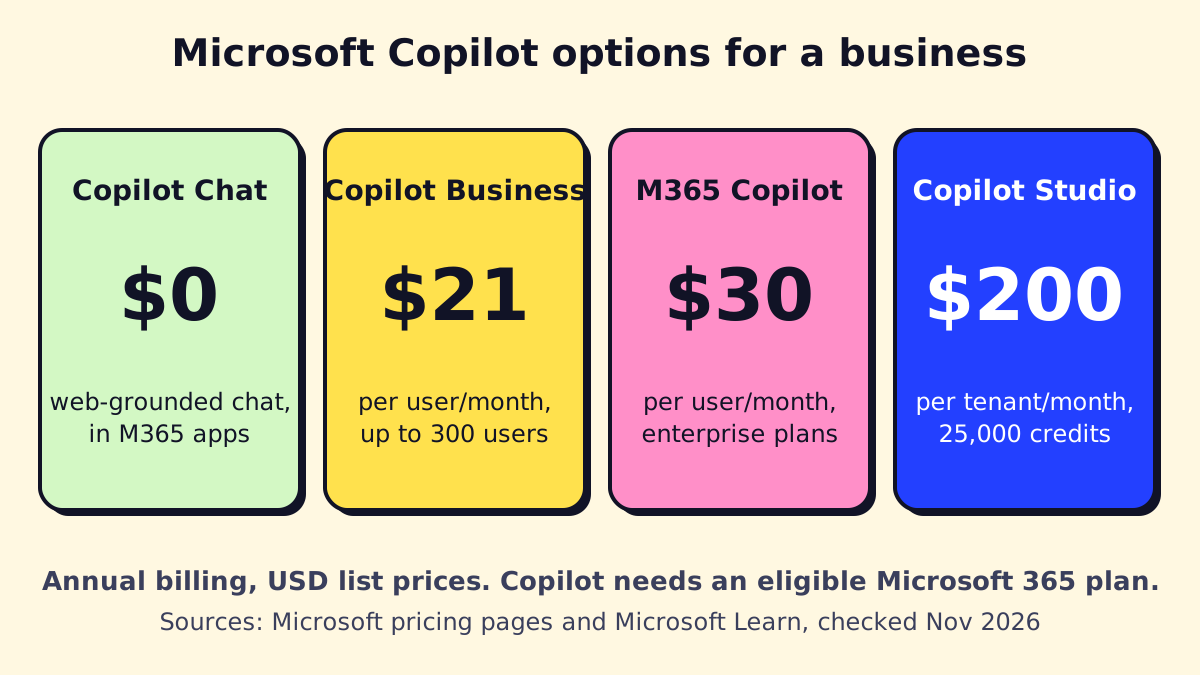 List prices, annual billing, USD, November 2026.
| Option | Price as of November 2026 | Notes |
|---|---|---|
| Copilot Chat | Included | With eligible Microsoft 365 business and enterprise plans |
| Copilot Business add-on | $21 per user/month (annual); $25.20 billed monthly | Up to 300 users; Microsoft lists an $18 first-year promo for annual commitments through December 31, 2026 |
| Business Standard + Copilot bundle | $23.50 per user/month (annual, promotional) | Microsoft 365 apps plus Copilot in one SKU |
| Business Premium + Copilot bundle | $32 per user/month (annual, promotional) | Adds Microsoft’s security and device management |
| Microsoft 365 Copilot (enterprise) | $30 per user/month (annual); $31.50 billed monthly with annual commitment | For enterprise Microsoft 365 plans |
| Copilot Studio capacity pack | $200 per tenant/month for 25,000 Copilot Credits | Pay-as-you-go is $0.01 per credit |
Sources: Microsoft’s Copilot business pricing, enterprise pricing and the pay-as-you-go meters page. Microsoft’s July 2026 pricing update confirmed Copilot Business at $21 while raising some bundle prices. Promotions change often, so check before you buy.
What a rollout really costs. For a 10-person team that licenses 4 heavy users, Copilot Business is $84 a month at list price ($72 on the promo). The bigger cost is the setup work: permissions cleanup, training and a prompt library.
Copilot Studio: when you need your own agent
Copilot Studio is Microsoft’s builder for custom agents: an HR policy bot in Teams, an internal “how do I…” assistant grounded on your SharePoint, a customer-facing chatbot on your website, or an agent that takes actions through Power Automate flows.
How it’s billed, per Microsoft’s Copilot Studio licensing docs:
- Usage is measured in Copilot Credits, consumed per answer or action depending on complexity.
- Prepaid packs or pay-as-you-go through Azure; unused prepaid credits don’t roll over.
- Users with a Microsoft 365 Copilot license can use internal agents in Copilot Chat, Teams and SharePoint for classic and generative answers without drawing down credits.
Copilot Studio fits when the agent lives in Microsoft’s world. For agents that answer phones, talk on WhatsApp, or work across many non-Microsoft systems, a custom build is often simpler. Our guide on how to build an AI agent walks through the options.
Data governance: fix permissions before you switch it on
Copilot follows your existing permissions. That’s good, and it’s also the main risk: if a salary spreadsheet was shared with “Everyone” three years ago, Copilot will happily surface it to anyone who asks about pay.
Microsoft’s privacy documentation states that prompts, responses and Graph data aren’t used to train foundation models and that Copilot only shows data the user can already access. Your job is to make sure “can already access” is what you intend.
A pre-rollout checklist:
- Find overshared content. Review SharePoint sites and OneDrive folders shared with “Everyone,” “Everyone except external users” or anyone-with-the-link. SharePoint Advanced Management, included with Microsoft 365 Copilot, has reports for this.
- Label sensitive files. Apply sensitivity labels (Microsoft Purview) to HR, finance, legal and client files.
- Clean up stale sites and Teams. Archive or delete what nobody uses.
- Turn on what Copilot needs. Meeting transcription for Teams recaps; AutoSave and OneDrive/SharePoint storage for Excel.
- Write a short AI use policy. What staff can paste in, what needs human review, and who to ask. Our AI governance guide has a template structure.
Regulated businesses (healthcare, legal, finance) should also check their compliance obligations and Microsoft’s data residency commitments for their region.
How to roll out Copilot in a small business
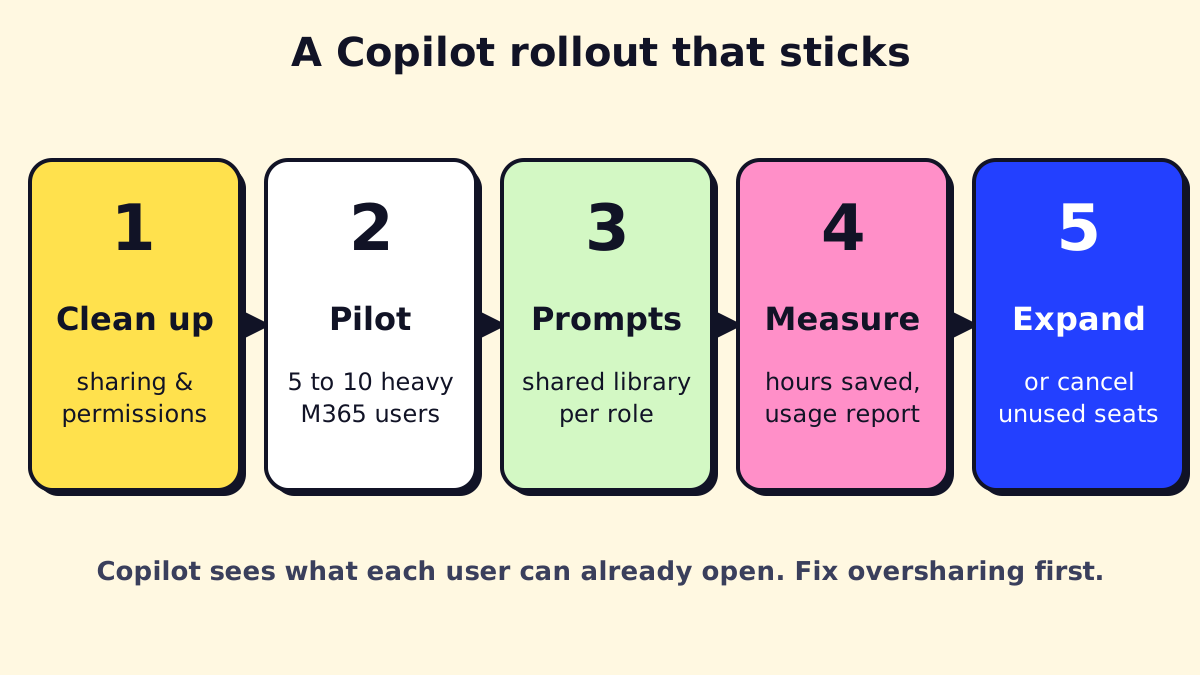
- Clean up sharing and permissions (the checklist above). Plan one to two weeks for a small tenant.
- Pilot with heavy Microsoft 365 users. Pick people who live in Outlook and Teams: the office manager, account managers, the owner. Skip people who rarely open Microsoft apps.
- Give each role a prompt library. Most disappointed users simply didn’t know what to ask.
- Measure for 30–60 days. Use the Copilot usage reports in the Microsoft 365 admin center and ask pilots which tasks got faster.
- Expand or cancel. Move seats from people who don’t use it to people who would. On annual billing, plan this before renewal.
Copilot prompts that work for small businesses
Good prompts name the goal, the source and the format. Copy and adapt:
- Outlook: “Summarize all emails from [client] in the last 30 days. List open requests, promised dates and anything I haven’t answered.”
- Teams: “Recap this meeting as decisions, action items with owners and deadlines, and open questions.”
- Word: “Using /Proposal-Template.docx and /Meeting-Notes.docx, draft a proposal for [client]. Keep pricing as placeholders.”
- Excel: “Show total revenue by month and service line as a PivotTable, then chart the top five services.”
- PowerPoint: “Create an 8-slide deck from /Q3-Report.docx for the team meeting. One idea per slide.”
- Copilot Chat (work): “What did we agree with [vendor] about the renewal price? Cite the email or file.”
Copilot vs Power Automate: assistant vs automation
Copilot helps a person do a task faster. Power Automate runs a task without a person. Many businesses need both:
| Task | Better fit |
|---|---|
| Summarize a thread and draft a reply | Copilot in Outlook |
| Save every invoice attachment to SharePoint and log it | Power Automate |
| Recap today’s client meeting | Copilot in Teams |
| Send a reminder when a contract is 30 days from expiry | Power Automate |
| Answer staff questions from the HR handbook | Copilot Studio agent |
Office 365 workflow automation (approvals, routing, file handling, notifications) is a Power Automate job; see Power Automate pricing for what’s included in your plan.
Is Copilot for Microsoft 365 worth it?
It’s worth it for people who spend most of the day in email, meetings and documents, and it pays off fastest when your files are organized and permissions are clean. It’s weak value for staff who rarely use Microsoft apps, and it won’t fix messy processes on its own. Start with a small pilot, measure, then decide.
If you’d like help with the permissions cleanup, the pilot or a Copilot Studio agent, we set these up for small teams and leave you with the prompt library and the policies.
We build a free demo on your own services and hours.
FAQ
Is Copilot for Microsoft 365 the same as Microsoft 365 Copilot?
Yes. Microsoft launched it as Copilot for Microsoft 365 and later renamed it Microsoft 365 Copilot. Both names refer to the paid AI assistant that works inside the Microsoft 365 apps with your work data.
Is Copilot free with Microsoft 365?
Copilot Chat, a web-grounded AI chat, is included at no extra cost with eligible Microsoft 365 business and enterprise plans. Copilot working across your mailbox, files and meetings in the apps needs a paid Copilot license.
Can I buy Copilot for just a few users?
Yes. Copilot is licensed per user, so you can buy seats only for the people who will use it. Copilot Business is for organizations with up to 300 users on a qualifying Microsoft 365 business plan.
Does Microsoft train its AI on my company data?
Microsoft states that prompts, responses and data accessed through Microsoft Graph aren't used to train its foundation models. Your data stays within the Microsoft 365 service boundary under your existing agreements.
Is Copilot better than ChatGPT for coding?
Microsoft 365 Copilot isn't a coding tool. For coding, compare GitHub Copilot with ChatGPT or Claude; for work across your Microsoft emails, files and meetings, Microsoft 365 Copilot has the advantage because it can read them.