- Partly free: work or school accounts can build cloud flows with standard connectors at no cost, and Power Automate for desktop is a free Windows app for attended desktop flows.
- Power Automate Premium is $15 per user per month (paid yearly) and adds premium connectors, attended RPA, AI Builder credits and process mining.
- Unattended bots need the Process license at $150 per bot per month, or Hosted Process at $215 if Microsoft hosts the machine.
- Pay-as-you-go charges $0.60 per premium cloud or attended run and $3.00 per unattended run, which suits shared flows that run rarely.
Is Power Automate free? Partly. Anyone with a work or school Microsoft account can build cloud flows with standard connectors at no extra cost, most Microsoft 365 plans include those same rights, and Power Automate for desktop is a free Windows app. You pay once you need premium connectors, unattended robots or AI features: Power Automate Premium costs $15 per user per month and the Process license $150 per bot per month, paid yearly, as of November 2026 (Microsoft pricing).
Below is every plan, what it actually unlocks, pay-as-you-go rates, and worked examples so you can estimate your own bill.
Power Automate pricing at a glance
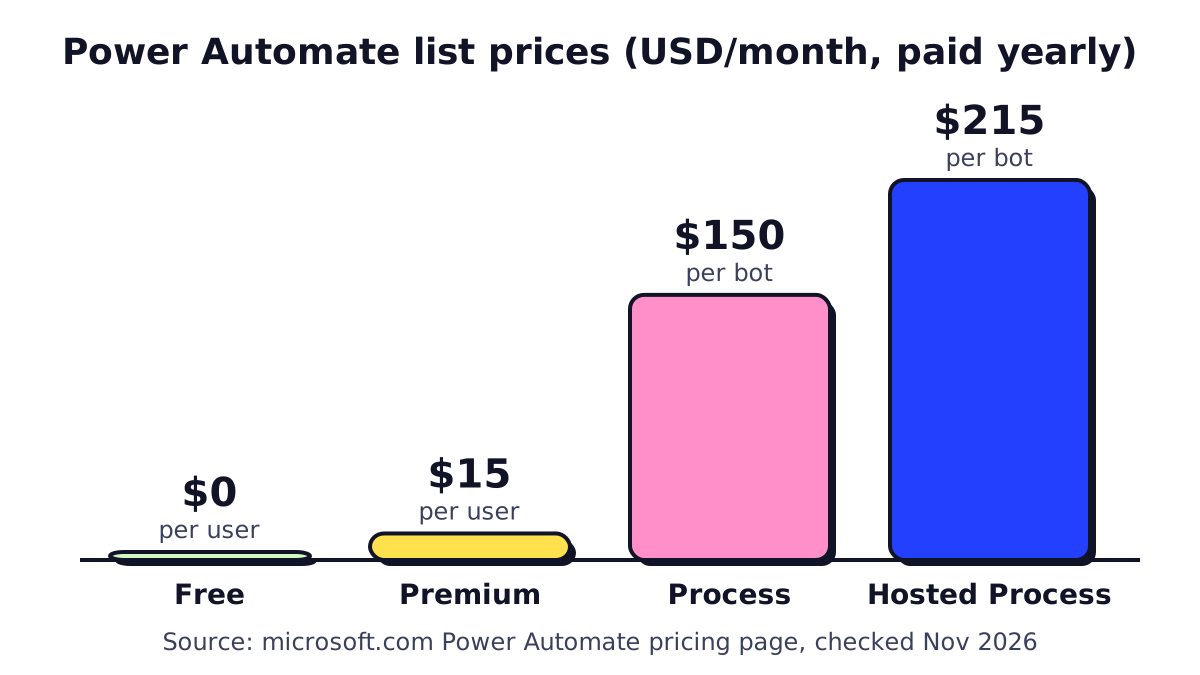 List prices in USD, paid yearly, from Microsoft’s pricing page in November 2026.
| Plan | Price (as of Nov 2026) | Licensed to | Main unlocks |
|---|---|---|---|
| Free / Microsoft 365 | $0 extra | User | Cloud flows with standard connectors |
| Premium | $15 per user/month | User | Premium and custom connectors, attended RPA, AI Builder, process mining |
| Process | $150 per bot/month | Machine or cloud flow | One unattended bot, or premium rights for one shared flow |
| Hosted Process | $215 per bot/month | Microsoft-hosted machine | Process plus a Microsoft-hosted virtual machine |
| Pay-as-you-go | $0.60 or $3.00 per run | Environment (Azure) | Premium runs billed per use |
| Process Mining add-on | $5,000 per tenant/month | Tenant | 100 GB process mining storage (Premium required) |
Source: Power Automate pricing and pay-as-you-go meters on Microsoft’s sites. Microsoft notes that checkout prices vary by currency, country and agreement.
Is Power Automate free? What you get without paying
There are three ways to use Power Automate at no extra cost.
1. The Power Automate Free license. Microsoft’s license documentation says basic capabilities are included at no cost for work or school accounts: you can create and run cloud flows (without sharing them) and author and run desktop flows locally in attended mode. Connectors are limited to standard ones.
2. Rights included with Microsoft 365. If your company pays for Microsoft 365 Business Basic, Standard or Premium (or an Office 365 / Microsoft 365 enterprise plan), your users can build and share cloud flows that use standard connectors: Outlook, SharePoint, OneDrive, Teams, Excel Online, Forms, Planner, Approvals and more. For a small office running on Microsoft 365, this covers a surprising amount of everyday automation.
3. Power Automate for desktop. The Windows app for building desktop (RPA) flows is free to download and run on your own PC in attended mode. Premium desktop features, sharing, and triggering desktop flows from the cloud need Premium.
Power Automate free license limitations
| You can’t, without paying | Why it matters |
|---|---|
| Use premium connectors (Salesforce, SQL Server, HTTP, many third-party apps) | Most integrations with non-Microsoft tools need these |
| Build custom connectors | Needed for apps with an API but no listed connector |
| Run desktop flows unattended | Overnight bots need a Process license |
| Use AI Builder credits | Invoice OCR, classification and prompts consume credits |
| Use process mining | Discovering bottlenecks from event logs |
| Share flows (Free license only) | Microsoft 365 users can share standard flows; Free-license users can’t |
The question to ask isn’t “is it free?” but “do my flows touch anything premium?” One premium action in a flow makes the whole flow premium.
Power Automate Premium: what $15 per user buys
Power Automate Premium is the per-user license Microsoft recommends for anyone who builds or runs serious automations. According to Microsoft’s license comparison, each Premium license includes:
- Unlimited cloud flows with standard, premium and custom connectors (within action limits of 40,000 per user per day)
- Desktop flows with one attended bot on the user’s registered machine
- Process and task mining, with 50 MB of process mining storage per license
- 5,000 AI Builder credits per month
- 250 MB of Dataverse database and 2 GB of file storage per license
- Business process flows and on-premises data gateways
Who needs it: the people who build flows that touch premium connectors, and the people whose own actions trigger those flows. For an automated flow, the flow owner’s license applies; for an instant (button) flow, the license of the person who presses the button applies.
Power Automate Process and Hosted Process
Process ($150 per bot per month) is a capacity license. It’s assigned to a thing, not a person, and has two uses:
- An unattended RPA bot. Allocated to a machine, it runs one desktop flow at a time with nobody signed in. To run two flows in parallel, you need two Process licenses.
- A licensed cloud flow. Assigned to a cloud flow (inside a solution), it lets that flow use premium connectors no matter who triggers it, with up to 250,000 actions per day. Useful for a company-wide flow that many unlicensed staff trigger.
One catch: the machine for an unattended bot still has to be registered by a user with Premium, so a first bot usually means one Premium license plus one Process license.
Hosted Process ($215 per bot per month) is the same idea, but Microsoft provides and manages the Windows virtual machine in Azure. You skip buying, patching and securing a PC that sits in a closet running bots.
Pay-as-you-go pricing
Instead of buying licenses up front, you can link a Power Platform environment to an Azure subscription and pay per run. Microsoft’s pay-as-you-go meters (listed as preview, as of November 2026):
- $0.60 per run for premium cloud flows and attended desktop flows
- $3.00 per run for unattended desktop flows, including hosted RPA
Runs of flows that use only standard connectors aren’t charged, runs covered by a user’s Premium license aren’t charged, and testing in the designer or resubmitting failed runs is free.
When pay-as-you-go wins: shared flows used by many people a few times a month, seasonal flows, and pilots. When it loses: anything that runs often. At $0.60 a run, 25 runs a month already costs as much as one Premium license. Microsoft’s own guidance is to put high-volume flows on a fixed license.
Which Power Automate license do you need?
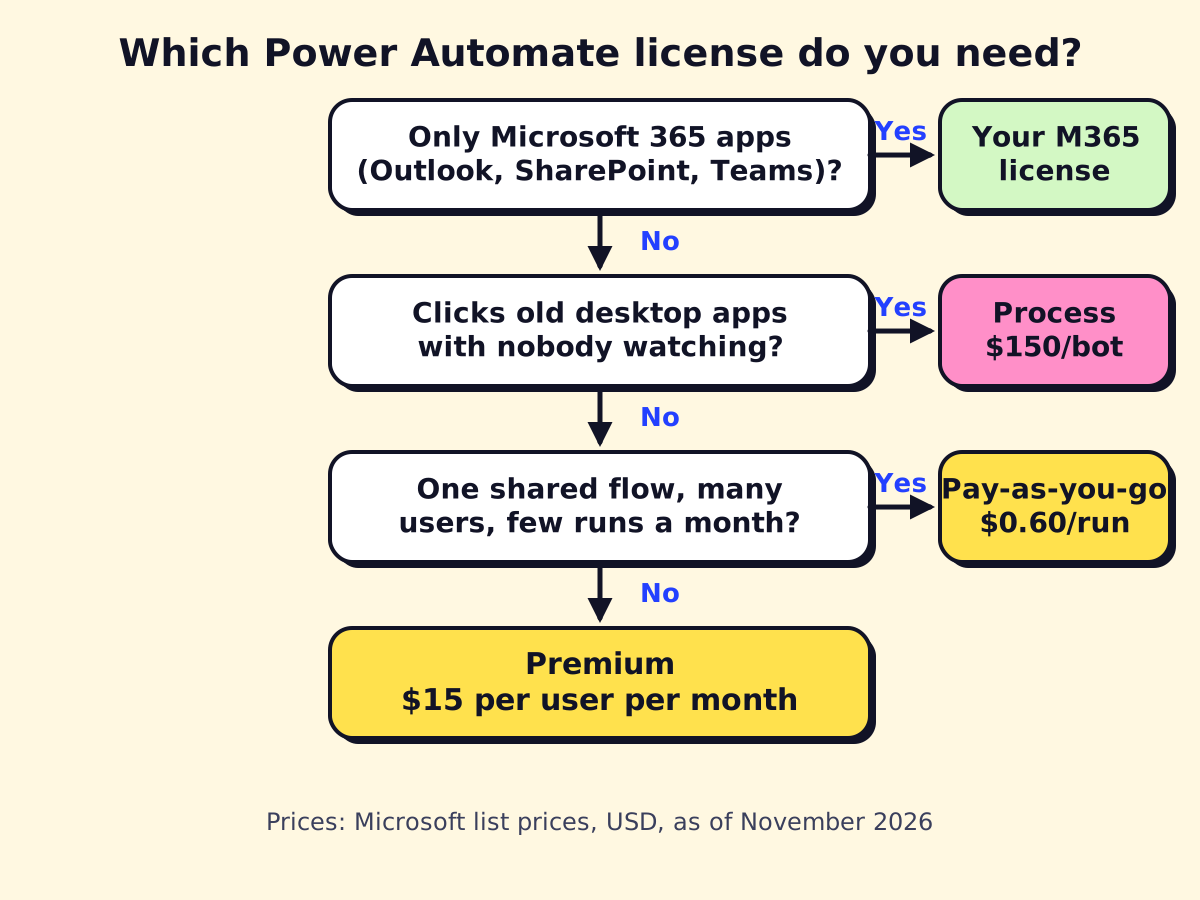
Walk through it in order:
- Do your flows only use Microsoft 365 apps? Then your Microsoft 365 license probably covers you. Cost: $0 extra.
- Do you need a bot to click through desktop software with nobody at the keyboard? You need Process (or Hosted Process), plus Premium for whoever builds and registers the machine.
- Is it one shared flow that many people trigger occasionally? Pay-as-you-go or a Process license on that flow is often cheaper than licensing everyone.
- Otherwise, give Premium to the few people who build and own premium flows.
Example costs for a small business
These are illustrative scenarios using list prices from November 2026, not quotes.
| Scenario | Licenses | Monthly cost |
|---|---|---|
| 10-person office automating Outlook, SharePoint and Teams | Microsoft 365 rights only | $0 extra |
| Office manager syncing a CRM and DocuSign with SharePoint | 1 × Premium | $15 |
| Two staff build flows; company-wide request flow used by 25 people | 2 × Premium + 1 × Process on the shared flow | $180 |
| Nightly bot copying data out of an old desktop billing system | 1 × Premium + 1 × Process | $165 |
| Same bot, but no on-site PC to run it | 1 × Premium + 1 × Hosted Process | $230 |
| Approval flow with premium connector run ~40 times a month | Pay-as-you-go | ~$24 |
Add the cost of building and maintaining the flows. That’s usually larger than the licenses in year one.
Legacy plan names you may still see
If you’re renewing an older agreement, you might see Per user, Per user with attended RPA, Per flow or the Unattended RPA add-on. Microsoft has moved new customers to Premium, Process and Hosted Process. Microsoft’s pay-as-you-go page still uses $40 per user with attended RPA and $100 per flow in its illustrative comparisons, which shows how much the current Premium price ($15 including attended RPA) has come down.
Hidden costs to budget for
- AI Builder credits. Invoice and receipt extraction consume credits. Premium includes 5,000 a month per license; heavy document volume can need more. If invoice processing is your main goal, compare options in our guide to document workflow automation.
- Dataverse storage. Flows that store data in Dataverse can outgrow included capacity. On pay-as-you-go, database storage above 1 GB is billed at $48 per GB per month.
- Copilot Studio. If you add AI agents, those are billed separately in Copilot Credits. See our guide to Copilot for Microsoft 365.
- The Word template trap. “Populate a Microsoft Word template” is premium. If you only need a PDF, building HTML and converting it with OneDrive’s standard “Convert file” action avoids the license.
- Your time. Someone has to fix flows when connections expire or fields change.
Is Power Automate worth paying for?
If your team lives in Microsoft 365, Premium at $15 per builder is cheap compared with Zapier or Make plans that charge by task volume. If your stack is mostly Google Workspace and SaaS apps, the math often favors other tools; see Zapier vs Make vs n8n and our n8n pricing guide. If you’re new to the product, start with what Microsoft Power Automate is and does.
Not sure which licenses your flows actually need? We can review your planned automations and give you a license plan before you buy, so you don’t pay for seats nobody uses.
We build a free demo on your own services and hours.
FAQ
Is Power Automate free with Microsoft 365?
Microsoft 365 business and enterprise plans include cloud flows with standard connectors such as Outlook, SharePoint, Teams and Excel. Premium connectors, the HTTP action, unattended RPA and AI Builder credits need a paid Power Automate license.
How much is Power Automate Premium?
Microsoft lists Power Automate Premium at $15.00 per user per month, paid yearly, as of November 2026. Prices at checkout can vary by country, currency and agreement.
What are the limitations of the free Power Automate license?
The free license only covers standard connectors, cloud flows can't be shared, and desktop flows run locally in attended mode only. There are no AI Builder credits and lower daily action limits.
Do I need a Premium license to populate a Word template?
Yes, the 'Populate a Microsoft Word template' action is a premium connector. A common workaround is to build the document as HTML in a flow and convert it to PDF with the standard OneDrive 'Convert file' action.
Is there a free trial of Power Automate Premium?
Yes. Microsoft offers a self-service trial with Premium capabilities from the Power Automate site. The pricing page describes a 30-day trial, while Microsoft's licensing docs describe a 90-day trial license, so check the length shown when you sign up.