- Zapier is free for 100 tasks a month. Paid plans start at $19.99/month billed annually ($29.99 monthly) for 750 tasks on Professional (November 2026).
- A task is one successful action step. Triggers, filters, Formatter and Paths steps don't count, so a Zap with three actions uses three tasks per run.
- Estimate your bill as runs per month × action steps per run, then pick the task tier above that number.
- Annual billing saves 33%, nonprofits get another 15% off, and moving long, high-volume workflows to Make or n8n can cut costs sharply.
Zapier pricing in short: Zapier is free for 100 tasks a month. Paid plans start at $19.99 a month billed annually ($29.99 billed monthly) for 750 tasks on the Professional plan, and Team starts at $69 a month billed annually for 2,000 tasks, according to Zapier’s pricing page as of November 2026. What you actually pay depends on how many tasks your Zaps use.
So the real question is what a task is and how many you’ll need. This guide covers each plan, the task tiers, how to estimate your monthly Zapier costs, and seven ways to bring the bill down.
Zapier pricing plans (November 2026)
| Plan | Price (annual billing) | Price (monthly billing) | Tasks/month | Users |
|---|---|---|---|---|
| Free | $0 | $0 | 100 | 1 |
| Professional | From $19.99/mo | From $29.99/mo | 750 to 2,000,000 | 1 |
| Team | From $69/mo | From $103.50/mo | 2,000 to 2,000,000 | Up to 25 |
| Enterprise | Custom | Custom | Custom annual limit | Unlimited |
Free gets you started with 100 tasks and no premium apps. Fine for testing or one tiny automation.
Professional is for one person. It unlocks all premium apps (including Webhooks by Zapier) and up to 100,000 Zapier Tables records.
Team adds up to 25 users, shared workspaces and up to 500,000 Tables records. It’s what most offices with more than one person building Zaps choose.
Enterprise adds advanced admin, security and custom limits; pricing is by quote.
Zapier task tiers and prices
You choose how many tasks you need each month, and the price scales with it. Here are Zapier’s published tiers for the two self-serve plans:
| Tasks/month | Professional (annual) | Professional (monthly) | Team (annual) | Team (monthly) |
|---|---|---|---|---|
| 750 | $19.99 | $29.99 | n/a | n/a |
| 1,500 | $39 | $58.50 | n/a | n/a |
| 2,000 | $49 | $73.50 | $69 | $103.50 |
| 5,000 | $89 | $133.50 | $119 | $178.50 |
| 10,000 | $129 | $193.50 | $169 | $253.50 |
| 20,000 | $189 | $283.50 | $249 | $373.50 |
| 50,000 | $289 | $433.50 | $399 | $598.50 |
| 100,000 | $489 | $733.50 | $599 | $898.50 |
Tiers continue up to 2 million tasks; above that, Zapier routes you to sales.
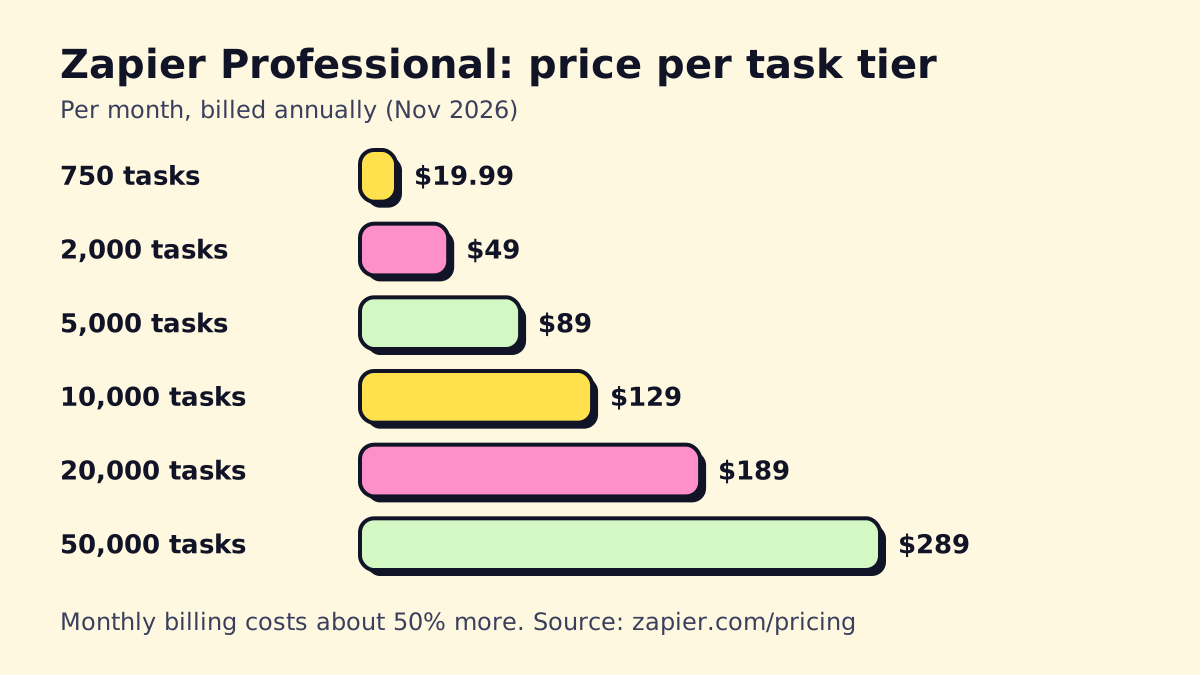 Source: zapier.com/pricing, checked November 2026.
Notice the per-task price drops as you go up: 750 tasks cost about 2.7 cents each, while 50,000 cost about 0.6 cents each (annual billing).
Add-ons: Agents and Chatbots
Zapier sells some AI products as separate add-ons. As of November 2026, its pricing page lists Zapier Agents with 400 free activities a month and a Pro tier from about $33.33/month billed annually (agent activities don’t use your task pool), and Zapier Chatbots with 2 free chatbots and paid tiers from about $13.33/month billed annually.
What is a task in Zapier?
A task is one successful action step in a Zap. Zapier’s help article on how task usage is measured spells out what’s free:
- Trigger steps don’t count. Zapier checking for new data, or receiving it, is free.
- Filter and Paths steps don’t count.
- Built-in tools like Formatter, Delay, Looping, Sub-Zap and Digest are excluded from task counts.
- Only successful actions count. A step that errors doesn’t use a task.
There are exceptions. The same help article lists Zapier MCP at 2 tasks per tool call and Code by Zapier at 1 task per run.
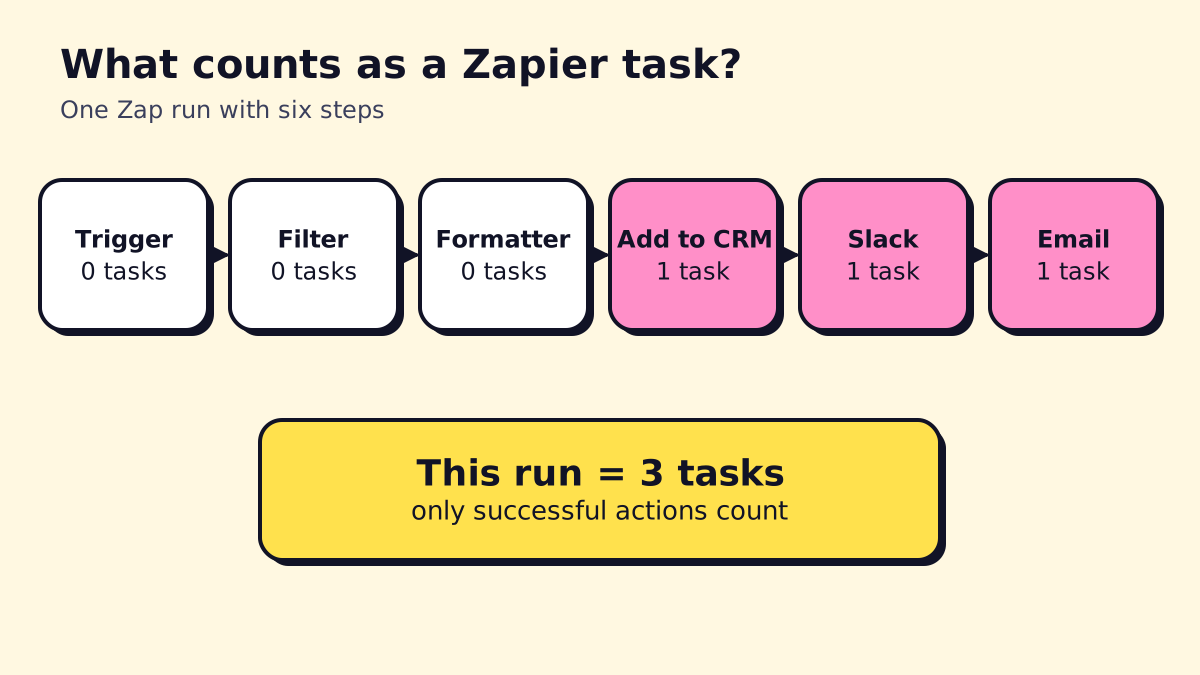
So a Zap that triggers on a new form entry, filters out spam, formats the phone number, then creates a CRM contact, posts to Slack and sends an email uses 3 tasks per run. If 400 leads come in a month, that’s 1,200 tasks.
How to estimate your Zapier cost
- List your Zaps (or the ones you plan to build).
- Count action steps in each, excluding the trigger, filters, Paths and Formatter.
- Estimate runs per month for each. Use real numbers: form submissions, invoices, appointments.
- Multiply action steps × runs for each Zap and add them up.
- Add 20–30% headroom for growth and retries.
- Pick the tier above that number.
Worked example: a small HVAC company
These are round, illustrative numbers.
| Zap | Actions per run | Runs/month | Tasks/month |
|---|---|---|---|
| Web lead to CRM + email + SMS alert | 3 | 250 | 750 |
| Job complete to review request | 2 | 300 | 600 |
| Invoice paid to accounting + thank-you email | 2 | 280 | 560 |
| Missed call to text-back + CRM log | 2 | 200 | 400 |
| Total | 2,310 |
With 25% headroom that’s about 2,900 tasks, so the 5,000-task Professional tier at $89/month billed annually ($133.50 monthly). The 2,000-task tier would run out mid-month.
Zapier overage: what happens if you go over
Paid plans can turn on pay-per-task. Per Zapier’s pricing page:
- Extra tasks cost 1.25× your plan’s base task rate on annual self-serve plans, or 2.5× on monthly plans.
- Usage stops at 3× your plan’s task limit until the next cycle, even with pay-per-task on.
- Without pay-per-task, Zaps stop running when you hit the limit.
The current per-task rates are listed on Zapier’s rates page. If you’re regularly in overage, moving up a tier is almost always cheaper.
Does Zapier cost money? The free plan in practice
Zapier’s free plan is real, but small. 100 tasks a month is roughly three per day, and premium apps like Webhooks aren’t included. It works for one personal automation or a quick test.
The better way to evaluate Zapier is the 14-day Professional trial, which needs no credit card. Build the Zaps you actually need, run them for two weeks and check the task count in your usage dashboard. That’s your real number.
Zapier nonprofit pricing
Zapier’s pricing page lists an extra 15% off for nonprofits, on top of the annual billing discount. It doesn’t apply to pay-per-task charges. Zapier asks you to apply and confirm nonprofit status; check its pricing page for the current process.
Seven ways to cut your Zapier bill
- Bill annually. Zapier lists annual billing as 33% off monthly. On the 5,000-task tier that’s $89 instead of $133.50 a month.
- Filter first. Put a Filter right after the trigger so spam, test entries and irrelevant records stop before any action runs. Filters are free.
- Use Formatter and Paths freely. They don’t use tasks, so do your data cleanup there instead of in a paid action.
- Combine actions. If one app can do two things in one call (create contact and add a tag), use it instead of two steps.
- Use Digest to batch notifications into a daily summary instead of one Slack message per event.
- Audit your Zaps quarterly. Turn off Zaps nobody looks at; old notification Zaps are common culprits.
- Move the heavy workflows. If one long workflow eats most of your tasks, rebuilding it in Make or n8n can cost a fraction. n8n counts a whole run as one execution regardless of steps; see our n8n pricing guide and the full Zapier vs Make vs n8n comparison.
Is Zapier worth the price?
For a small team with a handful of short Zaps, yes. Zapier saves hours of copy-paste for less than the cost of one hour of staff time a week, and nothing else is as quick to set up. It stops being good value when workflows get long (each action is a task) or volume climbs into the tens of thousands of runs.
If you’re new to Zapier, our guide on how to use Zapier walks through integrations, webhooks and common small-business Zaps. And if you’d rather have someone audit your Zaps and move the expensive ones, that’s the kind of work we do at opsmigo; see workflow automation for small businesses for where to start.
We build a free demo on your own services and hours.
FAQ
Does Zapier cost money?
Zapier has a free plan with 100 tasks a month and no premium apps. Most businesses end up on Professional, which starts at $19.99/month billed annually or $29.99 billed monthly as of November 2026.
Does Zapier have a free trial?
Yes. Zapier's pricing page offers a 14-day trial of the Professional plan with no credit card required, after which you drop to the Free plan unless you upgrade.
Does Zapier offer nonprofit pricing?
Yes. Zapier's pricing page lists an extra 15% off for nonprofits, on top of the annual billing discount. It doesn't apply to pay-per-task overage charges.
What are premium apps in Zapier?
Premium apps are integrations Zapier reserves for paid plans, such as Webhooks by Zapier and many business tools. The Free plan can't use them; Professional and above include them all.
What happens if I run out of Zapier tasks?
With pay-per-task turned on, Zapier keeps running and bills extra tasks at 1.25 times your base rate on annual plans or 2.5 times on monthly plans, up to 3 times your plan's tasks. Without it, Zaps pause until the next billing cycle.