- Zapier connects apps with Zaps: a trigger in one app (new form entry) starts actions in others (create CRM contact, send text).
- Zapier lists integrations for 8,000+ apps. If an app isn't there, Webhooks by Zapier can send or receive data from almost anything with a URL (paid plans only).
- Email Parser by Zapier turns structured emails, like lead notifications, into data you can push into a CRM or sheet, and it's free to use.
- Zapier doesn't support HIPAA-regulated health data, so keep patient details out of your Zaps.
Zapier integrations are the connections that let Zapier pass data between your apps: when something happens in one (a new form entry, a paid invoice, an email), Zapier automatically does something in another (creates a CRM contact, sends a text, adds a row). Zapier lists integrations for more than 8,000 apps, and for anything not on the list, Webhooks by Zapier can connect almost any system that can send or receive a web request.
This guide explains how Zapier works, how to set up your first Zap, how to use webhooks (with a sample payload), the Email Parser, Notion and ChatGPT integrations, and ten Zaps worth building for a small service business.
What is Zapier and how does it work?
Zapier is a no-code automation tool. You build Zaps, and every Zap has the same shape:
- Trigger: the event that starts it. “New submission in Jotform,” “New paid invoice in QuickBooks,” “New email matching a search in Gmail.”
- Actions: what Zapier does next. “Create contact in HubSpot,” “Send SMS,” “Add row to Google Sheets.”
- Optional logic in between: Filters (only continue if…), Paths (branch A or B), Formatter (clean up dates, names, phone numbers), Delay (wait an hour).
Zapier checks the trigger app for new data (every few minutes, depending on plan) or receives it instantly if the app supports instant triggers. Then it runs the actions in order.
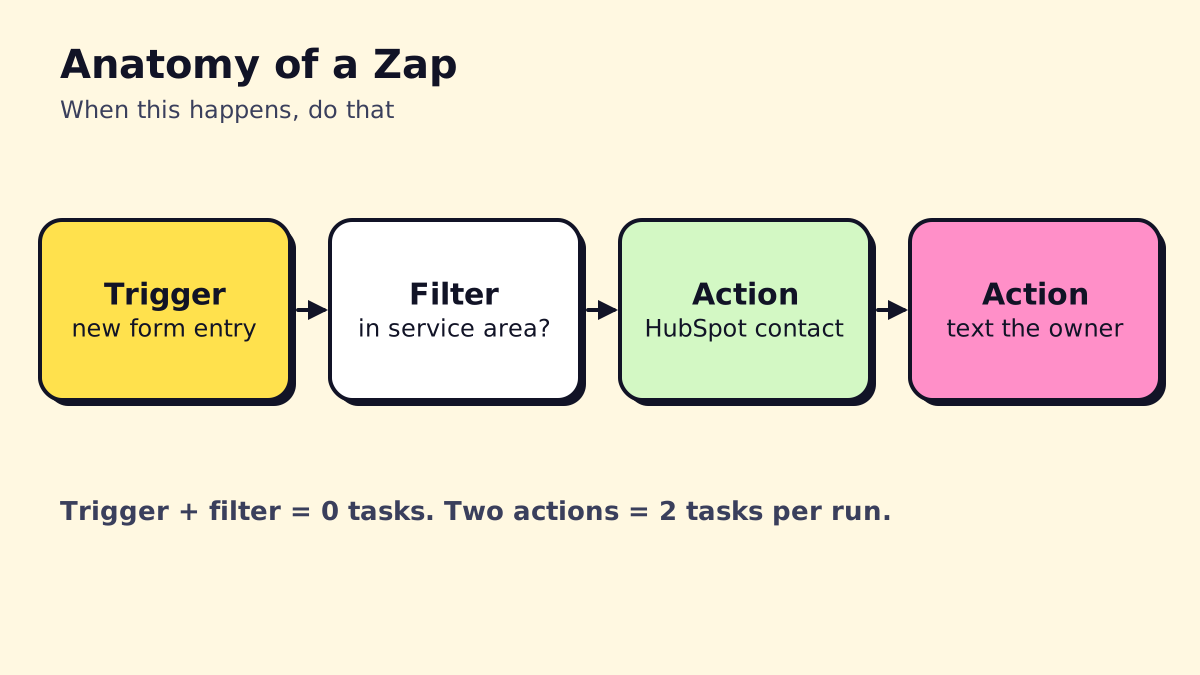
Each successful action uses one task, which is how Zapier bills. Triggers, Filters, Paths and Formatter steps are free. Our Zapier pricing guide breaks down the plans and how to estimate tasks.
How to set up Zapier: your first Zap in 10 minutes
- Create a Zapier account. The free plan gives you 100 tasks a month; the 14-day Professional trial unlocks premium apps.
- Click “Create” and choose “Zap.” You can also describe the automation in plain English and let Zapier’s AI draft it, then check each step.
- Pick the trigger app and event, for example Google Forms, “New Form Response.”
- Connect your account (sign in to the app through Zapier’s pop-up) and test the trigger so Zapier pulls a real sample.
- Add an action, for example HubSpot, “Create or Update Contact.” Map fields by clicking the sample data from the trigger.
- Test the action. Zapier creates a real record, so use test data.
- Name and publish the Zap. Turn it on and check the Zap history after the first few runs.
Finding Zapier integrations for your apps
Search the Zapier app directory for each tool you use. Each app page lists its triggers, actions and popular templates. Things to check:
- Is it premium? Some apps are only available on paid plans.
- Instant or polling trigger? Instant triggers fire within seconds; polling triggers check on a schedule.
- Does it have the action you need? An app can be “on Zapier” but only support a few actions. If yours is missing, the app’s API plus Webhooks by Zapier often fills the gap.
Popular Zapier integrations for small businesses
| Category | Common apps | Typical Zap |
|---|---|---|
| CRM | HubSpot, Pipedrive, Zoho CRM, Salesforce | New lead from a form becomes a contact and deal |
| Accounting | QuickBooks Online, Xero, Stripe | Paid invoice triggers a thank-you email |
| Email marketing | Mailchimp, Klaviyo, ActiveCampaign | New customer added to a nurture list |
| Forms | Google Forms, Jotform, Typeform, Gravity Forms | Submission routed to CRM and Slack |
| Websites and stores | Squarespace, Webflow, Shopify, WordPress | New order or form entry logged and followed up |
| Productivity | Google Sheets, Notion, Trello, Asana | New lead becomes a row, page or card |
| Communication | Gmail, Outlook, Slack, Microsoft Teams, Zoom | Alerts and follow-ups |
For CRM-specific automations, our CRM workflow automation guide goes deeper.
Webhooks by Zapier: connect anything with a URL
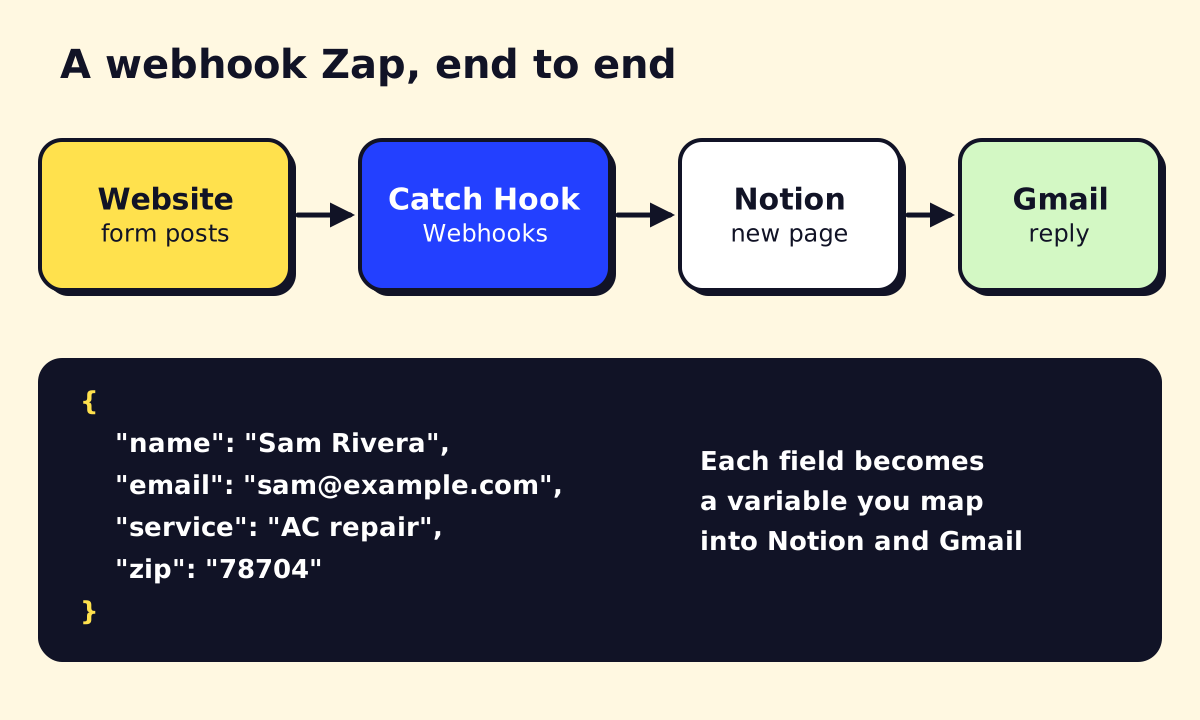
A webhook is a URL that one system calls to send data to another the moment something happens. Webhooks by Zapier lets a Zap receive data (Catch Hook) or send it (POST, GET, PUT) to any app with an API, even if it has no Zapier integration.
According to Zapier’s webhook help article, Webhooks by Zapier is available on Professional, Team and Enterprise plans, not Free.
How to catch a webhook in Zapier
- Create a Zap and choose Webhooks by Zapier as the trigger, event Catch Hook.
- Copy the webhook URL Zapier gives you. It looks like
https://hooks.zapier.com/hooks/catch/123456/abcdef/. - Paste that URL into the sending app’s webhook settings (your website form, booking tool, phone system, or custom code).
- Send a test submission, then click Test trigger in Zapier. Each field appears separately so you can map it.
- Add your actions.
Example webhook payload
Here’s what a website quote form might send to your Catch Hook URL as a JSON POST:
{
  "name": "Sam Rivera",
  "email": "sam@example.com",
  "phone": "+1 512 555 0142",
  "service": "AC repair",
  "zip": "78704",
  "message": "AC stopped cooling last night, can someone come today?",
  "source": "website-quote-form"
}
Zapier parses each key into a field: name, email, service and so on. In the next steps, you’d map name and email into your CRM, use a Filter on zip to check your service area, and send message to the owner by text if it mentions “today.”
A few tips:
- Catch Hook handles most cases. Use Catch Raw Hook only if you need the raw body and headers.
- The help article lists a 10 MB size limit for triggers (2 MB for Catch Raw Hook).
- Treat the URL like a password. Anyone who has it can trigger your Zap; add a Filter that checks a secret field if the data matters.
Sending data out with webhooks
The same app has POST and Custom Request actions. Use them to send data to an app’s API when Zapier doesn’t support the action you need, for example creating a job in field service software that only has a basic Zapier integration.
Email Parser by Zapier
Lots of lead sources only send email notifications: directory listings, older booking systems, aggregator sites. Email Parser by Zapier turns those emails into structured data.
- Go to parser.zapier.com and create a mailbox. You get a unique address.
- Forward a sample email to it, then highlight the parts you want (name, phone, job type) and label them.
- Set your lead source to forward notifications to that address (or create a forwarding rule in Gmail or Outlook).
- In Zapier, use Email Parser by Zapier, New Email as the trigger and map the parsed fields into your CRM or sheet.
It works best on machine-generated emails that look the same every time. For messy, human-written emails or PDF attachments, an AI step (ChatGPT or Zapier’s AI actions) does a better job of pulling out the details.
Zapier Notion integration
The Notion integration is one of the most searched for good reason: Notion makes a flexible lightweight CRM or job tracker, and Zapier fills it automatically.
Common Notion Zaps:
- New form lead to Notion database item, with status “New” and the lead’s details in properties.
- Updated Notion item to email or Slack, for example notify the tech when a job’s status changes to “Scheduled.”
- New calendar booking to Notion page with a meeting notes template.
Setup tip: in Notion, share the specific database with the Zapier connection, or Zapier won’t see it. Then map form fields to Notion properties one by one. Zapier’s Notion app page lists ready-made templates to start from.
Zapier with ChatGPT and AI
Zapier has several AI options:
- ChatGPT / OpenAI actions in a Zap: send text (an email, a form message) with instructions and use the reply in later steps. Example: summarize a long inquiry into two lines for a Slack alert, or draft a reply for review.
- AI by Zapier steps for common jobs like extracting fields or classifying text.
- Zapier Agents and Chatbots, sold as add-ons, for more autonomous jobs and website chat.
- Zapier MCP, which lets AI assistants such as ChatGPT and Claude run Zapier actions in your apps. Per Zapier’s help center, each MCP tool call uses 2 tasks.
When using AI steps, keep a human in the loop for anything customer-facing until you trust the output. For bigger AI projects, Zapier may not be the best home; our guide to AI tools for small business covers other options.
10 Zapier automations for small service businesses
- Website lead to CRM + instant email reply + Slack alert.
- Missed call (from your phone system) to text-back via Twilio or your SMS app.
- New booking to calendar invite + reminder text the day before.
- Job marked complete to review request a few hours later.
- Paid invoice in QuickBooks or Stripe to thank-you email and a row in your revenue sheet.
- Overdue invoice to reminder email sequence using Delay steps.
- Email Parser lead notification to CRM for directory and aggregator leads.
- New customer to Mailchimp or Klaviyo list with a tag for their service type.
- Signed contract to onboarding folder, tasks and welcome email.
- Daily digest of new leads posted to Slack or emailed to the owner each evening.
Each of these is 2 to 4 action steps, so they’re light on tasks. For longer, branching versions with AI, compare Zapier with Make and n8n in our Zapier alternatives roundup.
SMS by Zapier vs a real SMS provider
SMS by Zapier is a built-in app for sending simple text alerts to yourself or your team. For texting customers (confirmations, reminders, text-back), use a business SMS provider like Twilio or your phone system’s texting feature, which handle opt-outs and US carrier registration properly.
Zapier security, GDPR and HIPAA
From Zapier’s data privacy page:
- SOC 2 Type 2 and SOC 3 reports from an independent auditor.
- GDPR: a published Data Processing Addendum with Standard Contractual Clauses, and certification under the EU-US Data Privacy Framework. Data is hosted on AWS in the United States.
- HIPAA: Zapier says protected health information isn’t supported and it can’t sign business associate agreements.
If you run a clinic or dental office, don’t send patient details through Zapier. Use “new form submitted, check the portal” alerts instead, or a self-hosted tool in a compliant environment.
Is Zapier down?
Check status.zapier.com for incidents. When an app’s integration has an issue, only Zaps using that app are affected. Runs that errored during an outage can often be replayed from Zap history once things recover.
Should you hire a Zapier expert?
Most owners can build simple Zaps themselves in an afternoon. It’s worth getting help when Zaps start touching money, customer messages or several systems at once, or when your task bill keeps climbing. An expert or agency will also tell you when part of the job belongs in a different tool. That’s work we do at opsmigo; see how an AI automation agency engagement works.
We build a free demo on your own services and hours.
FAQ
What does Zapier do?
Zapier moves data between apps and takes actions automatically. When something happens in one app, like a new form submission, Zapier can create a contact in your CRM, send an email and post to Slack without anyone copying and pasting.
Is Zapier safe to use?
Zapier reports SOC 2 Type 2 and SOC 3 certifications and publishes a GDPR data processing addendum. It stores data on AWS servers in the US and doesn't support HIPAA-regulated health information.
Is Zapier GDPR compliant?
Zapier publishes a Data Processing Addendum with Standard Contractual Clauses and is certified under the EU-US Data Privacy Framework, according to its data privacy page. Data is hosted in the US, with no EU-only storage option.
How do I check if Zapier is down?
Go to status.zapier.com, which shows current incidents and the status of the editor, Zaps and individual app integrations. If one app's integration is down, Zaps using other apps usually keep running.
Can Zapier connect to ChatGPT?
Yes. Zapier has ChatGPT and OpenAI integrations that send text to a model and use the reply in later steps, and Zapier MCP lets AI assistants like ChatGPT and Claude run Zapier actions. OpenAI API usage is billed separately by OpenAI.