- Make.com (formerly Integromat) is a visual automation platform: you build scenarios by connecting app modules on a canvas, with routers and filters for branching logic.
- It bills in credits. Most module runs use one credit, so a scenario with a trigger and five actions uses about six credits each time it runs.
- Pricing starts free (1,000 credits/month) and paid plans start at $9/month billed annually for 10,000 credits, as of November 2026.
- Make is cheaper than Zapier for most multi-step workflows and easier than n8n for non-developers, but scheduled triggers that poll often can burn credits.
What is Make.com? Make.com is a visual automation platform that connects your apps and moves data between them on autopilot. You build “scenarios” by dragging app modules onto a canvas and linking them, for example: when a web form is submitted, add the lead to your CRM, text the owner if it’s urgent and log it in Google Sheets. It was called Integromat until 2022.
Make sits between Zapier (simplest) and n8n (most technical). This guide explains how it works, what it costs, how to build your first scenario, what reviewers say and when to choose it over Zapier.
What is Make.com, in plain terms
Make is an integration platform: it connects apps that don’t talk to each other natively. Its integrations directory lists 3,500+ apps, including Google Workspace, Microsoft 365, HubSpot, QuickBooks, Shopify, Slack, Notion, OpenAI and Twilio. For anything not listed, its HTTP module can call any API.
What sets Make apart is the visual canvas. Instead of a top-to-bottom list of steps, you see your whole automation as connected circles, with branches drawn as separate paths. That makes complex logic easier to follow than in Zapier, without the developer feel of n8n.
How Make works: scenarios, modules and credits
Three terms cover most of Make:
- Scenario: one automation, start to finish. You can run it on a schedule (every 15 minutes, daily at 8am) or instantly via a webhook.
- Module: one step in a scenario. A trigger module watches for new data; action modules create, update, search or send things.
- Credit: Make’s billing unit (it used to be called an “operation”). Most module runs use one credit. Make’s pricing page notes that routers and error handlers don’t use credits, and some AI features can use more than one.
A few more you’ll meet early:
- Router: splits a scenario into several paths.
- Filter: a condition on the line between two modules; data only passes if it matches.
- Iterator and aggregator: break a list into individual items, then combine results back together.
- Bundle: one item of data moving through the scenario (one form submission, one row).
How credits add up
Each module that processes a bundle uses a credit. A scenario with a trigger and four actions that handles one form submission uses about five credits. If a module processes 10 bundles (say, 10 new rows), it uses 10 credits.
The one that catches people out: scheduled triggers use a credit every time they check, even when there’s nothing new. A scenario scheduled every minute uses about 43,200 credits a month just checking, which is more than four times the 10,000 credits in the entry paid plan.
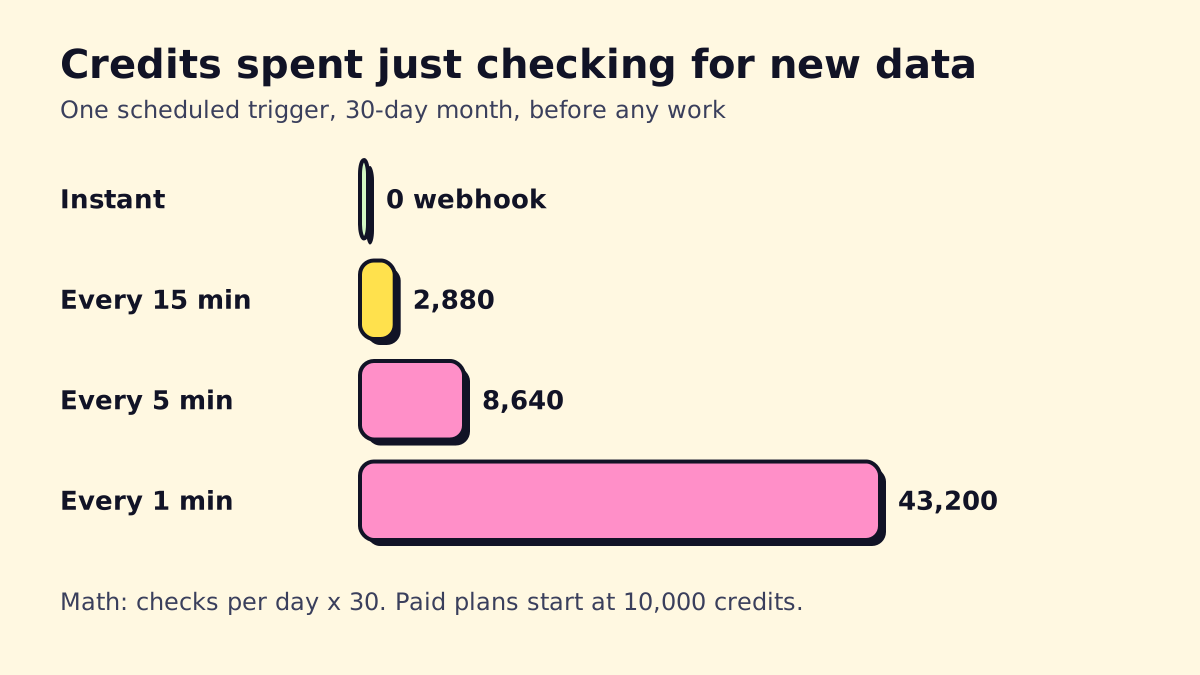 Illustrative math: checks per day × 30 days, before any real work is done.
The fix: use instant triggers (webhooks, or apps marked “instant”) wherever possible, and schedule the rest no more often than you need.
Make.com pricing (November 2026)
Make blocks most automated page readers, so we confirmed these figures against Make’s pricing page and Jetadmin’s September 2026 pricing check. All paid prices are for the 10,000-credit tier; higher credit volumes cost more.
| Plan | Annual billing | Monthly billing | Credits/month | Key limits |
|---|---|---|---|---|
| Free | $0 | $0 | 1,000 | 2 active scenarios, 15-min interval |
| Core | $9/mo | $10.59/mo | 10,000 | Unlimited scenarios, 1-min interval |
| Pro | $16/mo | $18.82/mo | 10,000 | Adds priority execution, custom variables, full-text log search |
| Teams | $29/mo | $34.12/mo | 10,000 | Adds team roles and shared templates |
| Enterprise | Custom | Custom | Custom | Security, support, admin controls |
Extra credits can be bought in bundles at your plan’s rate. On monthly plans they expire after a month.
Cost example: a lead workflow with a trigger and 5 actions, run 1,500 times a month, uses about 9,000 credits. That fits Core at $9/month billed annually. The same job on Zapier uses 7,500 tasks and costs $129/month on the 10,000-task tier. Our Zapier vs Make vs n8n comparison runs the full numbers.
Make.com tutorial: build your first scenario
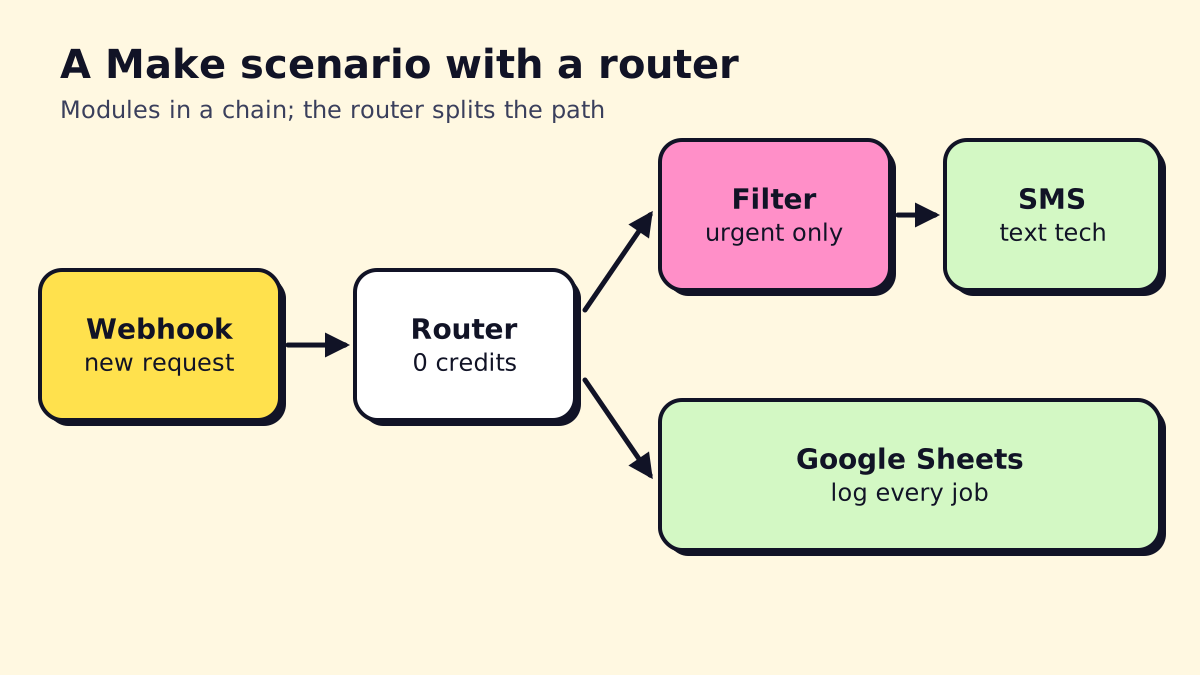
This builds the scenario in the diagram above: a website form sends a request, every job is logged in Google Sheets, and urgent jobs trigger a text to the on-call tech.
- Create a scenario. In your Make dashboard, click “Create a new scenario.”
- Add a Webhooks module (“Custom webhook”) as the trigger. Make gives you a URL. Point your website form at it and submit a test entry so Make learns the data structure.
- Add a Router after the webhook. You’ll get two paths.
- Path 1: add a Google Sheets “Add a Row” module. Connect your Google account, pick the sheet and map the form fields to columns.
- Path 2: click the line before the next module and add a Filter: “Urgency equals Emergency” (or “Message contains ‘no heat’”).
- After the filter, add a Twilio “Create a Message” module (or your SMS provider) with the customer’s name, phone and message.
- Click “Run once” and submit another test entry. Make shows bubbles on each module with the data that passed through. Click them to check.
- Set error handling. Right-click a module to add an error handler, for example “Resume” or “Rollback,” or send yourself an email on failure.
- Turn the scenario on. Webhook-triggered scenarios run instantly when data arrives.
That’s four credit-using modules per urgent run (webhook, sheet, SMS) and fewer for the rest, since the router doesn’t use credits and filtered-out paths don’t run.
Useful Make functions
Make has built-in functions for transforming data inside a field. Common ones:
parseNumber(text; decimal separator): turn “1,250.50” into a number. There’s notoNumberfunction; this is the one you want. See Make’s math functions.formatNumber(number; decimals; decimal separator; thousands separator): display a number nicely.formatDateandparseDate: convert date formats between apps.lower,upper,trim,replace: clean up text.
Make.com integrations and AI features
Make’s library covers most small business software. A few integrations worth knowing:
- OpenAI (ChatGPT, Whisper): summarize, classify or draft text inside a scenario; transcribe voicemails. OpenAI bills you separately for API usage.
- Make AI agents: agents that can decide which actions to take, built on Make’s scenarios as tools.
- Maia: Make’s AI assistant that helps you build and debug scenarios by describing what you want.
- HTTP and Webhooks: connect anything with an API.
For a broader view of agent-style automation, see our explainer on what AI agents are.
Make.com reviews: what users say
Make is well rated on review sites. Its Capterra listing showed about 4.8 out of 5 from around 400 reviews in November 2026, with a lower sub-score for ease of use (4.3) than for value. Common themes in reviews:
What reviewers like
- Price for the amount of automation you get.
- The visual builder for complex, branching workflows.
- Fine control over data mapping and transformation.
What reviewers complain about
- Learning curve for non-technical users, especially iterators, aggregators and functions.
- Credit usage that’s hard to predict, particularly with frequent scheduled triggers.
- Error handling and debugging take practice.
That matches our experience: Make rewards someone willing to spend a few hours learning it.
Make vs Zapier
| Make | Zapier | |
|---|---|---|
| Billing | Credits (most module runs) | Tasks (successful action steps) |
| Entry paid price | $9/mo annual, 10,000 credits | $19.99/mo annual, 750 tasks |
| Integrations | 3,500+ | 8,000+ |
| Builder | Visual canvas with routers | Linear steps with Paths |
| Complex logic | Strong | Workable but clunky |
| Beginner friendliness | Medium | Easiest |
Choose Make if your automations branch, loop through lists or run often, and you care about cost. Choose Zapier if you want the fastest setup and your apps are niche enough that only Zapier supports them. Our Zapier pricing guide shows how quickly tasks add up on longer workflows.
And if you’re weighing Make against n8n: n8n counts a whole run as one execution and can be self-hosted, so it pulls ahead for long, AI-heavy or high-volume workflows. Read what n8n is for that side.
Who Make.com is for
Good fit: service businesses with someone organized and a bit technical (an ops manager, office manager or owner who likes spreadsheets), running a handful of multi-step workflows, who want to keep costs low.
Not a good fit: teams that want zero learning curve, workflows involving HIPAA-regulated patient data (confirm with Make what its plans support before sending any), or very high-volume polling jobs.
If you’d rather skip the learning curve, we build and maintain Make scenarios for small businesses at opsmigo, and we’ll tell you honestly if Zapier or n8n would serve you better.
We build a free demo on your own services and hours.
FAQ
Is Make.com free?
Make has a free plan with 1,000 credits a month, 2 active scenarios and a 15-minute minimum interval between scheduled runs. It's enough to learn the tool and run one or two light automations.
Is Make.com the same as Integromat?
Yes. Integromat rebranded as Make in 2022. Old Integromat scenarios were migrated, and the product works the same way, with a visual scenario builder and app modules.
Is there a toNumber function in Make.com?
No. To turn text into a number in Make, use parseNumber(text; decimal separator), for example parseNumber(1.price; "."). To display a number with set decimals and separators, use formatNumber.
Can Make.com connect to OpenAI and ChatGPT?
Yes. Make has an OpenAI app (ChatGPT, Whisper and other models) that sends prompts and returns responses inside a scenario, plus its own AI agents. You pay OpenAI separately for API usage, and AI modules can use more Make credits.
Is Make.com better than Zapier?
Make is usually cheaper for multi-step workflows and better for complex branching. Zapier is easier for beginners and has more integrations (8,000+ vs Make's 3,500+).