- A legal answering service should screen new matters, collect conflict-check names and book consultations, while never giving legal advice.
- Callers who don't hire you can still be prospective clients under ABA Model Rule 1.18, so confidentiality rules apply to the answering service's notes.
- Legal-specific services list integrations with Clio Grow, MyCase, Lawmatics, Smokeball and others. Test that intake data lands in the right fields.
- As of November 2026, Answering Legal lists 100 minutes for $360 a month and Smith.ai 30 calls for $300 a month.
A legal answering service answers your law firm’s calls when your staff can’t, screens potential new clients, collects the names you need for a conflict check, and books consultations. It also takes messages for existing clients and pages an attorney when a call can’t wait, like an arrest or a hearing tomorrow morning. What it must never do is give legal advice, promise representation or quote fees you haven’t approved.
This guide covers solo attorneys and small to mid-size firms. It walks through the calls firms get, an intake flow, the ethics rules that apply, integrations with practice management software like Clio, practice-area notes and pricing.
What a legal answering service handles
Law firm calls fall into a few groups, each with a different goal:
| Caller | Goal |
|---|---|
| Potential new client | Screen, check conflicts, book a consultation |
| Existing client | Verify identity, take a detailed message, route to their attorney or paralegal |
| Court, clerk or opposing counsel | Message or transfer to the attorney on the matter |
| Jail or detention facility (criminal defense) | Accept or route per firm policy, page the attorney |
| Vendors, experts, process servers | Message to the right staff member |
New matters are where firms lose the most. A potential personal injury or criminal defense client who reaches voicemail often calls the next firm on the list. Those calls also come at bad times: evenings, weekends, right after an accident or an arrest. That’s why many firms pair a daytime virtual receptionist for lawyers with a 24/7 call answering service.
A law firm intake flow
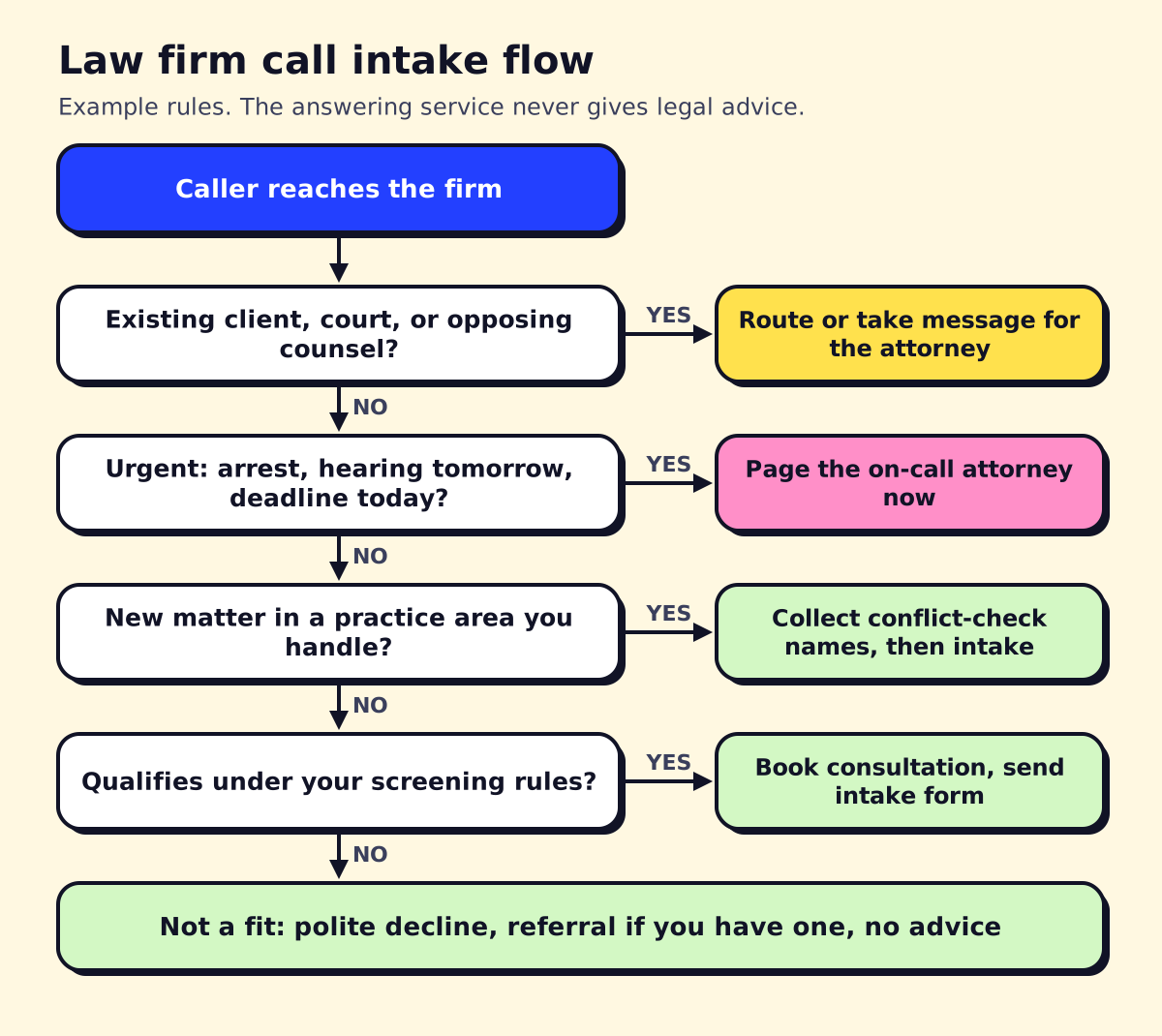 An example intake flow. Your firm sets the screening rules.
The flow above does three things in order.
Sort the caller. Existing clients and courts go one way, new matters another. This keeps the receptionist from running a new-client intake on someone whose case you’re already handling.
Catch urgent matters. For a criminal defense firm, an arrest in progress or a client in custody is urgent. For a family law firm, a protective order hearing tomorrow is urgent. For immigration, a detention. Write your firm’s urgent list and the attorney paging order.
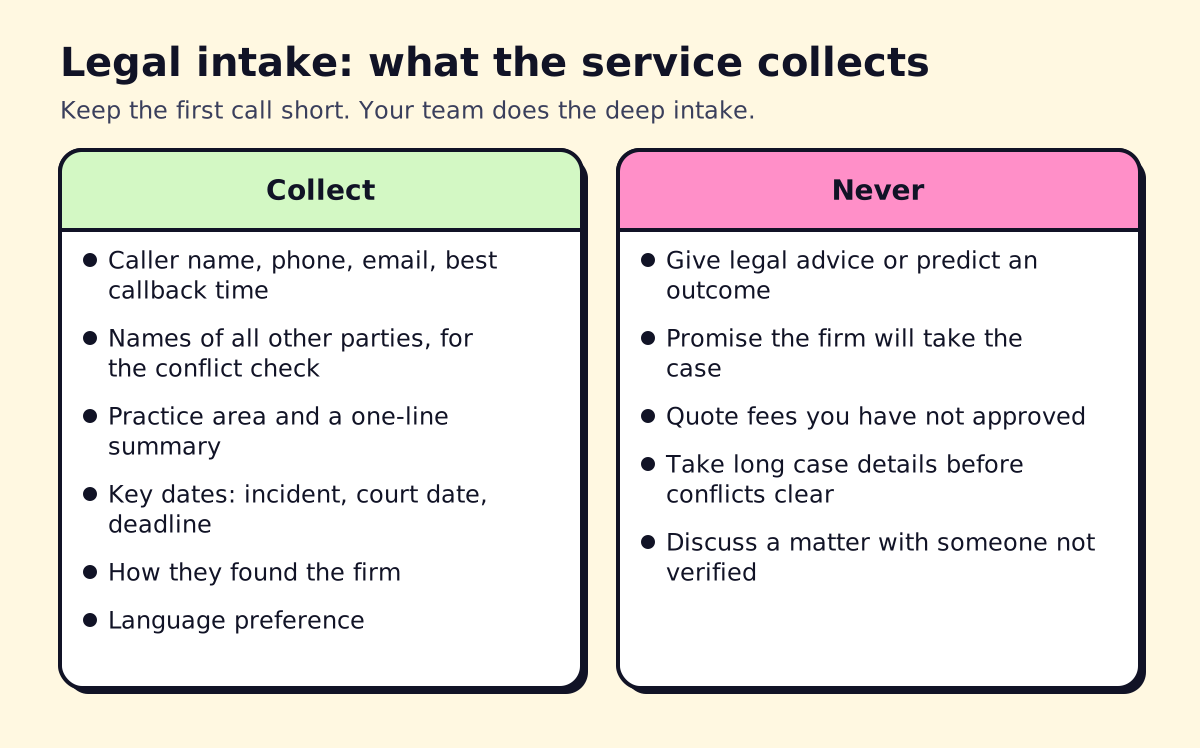
Screen, then conflicts, then book. The service asks a few screening questions (practice area, location, key dates), collects the names of other parties for a conflict check, and books a consultation or a callback. Firms that run conflicts before any detailed discussion protect themselves and the caller.
Keep the first call short. Your own intake specialist or attorney does the deep conversation once conflicts clear.
Ethics: confidentiality, prospective clients and supervision
A few ABA Model Rules shape how an answering service should work. States adopt their own versions, so check your state bar’s rules and opinions too.
Prospective clients (Rule 1.18). Someone who consults your firm about possibly hiring you is a prospective client, even if they never sign an engagement letter. Under ABA Model Rule 1.18, you generally can’t use or reveal what they told you, and learning too much can disqualify the firm from representing the other side. That’s a strong reason to keep the answering service’s first-call notes short until conflicts clear.
Confidentiality (Rule 1.6). Messages, recordings and transcripts the service creates hold confidential information. Ask where they’re stored, who can access them, how long they’re kept, and whether the vendor signs a confidentiality agreement.
Supervising nonlawyers (Rule 5.3). Lawyers are responsible for making reasonable efforts to ensure that outside assistants act consistently with their professional obligations. In practice: approve the script, review calls, and correct problems.
AI receptionists (Formal Opinion 512). In July 2024 the ABA issued Formal Opinion 512 on generative AI tools, which covers competence, confidentiality, communication with clients, supervision and fees when lawyers use AI. If an AI handles your intake calls, understand where the call data goes, whether it trains the vendor’s models, and how you’ll review its output. Several state bars have issued their own AI guidance as well.
No legal advice. The service shouldn’t tell a caller whether they have a case, how long they have to file or what something is worth. A scripted line works: “I’m not able to give legal advice, but I can set up a time for you to speak with an attorney.”
Our post on AI for lawyers goes further into AI use beyond the front desk.
Integrations: Clio, MyCase, Lawmatics and others
Intake data should land in your practice management or intake software, not just an email. Legal-focused services list a lot of integrations. As of November 2026, Answering Legal’s pricing page lists MyCase, Clio Grow, PracticePanther, Smokeball, Lawmatics, Litify, LeadDocket, SmartAdvocate and Salesforce, plus Zapier. Smith.ai’s pricing page lists Clio among its CRM integrations and LawPay for payments.
An integration on a list isn’t the same as a useful one. In the demo, ask the vendor to:
- Create a test lead and show it in your system with practice area, source and conflict names in the right fields, not crammed into a notes box.
- Show what happens to a call from an existing client: does it attach to their matter?
- Explain whether the consultation booking syncs to the attorney’s calendar both ways.
- Confirm whether consultation fees can be collected by phone (some services take payments through LawPay or similar tools).
Practice-area notes
Personal injury. High volume, high stakes, often 24/7. Screen for date of incident, injury, whether they’ve seen a doctor, whether police were called, insurance involved and whether another lawyer is already representing them. Many PI firms want a same-day callback for strong cases.
Criminal defense. Calls from jails and family members at night. Decide whether the service accepts collect calls, how it pages the attorney, and what it tells family members, who aren’t the client.
Family law. Emotional calls. The script needs calm language, a safety line for domestic violence (911 if in danger now), and care about who the service is talking to, since the other spouse might call too.
Immigration. Often multilingual, sometimes urgent (detention, hearing dates). Bilingual coverage matters most here.
Estate planning and business law. Mostly scheduled consultations, few emergencies. The service can book directly and send an intake form link.
Bilingual legal answering service
If many of your potential clients speak Spanish (or another language), a missed or mishandled intake is a lost case. Ask whether bilingual receptionists are on staff at all hours or only some shifts, whether there’s an extra charge, and whether intake notes come back in English. Answering Legal lists bilingual receptionists as a service on its pricing page; confirm hours and costs with any vendor. Our bilingual answering service guide covers the options in more depth.
Legal answering service cost
As of November 2026, published prices from legal-focused and general services:
| Provider | Plan | Monthly price | Included |
|---|---|---|---|
| Answering Legal | Solo | $360 | 100 minutes |
| Answering Legal | Essential | $676 | 200 minutes |
| Answering Legal | Growing | $936 | 300 minutes |
| Smith.ai | Starter | $300 | 30 calls |
| Ruby | Startup | $250 | 50 minutes |
Answering Legal says it charges no setup fees. Smith.ai charges $11.50 for each call over 30 on its Starter plan. Legal intake calls run longer than general message-taking, so per-minute plans can add up faster than you’d expect. Run your actual call volume and average length through each model; our answering service cost guide shows how.
The first 30 days with a new service
Most problems with a legal answering service show up in the first month, so supervise closely at the start.
- Week 1: Make test calls for every branch of your intake flow: a strong new matter, a weak one, a conflict, an existing client, an urgent call, a Spanish-speaking caller. Listen to each recording.
- Week 2: Read every intake note the service sends. Are conflict names spelled correctly? Are dates captured? Is anything in the notes that shouldn’t be there before conflicts clear?
- Week 3: Compare the consultations it booked against your screening rules. If it’s booking poor fits, tighten the questions. If it’s turning away good cases, loosen them.
- Week 4: Check the numbers: calls answered, new matters screened, consultations booked, consultations held, and retained clients. That last number is the one that justifies the cost.
After the first month, keep a lighter routine: a monthly review of a sample of calls and a script update whenever you add a practice area, change fees or hire attorneys. Document the review. If a bar complaint or malpractice question ever touches intake, a record showing you supervised the service is useful.
Checklist: the best law firm answering service for you
- Intake script built from your screening rules, with a “no advice” line.
- Conflict-check names collected before details.
- Urgent matter list and attorney paging order.
- Existing client verification before discussing any matter.
- Confidentiality terms in writing: storage, access, retention, AI training.
- Integration with your practice management or intake tool, tested live.
- Consultation booking synced to attorney calendars.
- Bilingual coverage during the hours your callers call.
- Call recordings for supervision and quality review.
- Month-to-month terms or a trial period.
If you’d like an AI intake receptionist that screens new matters and books consultations into your system, with live transfer for urgent calls, opsmigo can build and supervise that setup with you. Whatever you choose, write the intake rules first and review the first month of calls closely.
We build a free demo on your own services and hours.
FAQ
What is a legal answering service?
It's a live or AI receptionist service built for law firms. It answers calls, screens new matters, collects conflict-check details, books consultations, takes messages for existing clients and routes urgent calls to attorneys.
Can a law firm answering service do legal intake?
Yes, a first-stage intake: contact details, other parties for the conflict check, practice area, key dates and a short summary. Detailed intake and any advice should stay with the firm's lawyers and staff.
Is it ethical for a law firm to use an answering service or AI receptionist?
Yes, if the firm supervises it. The ABA's rules on confidentiality and supervising nonlawyer assistance apply, and ABA Formal Opinion 512 covers generative AI tools. Check your state bar's guidance too.
How much does a legal answering service cost?
As of November 2026, Answering Legal lists $360 a month for 100 minutes and $676 for 200 minutes, and Smith.ai lists $300 a month for 30 calls. AI-only options cost less but vary by vendor.
Do I need a bilingual legal answering service?
If a meaningful share of your callers speak Spanish or another language, yes. Practice areas like immigration, personal injury, family and criminal defense often get many non-English calls, and a missed intake is a lost case.