- AI for lawyers is safest and most useful on intake, drafting from your own templates, summarizing documents you supply, and client communication.
- Legal research and anything filed in court are the highest-risk uses: verify every citation in a trusted database before it leaves the firm.
- ABA Formal Opinion 512 (July 2024) applies existing duties to AI: competence, confidentiality, client communication, candor, supervision and reasonable fees.
- The quickest time savings for small firms usually come from workflow automation (intake, engagement letters, deadlines, client updates), not from a legal research product.
AI for lawyers works best on the parts of legal work that are about language and process: intake, first drafts from your own templates, summaries of documents you provide, chronologies, and client emails. It is riskiest where accuracy is everything, especially legal research and court filings, where every citation must be checked in a trusted database. Under ABA Formal Opinion 512, the same duties apply as with any other tool: competence, confidentiality, communication, candor, supervision and reasonable fees.
This guide covers what generative AI for lawyers does well, the ethics rules, AI tools by task, ChatGPT prompts for lawyers, and the law firm workflows worth automating first.
What generative AI for lawyers does well
Generative AI predicts likely text. That makes it strong at drafting, summarizing and rephrasing, and unreliable when a fact or a case has to be exactly right. Sort tasks by risk before you start.
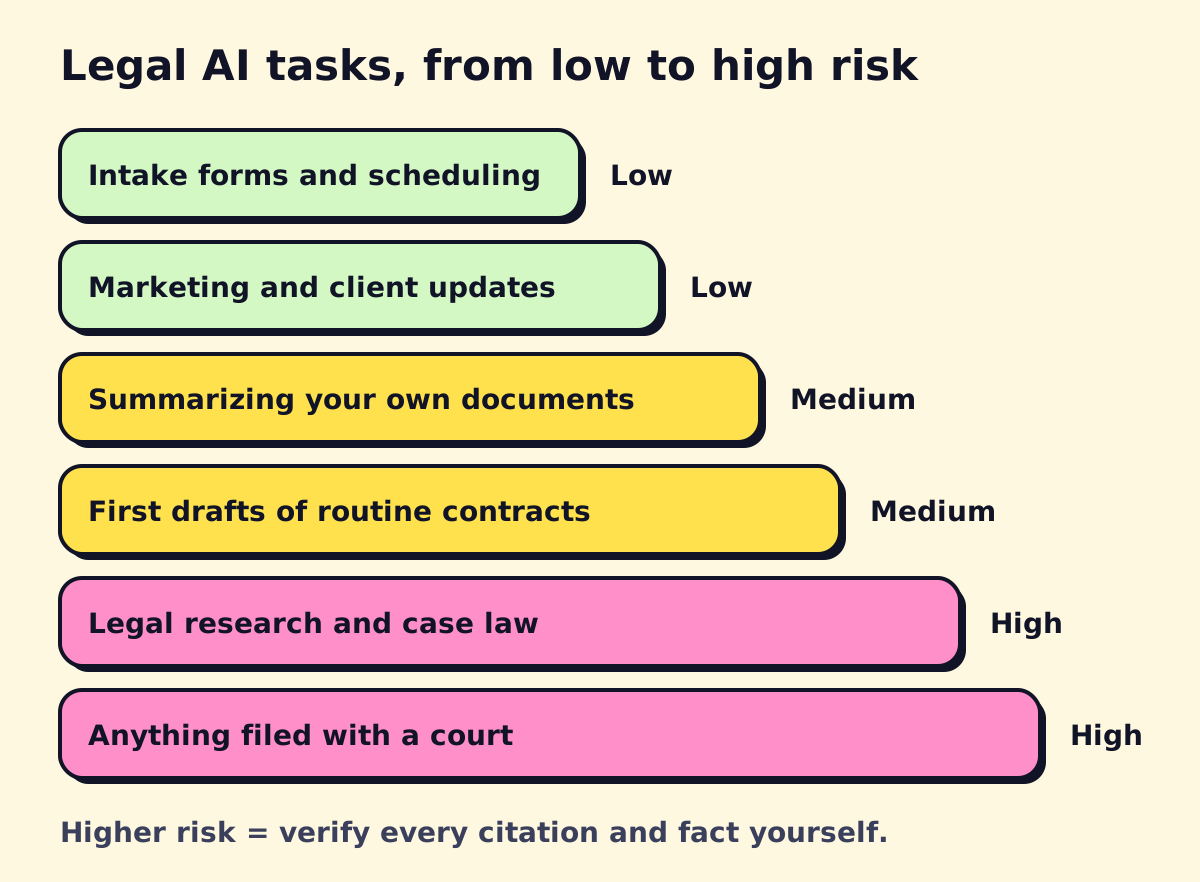 The higher the risk, the more you verify by hand.
Low risk, high payoff
- Intake summaries from forms, calls and emails
- Client update emails and plain-language explanations
- Website content and marketing drafts (see our AI marketing tools guide)
- Meeting notes and task lists
Medium risk: useful with review
- Summaries, timelines and issue lists from documents you upload
- First drafts of routine agreements and letters, built from your own precedents
- Comparing two versions of a contract and listing changes
- Deposition and transcript summaries
High risk: verify everything
- Legal research, case law and statutory citations
- Briefs, motions and anything filed with a court
- Advice on deadlines, limitation periods and jurisdiction-specific rules
The risk is real. In Mata v. Avianca (S.D.N.Y. 2023), lawyers who filed a brief with fictitious cases generated by ChatGPT were sanctioned $5,000 (Reed Smith summary). Similar sanctions have followed in other courts since.
Ethics rules: ABA Formal Opinion 512
On July 29, 2024, the ABA issued Formal Opinion 512, its first ethics opinion on generative AI (ABA announcement). It doesn’t create new rules; it applies the Model Rules you already follow. Formal opinions aren’t binding, and your state bar’s rules and opinions control, but most state guidance points the same way.
| Duty | Model Rule | What it means in practice |
|---|---|---|
| Competence | 1.1 | Understand what the tool can and can’t do, including that it can produce false citations. You don’t need to be an expert. |
| Confidentiality | 1.6 | Know what the vendor does with your inputs. Informed client consent may be needed before entering confidential information into some tools. |
| Communication | 1.4 | Tell clients about AI use when it matters to the representation or when they ask. |
| Candor and meritorious claims | 3.1, 3.3, 8.4(c) | Check output before relying on it in court. You’re responsible for what you file. |
| Supervision | 5.1, 5.3 | Set firm policies and train lawyers and staff on approved tools. |
| Fees | 1.5 | Bill actual time spent, not time saved. Don’t bill clients for learning a tool. Some tool costs may be overhead rather than billable expenses. |
Several states issued their own guidance too, including California’s practical guidance on generative AI and Florida Bar Ethics Opinion 24-1. Check your state bar’s site for the current version.
A one-page AI policy for a small firm
- Approved tools. List them. Personal and free consumer accounts are not approved for client work.
- Data rules. What may go into each tool (public information, anonymized facts, full client files).
- Verification. Every citation is checked in Westlaw, Lexis, Fastcase/vLex or an official source before use.
- Disclosure. When clients are told, and how the engagement letter addresses it.
- Billing. How AI-assisted work is billed, consistent with Rule 1.5.
- Court rules. Who checks standing orders on AI disclosure before filing.
Our guide to AI governance and a usage policy has a fuller template you can adapt.
AI tools for lawyers, by task
Legal-specific AI products mostly sell through quotes and demos rather than published prices, and they usually cost several times a general business assistant. Decide which task you’re solving before you take the demos.
| Task | Type of tool | Examples |
|---|---|---|
| Drafting, summarizing, email | Business AI assistant | ChatGPT Business, Claude Team, Microsoft 365 Copilot, Gemini in Google Workspace |
| Legal research with citations | Legal research platform with AI | Lexis+ AI, Westlaw with CoCounsel, vLex Vincent |
| Contract drafting and review | Contract AI inside Word | Spellbook, Microsoft Copilot in Word, CoCounsel |
| Practice management | Case management with AI features | Clio, MyCase, Smokeball, PracticePanther |
| Discovery and large document sets | E-discovery with AI review | Relativity, Everlaw, DISCO |
| Intake and phones | AI receptionist or answering service | See our legal answering service guide |
General assistants are the cheapest entry point. ChatGPT Business is $25 per user per month billed monthly or $20 annually, and Claude Team is $25 or $20 for a standard seat, as of November 2026 (OpenAI pricing, Claude pricing). Business plans don’t train on your data by default, which matters for Rule 1.6. They are not research databases, though: treat any case they mention as a lead to check, not a citation.
Free AI for legal research
There’s no free AI that reliably cites case law. There are free, reliable databases:
- CourtListener from the Free Law Project, for federal and state opinions and PACER documents
- Google Scholar case law search
- Cornell’s Legal Information Institute for statutes and regulations
- Your state court and legislature websites, and bar association member benefits (many include Fastcase/vLex access)
A practical method: use a general AI tool to brainstorm issues and search terms, then do the actual research in one of the databases above.
ChatGPT for lawyers: prompts that work
These work in ChatGPT, Claude, Copilot or Gemini. Remove client names and identifying facts unless your confidentiality obligations are satisfied for that tool.
Intake summary
Summarize this intake call transcript for an attorney. Include:
parties, key dates, what the client wants, possible claims to evaluate,
missing information, and any deadline that may be urgent.
Do not give legal conclusions. [paste transcript]
Plain-language client update
Rewrite this status update for a client with no legal background.
Under 200 words, explain what happened, what happens next, and what
we need from them. Keep every date exactly as written. [paste]
Chronology from documents
From the attached documents, build a chronology table with columns:
date, event, source document and page. Only include events stated in
the documents. Mark anything uncertain with a question mark.
Contract issue list
Review this [type] agreement from the perspective of the [buyer/tenant].
List the clauses that are unusual or unfavorable compared with common
market terms, quote each one, and suggest a fallback position.
Don't rewrite the whole agreement.
Deposition outline
Using these facts and documents, draft a deposition outline for
[witness role]. Group questions by topic, start broad, and flag the
documents to use as exhibits for each topic.
Legal writing edit
Edit this section of a brief for clarity and concision. Keep every
citation exactly as written and do not add new authority. Show the
changes as a list after the edited text. [paste]
Legal workflow automation for law firms
For small and mid-sized firms, the biggest time savings usually come from automating the administrative chain around each matter rather than from AI writing. Legal workflow automation connects your intake, practice management, documents, calendar and billing so that work moves without retyping.
| Workflow | What to automate |
|---|---|
| Intake | Web form, call or chat → summary → conflict-check request → follow-up email to the prospect |
| Engagement | Accepted matter → engagement letter generated from template → e-signature → retainer payment link |
| Matter setup | Signed engagement → matter created, folders built, team assigned, key dates calendared |
| Deadlines | Court dates and limitation periods → calendar entries with reminders to two people |
| Client updates | Milestone reached → plain-language update drafted for attorney approval |
| Billing | Unbilled time reminders, invoice sending, payment reminders |
You can build much of this with your practice management system’s built-in automations, plus tools like Zapier, Make or n8n for the gaps. Our guides to document automation and CRM workflow automation walk through the engagement-letter and intake pieces.
AI for paralegals
Paralegals get some of the clearest wins: document summaries, chronologies, exhibit lists, first-draft correspondence and organizing discovery. The job shifts toward checking output, managing deadlines and client contact, which makes clear review rules more important.
AI for law students
Law students can use AI to quiz themselves, summarize their own notes and get feedback on writing structure. Check your school’s honor code first; many restrict AI on graded work.
Where to start
Pick one low-risk task (intake summaries or client updates) and one workflow (engagement letters are a good first build). Write the one-page policy before anyone uses AI on client work. If you want help setting up intake, document assembly or an AI receptionist for your firm, opsmigo builds these for small law firms; for a wider view of tools beyond legal, see our AI tools for small business guide.
We build a free demo on your own services and hours.
FAQ
Can lawyers use ChatGPT?
Yes, with care. Use a business plan with training on your data turned off, avoid entering confidential client information unless your duty of confidentiality is satisfied (which may require informed consent), and verify any legal authority it gives you.
What does ABA Formal Opinion 512 say?
Issued July 29, 2024, it says lawyers using generative AI must understand the tools well enough to use them competently, protect client confidences, tell clients when it matters, check output for accuracy, supervise staff use, and charge reasonable fees, including not billing for time spent learning a tool.
Is there free AI for legal research?
Free case law databases such as CourtListener, Google Scholar and Cornell's Legal Information Institute are reliable sources. General free chatbots are not reliable for citations, so use them only to brainstorm and then confirm everything in a database.
Will AI replace paralegals?
It is changing the work more than replacing it. Paralegals who use AI for document summaries, chronologies and first drafts spend more time on checking, client contact and case management.
Do courts require disclosure of AI use?
Some judges and courts have standing orders or local rules on AI-assisted filings, and the requirements vary. Check the rules for each court before you file.