- For most small HR teams, the best AI tool is the AI already built into your ATS or HR system, plus one business-tier assistant (ChatGPT, Claude, Copilot or Gemini) with data controls.
- Use AI to draft, summarize and schedule. Keep hiring, firing, pay and discipline decisions with a person.
- AI screening is regulated in places: NYC requires annual bias audits, Illinois requires notice, Ontario requires disclosure in job postings, and Colorado's rules start January 1, 2027.
- Automate onboarding, PTO and offboarding paperwork first. They are rule-based, repetitive and low risk.
The best AI tool for HR teams is usually not a new app. For a small or mid-sized business, it is the AI already built into your applicant tracking or HR system, plus one business-tier assistant such as ChatGPT, Claude, Microsoft Copilot or Gemini that your team uses for drafting and summarizing. Add a dedicated AI recruiting tool only if you hire at volume, and keep every hiring decision with a person.
This guide covers which AI tools for HR are worth paying for, the ChatGPT prompts for HR and recruiting that save the most time, which HR processes to automate first, and the bias rules that apply to AI in hiring in the US and Canada.
What is the best AI tool for HR teams?
There is no single winner, because “HR” is five different jobs. Pick by job, and check whether the system you already pay for covers it before buying anything new.
| HR job | Best type of tool | Examples | Who it fits |
|---|---|---|---|
| Writing and summarizing | Business AI assistant | ChatGPT Business, Claude Team, Microsoft 365 Copilot, Gemini in Google Workspace | Every HR team |
| Hiring pipeline | Applicant tracking system (ATS) with AI features | Workable, Greenhouse, BambooHR Hiring, JazzHR | Teams hiring more than a few people a year |
| Payroll, PTO, records | HRIS or payroll platform | Gusto, Rippling, BambooHR, ADP | Anyone with employees |
| Scheduling interviews | Calendar scheduling with rules | Calendly, Microsoft Bookings, ATS schedulers | Teams running many interviews |
| Moving data between systems | Workflow automation | Zapier, Make, n8n, Power Automate | Teams with tools that don’t talk to each other |
Our view: start with the assistant and your existing HR platform’s AI features. Most HR platforms have added AI writing and summary features in the last two years, often at no extra cost. A separate AI recruiting product only pays off when you are screening hundreds of applicants a month.
For the general-purpose assistants, here is what a seat costs as of November 2026: ChatGPT Business is $25 per user per month billed monthly or $20 billed annually (OpenAI pricing), and Claude Team is $25 per standard seat monthly or $20 annually (Claude pricing). If you already run Microsoft 365, read our guide to Copilot for Microsoft 365 before adding another subscription. We compare all of them in our AI tools for small business guide.
What to look for in any AI tool for HR
- Data controls. Business plans let you turn off training on your data and set retention. Consumer free plans often don’t.
- Explainability. If a tool ranks or scores candidates, you should be able to see why.
- Audit support. Ask the vendor whether the tool has had a bias audit and whether you can see the summary.
- Human override. You should be able to advance or reject anyone manually, and the system should log who decided.
AI tools for recruiting: where they help
Most AI tools for recruiters do four things well: write job ads, search and rediscover candidates already in your database, summarize resumes against the job’s requirements, and handle scheduling. They do one thing poorly: judging who will be good at the job.
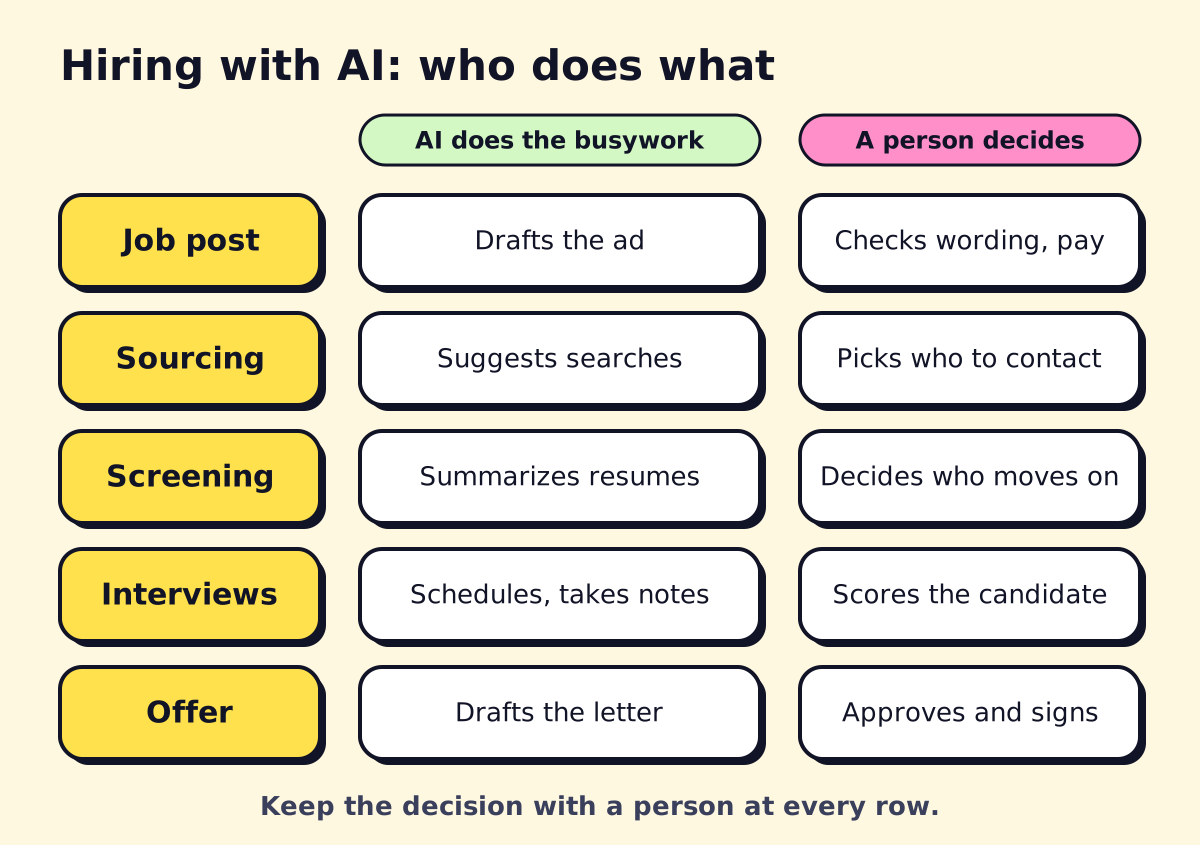 Let AI do the busywork at each hiring step. Keep the decision with a person.
Using AI for recruiting, step by step
- Job post. Have AI draft the ad from your notes, then check the pay range, location rules and anything that reads as a “nice to have” disguised as a requirement.
- Sourcing. Ask AI to suggest Boolean search strings or alternative job titles. A person chooses who to contact.
- Screening. Use AI to summarize each resume against three to five must-have criteria you wrote. Don’t let it auto-reject. Read the summaries and decide.
- Interviews. Use a structured interview guide (AI can draft it), the same questions for every candidate, and a scoring rubric. Let AI take notes only if the candidate is told.
- Offer. AI can draft the offer letter from your template. A person checks the numbers.
Candidates use ChatGPT for resumes too
Job seekers widely use ChatGPT and other AI tools to write and tailor resumes. Polished resumes are now the norm, so the writing quality of a resume tells you less than it used to. Put more weight on work samples, short paid trial tasks and structured interviews. Also check that your screening criteria don’t reward keyword stuffing.
ChatGPT for HR: prompts that work
These prompts work in ChatGPT, Claude, Copilot or Gemini. Replace the brackets, and remove names and personal details before pasting any employee information.
Job description
Write a job description for a [role] at a [type of business] in [city].
Must-haves: [3-5 items]. Nice-to-haves: [2-3 items].
Pay range: [range]. Schedule: [hours].
Use plain language, under 400 words, no jargon, and avoid wording that
discourages older workers, parents or people with disabilities.
Structured interview questions
Create 8 structured interview questions for a [role].
Map each question to one of these competencies: [list].
For each, give what a strong, average and weak answer sounds like.
Resume summary against criteria (ChatGPT prompt for recruiters)
Here are the must-have criteria for the role: [list].
Here is a resume with the name and contact details removed: [paste].
For each criterion, say "met", "partly met" or "not shown", quoting the
line that supports it. Do not give an overall score or recommendation.
Policy first draft
Draft a [remote work / PTO / phone use] policy for a [size]-person
[industry] business in [state or province]. Flag any points where
local employment law may set requirements I should check with counsel.
Onboarding checklist
Build a first-30-days onboarding checklist for a new [role].
Split it into: before day one, day one, week one, and days 8-30.
Assign each item to HR, the manager or IT.
Employee FAQ from a handbook
Here is our employee handbook: [paste or attach].
Write the 15 questions employees most likely ask, with short answers
that quote the handbook section. If the handbook doesn't answer it,
say so instead of guessing.
Rewriting manager feedback
Rewrite this performance feedback so it is specific, behavior-based and
respectful. Keep every concrete example. Don't soften the main point.
[paste feedback]
Candidate rejection email
Write a short, warm rejection email for a candidate who reached the
final interview for [role]. Thank them, give one sentence of honest
context, and invite them to apply again. No false promises.
For more general business prompts, see the prompt section in our AI tools for small business guide.
HR workflow automation: what to automate first
AI writes. Automation moves things. Most of the time savings in HR come from the second one: forms that create accounts, documents that file themselves and reminders that send on time. If you’re new to the idea, our workflow automation guide explains the basics.
Start with processes that follow the same steps every time:
| Process | What to automate | Typical tools |
|---|---|---|
| Employee onboarding | Offer signed → create email and app accounts, send welcome pack, assign checklist, book day-one meetings | HRIS + Zapier, Make or n8n |
| PTO requests | Request → manager approval → calendar block → payroll note | HRIS or Microsoft Forms + Power Automate |
| Payroll prep | Timesheets collected → exceptions flagged → summary to payroll | Payroll platform rules, spreadsheet + automation |
| Offboarding | Last day set → access removal tasks, equipment return, final pay reminder | HRIS + automation tool |
| Documents | Offer letters, policy acknowledgments generated from templates and e-signed | Document automation, e-signature |
How to automate employee onboarding in five steps
- Write the current checklist down, with an owner and deadline for each item.
- Choose the trigger: usually “offer accepted” in your ATS or a signed offer letter.
- Automate the account and document steps first. Our document automation guide covers offer letters and e-signature.
- Send the new hire and manager a dated checklist automatically.
- Add a 30-day check-in survey that goes to HR.
Not sure which automation platform to use? Our Zapier vs Make vs n8n comparison breaks down cost and difficulty.
Can you automate payroll?
Mostly, yes, and you probably already have. Modern payroll platforms run pay, tax filings and year-end forms on a schedule. What’s worth automating around payroll is the messy input: collecting timesheets, flagging overtime or missing hours, and getting approvals before the cutoff. Keep a person reviewing each run before it’s submitted.
Free AI tools for HR
You can get real value from free tools if you are careful with data:
- Free tiers of ChatGPT, Claude and Gemini handle job ads, policy drafts and interview guides well.
- Microsoft Copilot Chat is available to many Microsoft 365 business users at no extra charge, with work data protections when signed in with a work account.
- Your HR platform’s built-in AI, which is often included in the plan you already pay for.
The rule: anything with a person’s name, salary, health, performance or immigration details goes only into a business-plan tool where you control retention and training. That is also the core of a good AI usage policy.
AI hiring risks: bias and the laws to check
AI hiring tools learn from past data, and past hiring data can carry past bias. If a tool screens out a protected group at a higher rate, you can be liable even if a vendor built it. These are the rules US and Canadian employers ask about most (as of November 2026; laws change, so confirm with counsel):
| Where | Rule | What it requires |
|---|---|---|
| New York City | Local Law 144 | A bias audit within one year before using an automated employment decision tool, a public summary of results, and notice to candidates (NYC DCWP) |
| Illinois | HB 3773 (in effect since January 1, 2026) | Notice when AI is used in hiring, promotion or discharge decisions, and a ban on AI use that results in discrimination (National Law Review) |
| Colorado | SB 26-189, replacing the 2024 AI Act | A narrower disclosure-based framework, effective January 1, 2027 (McDermott Will & Schulte) |
| Ontario | Working for Workers Four Act | Employers with 25+ employees must say in public job postings whether AI is used to screen, assess or select applicants, from January 1, 2026 (Osler) |
| US federal | Title VII and other anti-discrimination laws | No AI-specific rule. The EEOC removed its 2023 AI guidance in January 2025, but the underlying law on discriminatory outcomes still applies (National Law Review) |
A short checklist before using AI in hiring
- Write down which steps use AI and what it does at each one.
- Ask the vendor for its most recent bias audit summary and keep a copy.
- Tell candidates when AI is used, even where the law doesn’t require it yet.
- Never let a tool auto-reject without a person reviewing.
- Review pass-through rates by group once a quarter if you have enough volume.
- Keep a way for candidates to request a human review or an accommodation.
Where to start this month
Pick one drafting task (job ads or interview guides) and one automation (onboarding is the usual winner). Run both for 30 days, then measure the hours saved. If you’d rather have someone map your HR workflows and build the automations, opsmigo sets these up for small teams, and a short call is the easiest way to see what fits.
We build a free demo on your own services and hours.
FAQ
What is the best free AI tool for HR?
The free tiers of ChatGPT, Claude, Gemini and Microsoft Copilot Chat are all fine for drafting job ads and policies. Do not paste employee or candidate personal data into a free consumer account; use a business plan with training on your data turned off.
Can I use ChatGPT for HR?
Yes, for drafting and summarizing: job descriptions, interview guides, policy first drafts, onboarding checklists and employee FAQs. Use a business plan, remove names and personal details where you can, and have a person review anything that affects someone's job.
Is it legal to use AI to screen resumes?
Generally yes, but discrimination law still applies to the outcome, and some places add rules. New York City requires a bias audit and candidate notice for automated hiring tools, Illinois requires notice, and Ontario requires AI disclosure in public job postings for employers with 25 or more employees.
Is it bad for candidates to use ChatGPT for their resume?
No. Most candidates now use AI to polish resumes, so polished writing tells you little. Put more weight on work samples, structured interviews and reference checks than on resume wording.
How do I automate HR processes without new software?
Start with the tools you have. A form plus an automation tool such as Zapier, Make or n8n can create accounts, send onboarding checklists, file documents and remind managers, using your existing email, calendar and HR system.