- Use AI for financial modeling to structure models, write formulas, run scenarios and explain them. Keep the assumptions and the final numbers in the spreadsheet, not in a chat.
- The fastest accounting wins come from AI already inside your books (bank matching, categorization, reconciliation) plus automation for invoices, expenses and reminders.
- AI is good at the narrative part of finance reports: variance commentary, summaries and board-pack drafts.
- Keep controls: no AI posts to the ledger without review, approval limits on payments, and client tax data only in tools you're allowed to use.
AI for financial modeling is most useful as a fast, careful assistant: it can lay out a model’s structure, write and check formulas, build scenario switches and explain what drives the result. It should not invent your assumptions or be trusted to do arithmetic inside a chat window. For day-to-day accounting, the biggest wins are less exciting: AI matching and categorizing inside your accounting software, plus automation that moves invoices, expenses and reminders without anyone retyping them.
This guide covers what AI does well for accounting and finance teams, the best AI tools for finance reports, ChatGPT prompts for accountants, which workflows to automate first, and the controls to keep in place.
AI for financial modeling: what works
Think of AI as a quick analyst who knows Excel very well but has never seen your business. It is excellent at mechanics and weak at judgment.
Where it helps
- Structure. Ask for a tab layout (assumptions, revenue build, costs, headcount, cash flow, scenarios) before you type a single number.
- Formulas. It writes and explains formulas such as XLOOKUP, INDEX/MATCH, SUMIFS and dynamic arrays, and it finds broken references. Our AI for Excel guide covers Copilot and formula helpers in detail.
- Scenarios and sensitivity. It can set up a base, upside and downside switch and a two-way data table on price and volume.
- Explaining a model you inherited. Paste the formulas from a tab and ask what each block does and where it could break.
- Checking. Ask it to list hard-coded numbers inside formulas, circular references and rows that don’t sum.
Where it fails
- Assumptions. It will happily make up a churn rate or a growth rate. Every assumption should come from your data or a named source, entered in one place.
- Math in chat. Language models can get arithmetic wrong. Keep calculations in the spreadsheet, or use a tool that runs the calculation as code and shows it.
- Context. It doesn’t know your contracts, seasonality or the customer who’s about to leave unless you tell it.
A simple workflow for building a model with AI
- Write a one-paragraph brief: the decision the model supports, the time horizon and the three numbers that matter most.
- Ask AI for the tab structure and the list of inputs. Edit it.
- Build the assumptions tab yourself, with a source note next to each input.
- Ask AI for the formulas tab by tab, and paste them in.
- Ask it to audit the finished model for hard-codes, broken links and sign errors.
- Stress-test: change each key assumption by 20% and check the result moves the way you’d expect.
AI for FP&A and budgeting
For FP&A (financial planning and analysis), AI is most useful for the writing that follows the numbers: variance explanations, budget-vs-actual summaries and the first draft of the monthly commentary. Dedicated FP&A tools such as Fathom, LivePlan, Jirav, Datarails and Cube add forecasting and consolidation on top of your accounting data, and most have added AI features. They’re worth it when you manage several entities, run rolling forecasts, or spend days each month stitching spreadsheets together.
Best AI tool for finance reports
There’s no single best AI tool for finance reports. It depends on what the report is for.
| Report | What does the heavy lifting | Where AI adds value |
|---|---|---|
| Monthly management report | Your accounting software’s reports | Drafting variance commentary and a one-page summary |
| Board or investor pack | Spreadsheet or FP&A tool | Turning numbers into a clear narrative and Q&A prep |
| Dashboards | Power BI, Looker Studio, Fathom | Asking questions in plain English, spotting outliers |
| Cash-flow forecast | Spreadsheet or FP&A tool | Scenario setup, explaining what changed week to week |
| Client advisory letters (for firms) | Practice software + templates | First drafts personalized to each client’s numbers |
A good starting point for most businesses: export the month’s P&L, balance sheet and budget, then ask a business-plan AI assistant to draft the commentary. Give it last month’s commentary as a style example. Check every number it quotes against the report.
For general-purpose assistants, prices as of November 2026 are about $20 to $25 per user per month: Claude Team, for example, is $20 per seat annually or $25 monthly (Claude pricing), and Microsoft’s Copilot Business add-on for Microsoft 365 is $21 per user per month on annual billing (Microsoft). If your team lives in Excel and Outlook, start with our Copilot for Microsoft 365 guide.
AI inside your accounting software
Before you buy anything, check what your accounting software already does. QuickBooks Online, for example, now includes an Accounting Agent that suggests categories, matches bank transactions and flags anomalies for you to review; Intuit says Accounting AI is included with Essentials, Plus and Advanced, and AI-assisted reconciliation with Plus and Advanced (QuickBooks help). Xero, Sage and the receipt-capture tools that plug into them have added similar features.
These built-in features are the safest place to start because they work inside your existing permissions and audit trail, and nothing gets posted without someone approving it.
ChatGPT for accounting: prompts for accountants
These prompts work in ChatGPT, Claude, Copilot or Gemini. Use a business plan with training on your data turned off, and remove client names and identifiers where you can.
Variance commentary
Here is our P&L for [month] with budget and prior-year columns: [paste].
Write variance commentary for every line over [5%] or [$5,000].
For each, give the likely driver as a question for me to confirm,
not as a fact. Keep it under 250 words.
Explain an accounting treatment
Explain how [ASC 606 / IFRS 15 / lease accounting] applies to this
situation: [describe]. Give the journal entries, cite the standard's
paragraph numbers, and list what you'd need to confirm.
Month-end close checklist
Build a month-end close checklist for a [industry] business on
[QuickBooks/Xero] with [number] bank accounts, payroll through [provider]
and [inventory / no inventory]. Order the steps, assign an owner,
and add a target day (business day 1-5).
Excel formula help
In Excel, column A has dates, B has customer names, C has amounts.
Write a formula that sums C for [customer] for the current quarter,
and explain each part.
Client email (for outsourced accounting firms)
Write a short, friendly email asking a client for the documents
missing for their [month] close: [list]. Explain why each matters
in one line. Give a due date of [date].
Review a model for errors
Here are the formulas from my revenue tab: [paste].
List hard-coded numbers, inconsistent ranges, possible circular
references and anything that would break if I add a row.
Confidentiality for tax and accounting firms
Client financial data is sensitive, and some of it is regulated. In the US, tax preparers face specific rules under Internal Revenue Code Section 7216 on using or disclosing tax return information, including to third-party tools, without the client’s consent (IRS Section 7216 information center). Check your professional body’s guidance and your engagement letters, and write down which AI tools staff may use. Our guide to AI governance and a usage policy has a template.
Accounting workflow automation: what to automate first
AI drafts and suggests. Automation does the moving. In most finance teams the hours go to collecting documents, retyping invoices and chasing approvals.
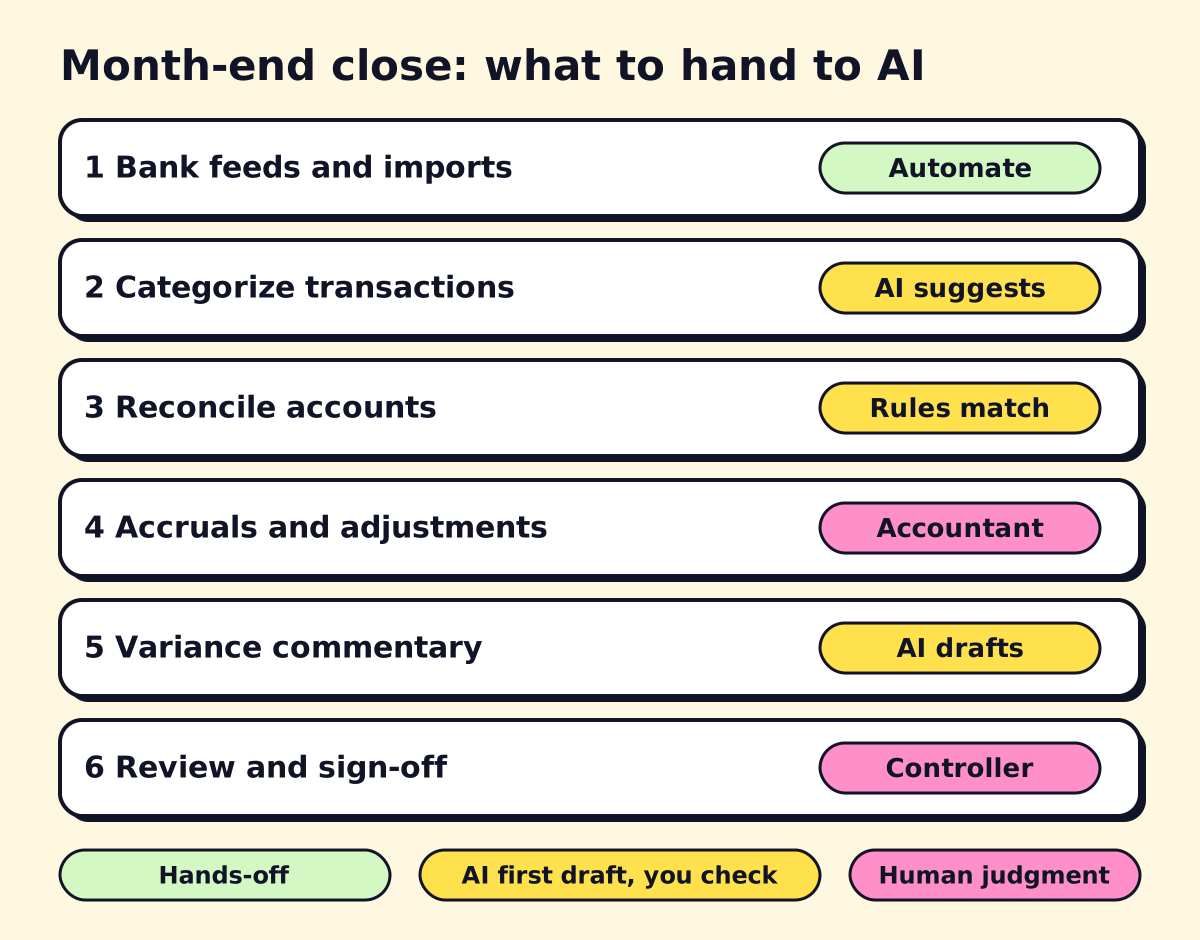 Automate the inputs, let AI draft and suggest, and keep judgment calls with the accountant.
| Workflow | What to automate | Typical tools |
|---|---|---|
| Accounts payable | Invoice arrives by email → data extracted → coded → routed for approval → synced to the ledger | AP tools (Bill, Dext, Hubdoc), document automation |
| Expense reports | Receipt photo → matched to card transaction → policy check → approval | Ramp, Expensify, Brex, built-in card tools |
| Bank reconciliation | Bank feeds → rules for recurring items → AI suggested matches → review exceptions | Your accounting software |
| Accounts receivable | Invoice due → reminder sequence → payment link → escalation to a person | Accounting software reminders, Zapier, Make, n8n |
| Close checklist | Tasks assigned with due dates, reminders, sign-off log | Practice or project tools, automation |
| Financial statements | Generated from the ledger once accounts are reconciled | Accounting software reports |
How to automate bank reconciliation
- Connect every bank and card account through a bank feed.
- Create rules for transactions that repeat (rent, software, payroll).
- Let the software’s AI suggest matches for the rest.
- Review exceptions weekly, not monthly, so the close starts clean.
- Lock the period after sign-off.
Can you automate a company’s financial statements?
Mostly, yes. Accounting software produces the statements from the ledger. What can’t be fully automated is making the ledger right: accruals, prepaid expenses, revenue recognition and judgment calls. Automate the inputs and the reminders, and keep an accountant reviewing the adjustments.
For processes that span several systems (for example, an ERP, a bank portal and a spreadsheet with no API), see our explainer on robotic process automation.
Controls to keep when you add AI
Finance is where a small AI error turns into a real loss. Keep these controls:
- No auto-posting. AI suggests; a person approves anything that hits the ledger.
- Payment approvals. Keep dual approval above a dollar threshold. AI-generated invoices and spoofed vendor emails make payment fraud easier.
- Vendor changes. Verify any change of bank details by phone, using a number you already have.
- Audit trail. Use tools that log who approved what and when.
- Data rules. Decide which tools may see client or payroll data, and use business plans with training turned off.
- Source checking. Any tax or accounting answer from AI gets checked against the standard or the tax authority’s guidance before it goes to a client.
Where to start
Turn on the AI features in your accounting software, automate one input (AP invoices or expense receipts), and use an AI assistant for the monthly commentary. That combination saves time in the first month without changing how your books are controlled. If you want help mapping your close and building the automations, opsmigo does this for small finance teams and accounting firms. Our business process automation guide shows how we scope that work.
We build a free demo on your own services and hours.
FAQ
Can AI build a financial model?
It can build a solid first draft: tab structure, formulas, scenario switches and a sensitivity table. You still own the assumptions, and you should test the model the same way you'd test one a junior analyst built.
Is ChatGPT good for accounting?
It's good for explaining standards, drafting memos and client emails, writing Excel formulas and summarizing documents. It's not a bookkeeping system and it can be confidently wrong on tax rules, so check anything technical against the source.
Can I use ChatGPT for taxes?
For general questions and checklists, yes, but verify answers against IRS or CRA guidance. US tax preparers must also follow Section 7216 rules before sharing a client's return information with any third-party tool.
How do I automate bank reconciliation?
Connect bank feeds to your accounting software, set matching rules for recurring transactions, and let its AI suggest matches. Review the exceptions each week instead of matching every line by hand.
What is the best AI tool for finance reports?
For most small businesses, it's the reporting in your accounting software plus a business AI assistant to write the commentary. Add a dedicated FP&A or BI tool only when you consolidate several entities or need rolling forecasts.