- Business process automation (BPA) uses software to run repeatable, multi-step business tasks end to end. AI automation services add the ability to read emails, documents and calls.
- The best first candidates are high-volume, rule-heavy tasks: invoice entry, lead routing, scheduling, onboarding, ticket triage.
- Calculate ROI from volume, minutes per task and loaded hourly cost, minus build and running costs. Our worked example pays back in under six months.
- Pick a BPA partner who measures a baseline first, builds in your accounts, and plans for exceptions and maintenance.
AI automation services apply software and AI models to business process automation (BPA): running repeatable, multi-step business tasks such as invoice entry, lead routing, scheduling and onboarding with little manual work. Classic BPA follows fixed rules between systems. AI adds the ability to read the messy inputs those rules couldn’t handle, like emails, PDFs, forms and phone calls. The best place to start is a high-volume task with a clear “done”, and the easiest way to justify it is a simple ROI calculation, which we work through below.
What business process automation is (and isn’t)
A business process is a repeatable chain of steps that produces an outcome: a paid invoice, a booked job, an onboarded client. Business process automation uses software to run that chain, with people stepping in for exceptions and approvals.
| Term | What it means | Example |
|---|---|---|
| Task automation | One step, one tool | Auto-reply to a form |
| Workflow automation | A sequence of steps across apps | Form → CRM → email → task |
| Business process automation | A whole process end to end | Lead to signed contract to first invoice |
| RPA (robotic process automation) | Software bots clicking through screens | Copying data from an old system with no API |
| BPM (business process management) | Designing and improving processes | Mapping and measuring the quote process |
Our workflow automation guide covers the tools that run individual workflows, and our RPA explainer covers screen-clicking bots for older systems.
Types of business process automation
- Rule-based: if X, then Y. Reliable, cheap, but brittle with messy inputs.
- Document-based: extract data from invoices, forms and contracts. See our document automation guide.
- AI-assisted: a model classifies, extracts or drafts, and rules handle the rest.
- Agentic: an AI agent plans and carries out several steps toward a goal, with guardrails.
Most small-business automations are rule-based with one or two AI steps. That combination is usually more reliable than a fully agentic design.
Business process automation examples by department
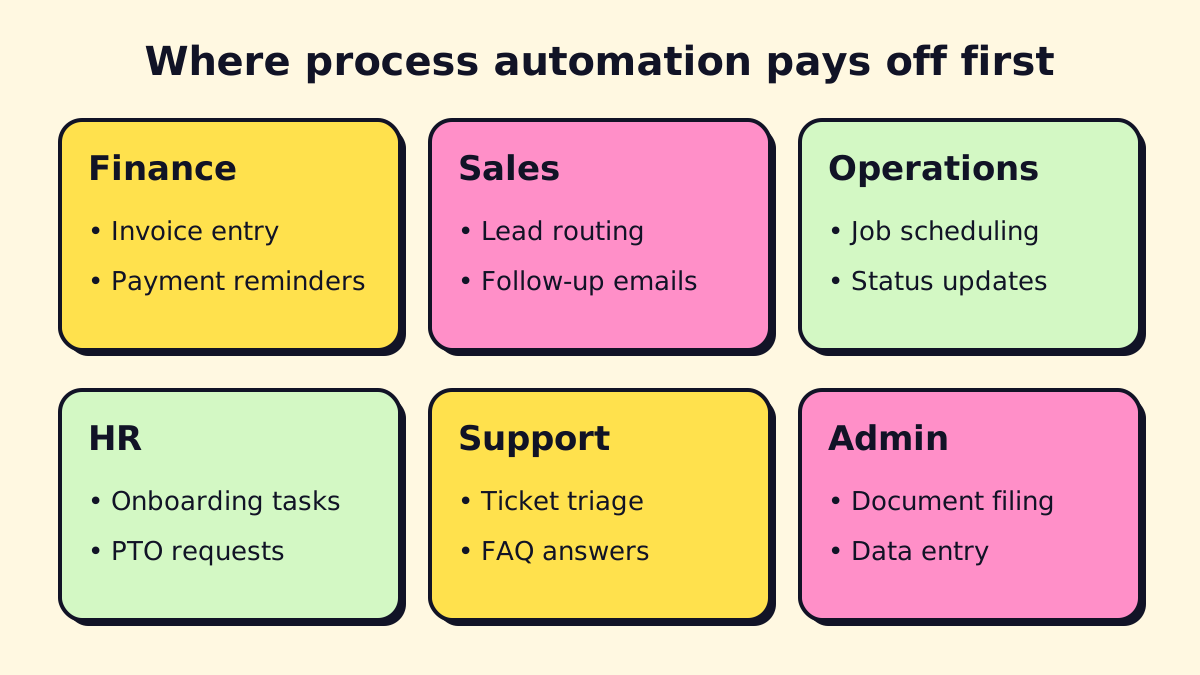
Finance and accounting
- Invoice capture: read supplier invoices from email, extract vendor, amount and due date, create a draft bill in QuickBooks or Xero for approval.
- Payment reminders: send polite reminders at 3, 7 and 14 days overdue, and stop when payment arrives.
- Expense coding: suggest the account and tax code for each transaction.
AI steps make this work with messy, multi-format invoices that rule-based tools struggle with.
Sales
- Lead routing: score and assign web leads by service, location and size within a minute.
- Follow-up: send a personalized reply and book a call if the lead doesn’t respond.
- Quote generation: fill a quote template from a discovery form.
Our CRM workflow automation guide goes deeper.
Operations and field service
- Job scheduling: turn a booked call into a calendar slot and a technician assignment.
- Status updates: text customers when the tech is on the way.
- Job close-out: collect photos and notes, generate the invoice.
HR
- Onboarding: create accounts, send documents for signature, assign training.
- Time-off requests: route for approval and update the calendar.
Customer support
- Ticket triage: classify by topic and urgency, route to the right person.
- Suggested replies: draft answers from your help docs for an agent to approve.
Admin
- Document filing: name and file attachments into the right client folder.
- Data entry: move data between systems that don’t talk to each other.
Industry examples
| Industry | High-value process to automate |
|---|---|
| Banking and wealth management | Client onboarding document collection and checks |
| Insurance | First notice of loss intake and claim routing |
| Retail and e-commerce | Order exceptions, returns, stock alerts |
| Healthcare clinics | Intake forms, reminders, referral processing |
| Law firms | Conflict checks, intake, deadline reminders |
| Property management | Maintenance requests and vendor dispatch |
How to automate business processes: a 6-step method
- List candidates. Ask each team: what do you do more than 20 times a week that follows the same pattern?
- Measure the baseline. Volume per month, minutes per item, error rate, who does it.
- Map the process as it really runs. Include the exceptions. If a step is “Maria checks if it looks right”, write down what she checks.
- Fix before you automate. Remove steps that exist only because of old habits. Automating a bad process makes bad results faster.
- Build the smallest useful version. Automate the 70% of cases that are routine; route the rest to a person.
- Monitor and improve. Error alerts, a weekly look at exceptions, and a monthly check against the baseline.
Good vs. poor candidates
| Good candidate | Poor candidate |
|---|---|
| High volume, repeated weekly | Happens a few times a year |
| Inputs arrive digitally | Inputs on paper or in someone’s head |
| Clear definition of “done” | Relies on taste or negotiation |
| Mistakes are cheap to catch | Mistakes are costly and hard to spot |
Business process automation ROI: a worked example
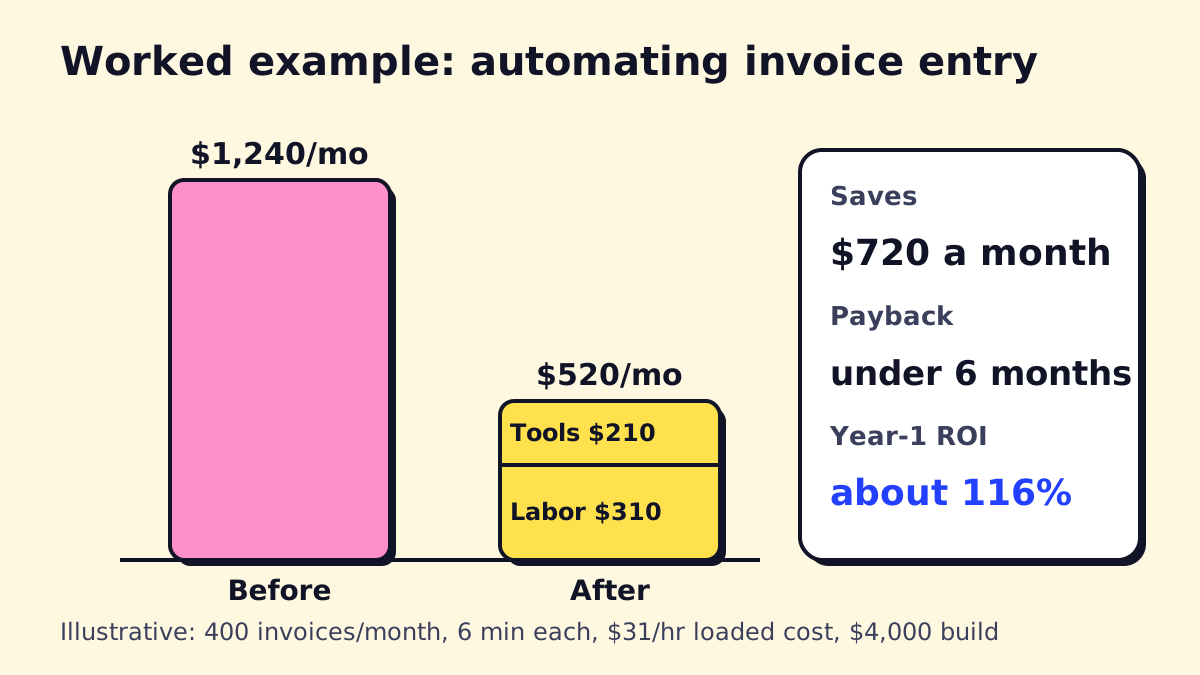
Here is the calculation for automating supplier invoice entry at a mid-sized service business. The numbers are illustrative; swap in your own.
Step 1: Today’s cost
- Volume: 400 invoices a month
- Time per invoice: 6 minutes (open, read, key in, attach, file)
- Hours per month: 400 × 6 ÷ 60 = 40 hours
- Hourly cost: the median general office clerk earned $21.64 an hour in May 2025 (BLS). Wages are about 70% of total compensation for private-industry workers (BLS, June 2026), so the loaded cost is roughly $21.64 ÷ 0.70 ≈ $31 an hour.
- Monthly cost: 40 × $31 = $1,240
Step 2: Cost after automation
- Share handled automatically: 75% (the rest go to a person as exceptions)
- Remaining manual work: 10 hours × $31 = $310
- Running costs: automation platform and AI usage ($60) plus maintenance time ($150) = $210
- Monthly cost after: $310 + $210 = $520
Step 3: Savings, payback and ROI
- Net monthly savings: $1,240 − $520 = $720
- One-time build cost: $4,000 (assumed)
- Payback: $4,000 ÷ $720 ≈ 5.6 months
- Year-one ROI: ($720 × 12 − $4,000) ÷ $4,000 ≈ 116%
This leaves out benefits that are real but harder to price: fewer late-payment fees, faster month-end close, and a bookkeeper who can do higher-value work. It also leaves out risks: if only 50% of invoices go through cleanly, savings drop to about $410 a month and payback stretches to nearly ten months. Run both cases before you commit.
ROI rules of thumb
- If payback is over 18 months, look for a higher-volume task first.
- Count maintenance. Automations need a few hours a month.
- Measure the baseline before building, or you’ll never prove the result.
Building a business process automation strategy
One automation is a project. Five that share data and owners is a strategy. For a small or mid-sized business, the strategy can fit on a page.
- A ranked backlog. Every candidate process with volume, minutes, risk and estimated payback. Re-rank it each quarter.
- A standard stack. Pick one main automation platform and one AI provider so skills, credentials and monitoring stay in one place.
- Shared building blocks. Contact lookup, error alerts and logging built once and reused in every workflow.
- Clear ownership. One person owns the automation list; each workflow has a business owner who knows what “correct” looks like.
- Rules for AI. Which data can go to which AI tools, and where a human must approve. Our AI strategy consulting guide shows how this fits into a 90-day roadmap.
Training your team
Automation changes jobs, so explain it early. Show the people who do the work what the automation handles, what still comes to them, and how to flag a problem. Short training on real examples beats long manuals. When staff see their least favorite tasks disappear, they usually start suggesting the next ones.
Testing automated processes
Before switching a process over, run it in parallel for a week: the automation does the work, a person checks every result. Track the error types, not just the count. Then reduce checking to a daily sample once the error rate is acceptable. Re-test whenever a connected app changes.
Challenges, risks and disadvantages of BPA
| Challenge | What happens | How to reduce it |
|---|---|---|
| Automating a broken process | Errors happen faster | Map and simplify first |
| Silent failures | A broken step goes unnoticed for weeks | Error alerts and a daily summary |
| Tool changes | A vendor updates an API or form | Maintenance plan and logs |
| Staff resistance | People work around the system | Involve the people who do the work |
| Over-automation | Edge cases get mishandled | Route exceptions to a person |
| Vendor lock-in | Hard to move later | Build in accounts you own, document it |
| Data privacy | Sensitive data flows to new tools | Review data flows and access |
Choosing AI automation services and consultants
You have three routes:
- Do it yourself with Zapier, Make, n8n or Power Automate. Good for simple, low-risk workflows.
- Business process automation consulting to map processes, prioritize and design, then build in-house.
- A BPA company or AI automation agency that designs, builds and maintains. Our guide to choosing an AI automation agency covers pricing models and red flags.
Questions to ask a BPA company or consultant
- Will you measure our baseline before building?
- Which platform will you use, and why that one for us?
- How do exceptions reach a person?
- How will we know if something breaks?
- Who owns the accounts, and what documentation do we get?
- What’s the monthly cost to run and maintain this?
Enterprise BPA platforms vs. SMB tools
Large companies often use suites like IBM Cloud Pak for Business Automation, Pega, Appian or SAP Build Process Automation, with long implementation projects. Small and mid-sized businesses rarely need them. Low-code and no-code tools (n8n, Make, Zapier, Power Automate) cover most SMB processes at a fraction of the cost, and local business process automation services can usually build on them quickly.
If you have a process in mind and want a second opinion on the ROI, opsmigo can run the numbers with you before anything gets built.
We build a free demo on your own services and hours.
FAQ
What is business process automation?
Business process automation is the use of software to carry out a repeatable business process, such as approving invoices or onboarding a client, with little or no manual work. It usually connects several systems and follows defined rules, with people handling exceptions.
What are examples of business process automation?
Common examples are invoice capture and approval, routing web leads to the right salesperson, sending appointment reminders, onboarding new employees, triaging support tickets and generating monthly reports.
What is the difference between business process automation and business process management?
Business process management (BPM) is the discipline of designing, measuring and improving processes. Business process automation (BPA) is using software to execute them. BPM decides what the process should be; BPA runs it.
What are the disadvantages of business process automation?
Upfront cost and setup time, ongoing maintenance when tools change, the risk of automating a bad process, and staff resistance if people aren't involved. Poorly monitored automations can also fail silently.
How do I calculate business process automation ROI?
Multiply monthly volume by minutes per task and the loaded hourly cost to get today's cost. Estimate the share the automation will handle, subtract monthly running costs, then divide the build cost by the net monthly savings to get the payback period.
Is workflow automation the same as process automation?
They overlap. Workflow automation usually means automating a sequence of steps between people and apps; process automation is the broader goal of running a whole business process end to end, which may include several workflows.