- Robotic process automation (RPA) uses software 'bots' that click, type and copy data in applications the way a person would, following fixed rules.
- RPA is the right tool when an app has no API or connector. When it does, API-based workflow automation is cheaper and less fragile.
- AI handles the messy parts RPA can't (reading documents, emails, judgment calls). Most modern projects combine RPA, workflow automation and AI.
- Entry costs are low (Power Automate Premium is $15/user/month; UiPath Basic starts at $25/month), but build and maintenance usually cost more than the licenses.
Robotic process automation (RPA) is software that mimics what a person does on a computer: it opens applications, reads fields on the screen, types, clicks, copies and pastes, following rules you define. The “robots” are programs, not machines. RPA is most useful for repetitive, rule-based work in systems that have no API, like an old billing program or an insurance portal you log into every day.
This pillar guide explains how RPA works, how it differs from workflow automation and AI, where it pays off, the main tools and what they cost, and when you should not use RPA at all.
What does RPA stand for?
RPA stands for robotic process automation. Each word tells you something:
- Robotic: a software bot does the work instead of a person.
- Process: it follows a defined sequence of steps.
- Automation: it runs without someone doing each step by hand.
The acronym causes confusion in search results. In medicine, “RPA” or “RPA-C” can refer to a registered or certified physician assistant credential, and in Québec, RPA is a “résidence privée pour aînés” (a private seniors’ residence). This article is about the technology meaning.
How robotic process automation works
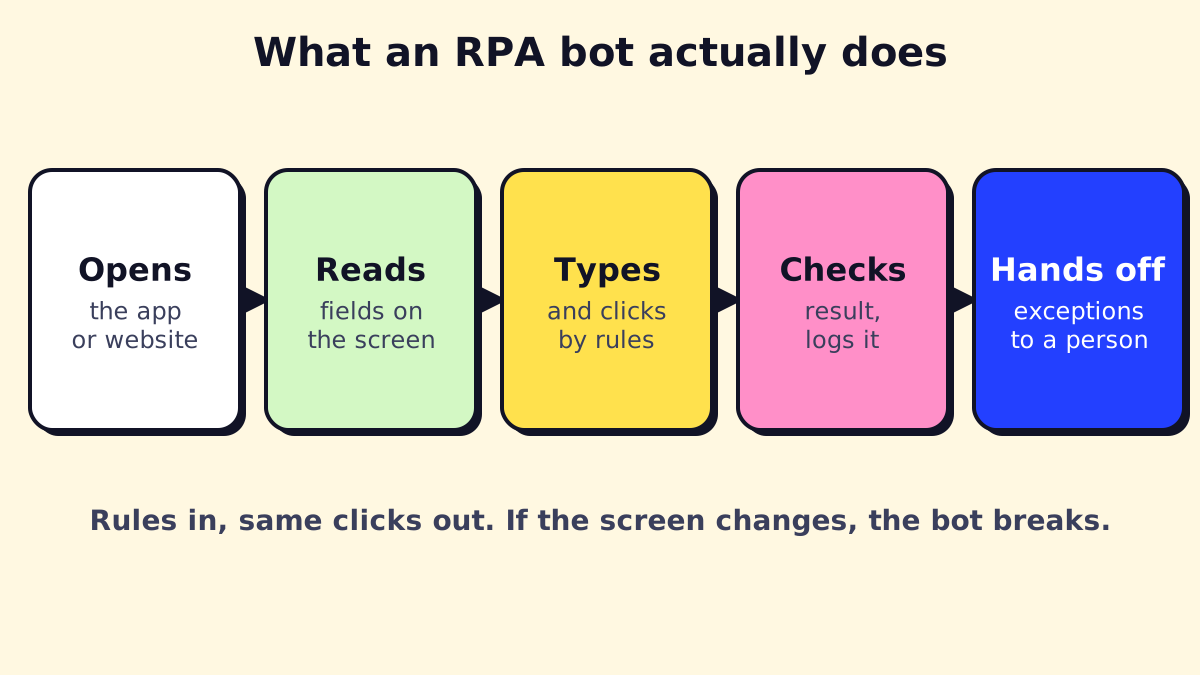 RPA follows the same clicks every time. That’s its strength and its weakness.
An RPA setup has three parts:
- A designer or recorder. A developer records the steps or builds them in a visual editor: “open app, log in, go to Claims, paste ID from row 2 of the spreadsheet, click Search, copy Status.” Tools identify buttons and fields by their properties (selectors), not just screen position, so the bot survives small layout changes.
- The bot (robot) runtime. The program that actually runs the steps on a Windows machine or virtual machine.
- An orchestrator. A control panel that schedules bots, hands them work queues, stores credentials securely and logs every run. UiPath Orchestrator, Automation Anywhere Control Room, Blue Prism’s control room and Power Automate’s cloud portal all play this role.
Attended vs unattended bots
| Type | How it runs | Typical use |
|---|---|---|
| Attended | On a user’s PC, triggered by that user, often mid-task | “Fill this form in three systems for the customer I’m on the phone with” |
| Unattended | On a dedicated machine or VM, on a schedule or queue, nobody watching | Overnight batch: 500 eligibility checks, daily report downloads |
| Hosted / cloud | Unattended bots on vendor-managed virtual machines | Same as unattended, without managing your own PCs |
Licensing usually follows this split: attended bots are licensed per user, unattended bots per bot or per run.
RPA vs AI vs workflow automation
These three get mixed up constantly. They solve different problems.
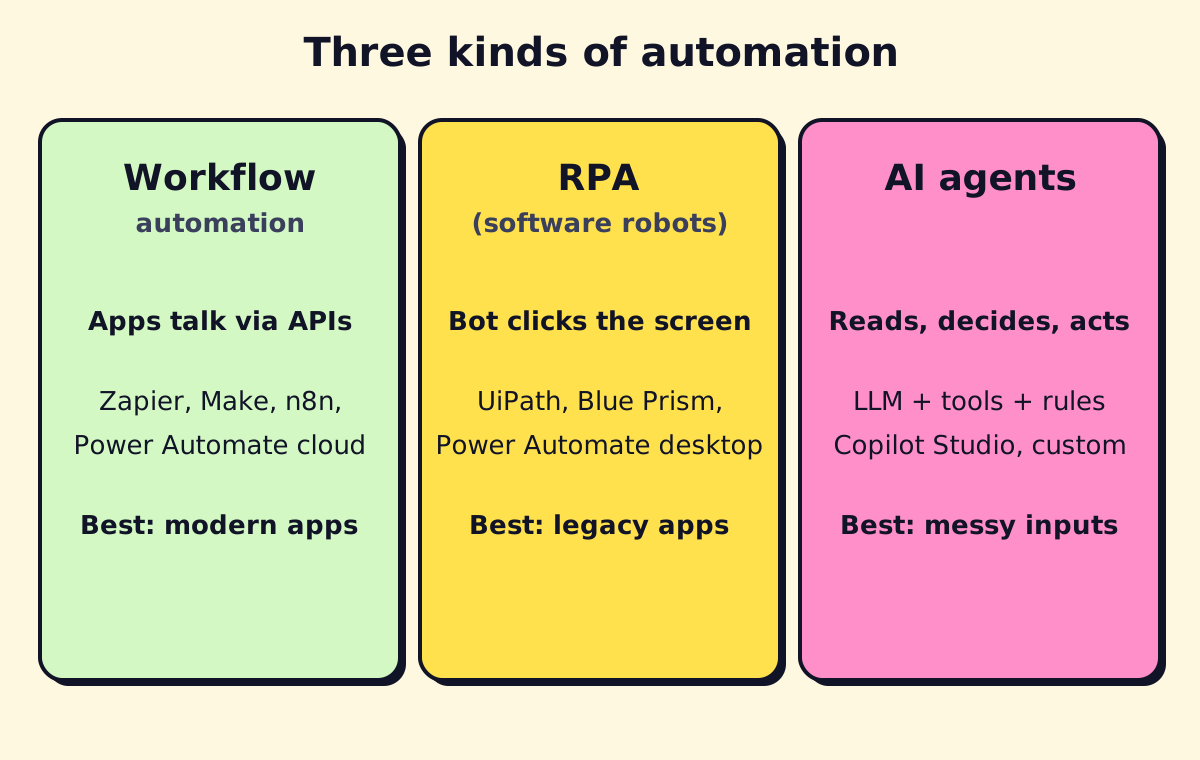
| Workflow automation | RPA | AI / AI agents | |
|---|---|---|---|
| How it connects | APIs and connectors | The user interface (screen) | APIs, documents, text, voice |
| Handles | Structured data between modern apps | Structured data in apps with no API | Unstructured inputs and judgment |
| Breaks when | An API changes (rare, versioned) | A screen, field or login changes | Instructions are vague or data is poor |
| Examples | Zapier, Make, n8n, Power Automate cloud flows | UiPath, Automation Anywhere, Blue Prism, Power Automate desktop flows | Copilot Studio, custom LLM agents, document AI |
Business process automation vs robotic process automation
Business process automation (BPA) is the broader goal: automating a whole process end to end (for example, from customer request to invoice). RPA is one technique inside BPA, used for the steps where software has to drive a screen. A good BPA project uses APIs where possible and RPA only where nothing else works. Our guide to business process automation covers the bigger picture, and workflow automation covers the API-based side.
RPA vs low-code
Low-code platforms (Power Apps, OutSystems, Retool) let you build new apps and forms quickly. RPA automates the apps you already have. They often meet: a low-code app collects the data, and an RPA bot keys it into the legacy system.
AI-powered RPA, cognitive RPA and agentic automation
Classic RPA can’t read an email and decide what it’s asking for. Adding AI fills that gap:
- Cognitive RPA / intelligent automation: RPA plus OCR, document understanding and machine learning, for example extracting fields from scanned invoices before a bot keys them in.
- AI agents: large language models that can read, reason and choose actions, calling tools (APIs, flows, even RPA bots) to get work done.
The practical pattern in 2026: AI reads and decides, APIs move the data, RPA handles the legacy screens.
Benefits of RPA
When it fits, RPA delivers:
- Speed on volume. Bots work around the clock on queues of hundreds or thousands of items.
- Fewer typing errors. A bot copies exactly what it’s told to copy.
- No system replacement. You automate the old software instead of migrating off it.
- An audit trail. Every bot run is logged, which helps in regulated work.
- Fast first wins. A narrow process can go live in weeks.
And the honest costs: bots break when applications change, need monitoring and someone to fix them, and can automate a bad process just as faithfully as a good one.
RPA use cases by industry
Common RPA processes are high-volume, rule-based and stable. Typical examples:
| Industry / function | RPA use cases |
|---|---|
| Finance and accounting | Accounts payable data entry, bank and card reconciliations, downloading statements, month-end journal prep, vendor master updates |
| Banking | Account opening checks, KYC document collection, loan data entry, sanctions screening support, card dispute processing |
| Insurance | First notice of loss intake, policy admin updates, claims status checks, underwriting data gathering from portals |
| Healthcare | Insurance eligibility checks, prior authorization submissions, claim status, payment posting (see RPA in healthcare) |
| HR | Onboarding accounts across systems, payroll changes, benefits enrollment, offboarding checklists |
| Real estate and property management | Pulling listings or tenant data from portals, rent roll updates, lease data entry, utility bill downloads |
| Logistics and supply chain | Shipment tracking across carrier portals, order entry, invoice-to-PO matching |
| Retail and e-commerce | Price and stock monitoring, order sync between marketplaces and ERP, returns processing |
| Telecom | Service activation, number porting steps, billing adjustments |
| Marketing and advertising | Downloading campaign reports from ad platforms without APIs, compiling client reports |
RPA in accounting and finance
Finance teams were early RPA adopters because their work runs on structured data and legacy ERPs. The best candidates are accounts payable (keying invoices into the ERP after extraction), reconciliations (matching bank lines to ledger entries), and report downloads. Today, much of AP is better handled by document AI plus API integrations; our guide to document workflow automation covers that route, and AI tools cover much of the rest.
RPA in real estate
For brokerages and property managers, RPA often means pulling data out of portals: MLS exports, utility bills, tenant screening reports, or rent payments from a property management system without an open API. Increasingly, the front end of real estate automation is a chatbot or AI agent that captures leads and books showings.
RPA tools: UiPath, Automation Anywhere, Blue Prism and Power Automate
| Tool | Strengths | Watch out for | Pricing (as of Nov 2026) |
|---|---|---|---|
| UiPath | Market leader, large community, strong document understanding and orchestration | Costs climb quickly beyond the entry plan | Community: free; Basic: from $25/month; Standard and Enterprise: contact sales |
| Automation Anywhere | Cloud-native platform, strong in enterprise and BPO | No public price list | Community Edition free; paid plans by quote |
| SS&C Blue Prism | Governance and security for large regulated enterprises | Heavier setup, enterprise-oriented | By quote |
| Microsoft Power Automate | Desktop flows included in a broader automation tool; cheap entry for Microsoft 365 shops | Best inside the Microsoft ecosystem | Premium $15/user/month (attended); Process $150/bot/month (unattended) |
| Others | ServiceNow RPA, SAP Build Process Automation, MuleSoft RPA for their own ecosystems | Mostly sensible if you already run that platform | Usually bundled or by quote |
For small and mid-sized businesses, the practical shortlist is usually Power Automate (if you’re on Microsoft 365) or UiPath (if you need more power or aren’t a Microsoft shop). Our guides on what Power Automate is and Power Automate pricing go deeper on the Microsoft option.
How much does RPA cost?
License costs are the easy part to see. A realistic budget has four lines:
| Cost line | What it covers | Typical driver |
|---|---|---|
| Licenses | Developer seats, attended and unattended bots, orchestrator | Number of bots running in parallel |
| Infrastructure | Windows machines or VMs for unattended bots, or hosted bots | Hosted bots cost more per month but skip the hardware |
| Build | Process analysis, development, testing, security review | Number of steps, systems and exceptions |
| Run and maintain | Monitoring, fixing bots when apps change, handling exceptions | How often target apps change |
Two entry-level reference points from vendor pricing pages: a single Power Automate unattended bot costs $150 per month plus a $15 Premium license for the builder, and UiPath’s Basic plan starts at $25 per month. Enterprise RPA programs with dozens of bots are priced by quote and are a different scale entirely.
Building an RPA business case
A simple way to estimate value (illustrative numbers, not a benchmark):
- Volume: 60 eligibility checks a day.
- Time per item today: 6 minutes = 6 hours of staff time a day.
- Automation rate: the bot fully handles 80%; staff still handle 20% exceptions. Time saved: about 4.8 hours a day.
- Value: multiply saved hours by loaded hourly cost, then add value you can measure from fewer errors or faster turnaround.
- Subtract: licenses, infrastructure, build cost spread over 12–24 months, and a maintenance allowance.
If the case only works with 100% automation, it doesn’t work. Plan for exceptions.
RPA implementation: steps and best practices
- Pick the process. High volume, rule-based, stable, digital inputs, clear success criteria.
- Map it as it really runs. Watch someone do it; list every exception and system. Process mining or task mining tools can help on larger teams.
- Fix before you automate. Remove steps that don’t need to exist. Check whether an API or connector covers part of it.
- Design for failure. Retries, timeouts, screenshots on error, a queue for exceptions and a named person who receives them.
- Secure credentials. Bots get their own accounts with least-privilege access, stored in the orchestrator’s vault, never in the script.
- Test with real data, including bad data.
- Pilot, then scale. Run in parallel with people for a week or two before switching over.
- Monitor and maintain. Track success rate, exceptions and run time. Expect to update bots when target apps change.
RPA center of excellence (CoE)
Larger organizations set up an RPA CoE: a small team that sets standards, picks processes, reviews security and maintains the bots. A small business doesn’t need a formal CoE, but it does need the same basics: an owner for each bot, documentation and a change process.
When not to use RPA
RPA is often the wrong tool. Skip it when:
- An API or connector exists. Use workflow automation instead; it’s faster and far less fragile.
- The process changes often. Every change means rework.
- Inputs are unstructured. Free-text emails, varied PDFs and phone calls need AI first.
- Volume is low. Automating a 10-minute weekly task rarely pays back.
- The process is broken. Automating a bad process just makes mistakes faster.
- The app’s terms forbid it. Some portals prohibit automated access; check before you build.
RPA services: build in-house or hire help?
Options range from training an internal “citizen developer” on Power Automate to hiring an RPA consulting firm or using RPA as a managed service, where a provider builds, hosts and maintains the bots for a monthly fee.
What to ask an RPA services provider:
- Will you check for API-based options before proposing bots?
- Who monitors the bots, and how fast do you fix a broken one?
- Where do credentials live, and who can see them?
- What happens to the bots and documentation if we stop working together?
- Can you add AI where inputs are messy, or only screen automation?
If you have a process in mind and aren’t sure whether it needs RPA, workflow automation or an AI agent, we can assess it and tell you which approach fits, including when the answer is “don’t automate this yet.”
We build a free demo on your own services and hours.
FAQ
What does RPA stand for?
RPA stands for robotic process automation. In technology it means software robots that automate repetitive, rule-based computer tasks. In medicine, RPA can mean something unrelated, such as a registered physician assistant, so context matters.
Is RPA the same as AI?
No. RPA follows fixed rules and doesn't learn or understand content. AI reads, classifies and decides. Many tools now combine them, often called intelligent automation or AI-powered RPA.
What is an RPA developer?
An RPA developer designs, builds, tests and maintains software bots in tools like UiPath, Automation Anywhere, Blue Prism or Power Automate. The job mixes process analysis, light programming and troubleshooting when target applications change.
Is RPA dying because of AI agents?
No, but its role is narrowing. AI agents and APIs now handle many tasks that once needed screen-clicking bots, while RPA remains useful for legacy desktop and web apps that have no API.
How long does an RPA project take?
A single well-defined process often takes a few weeks from analysis to production. Larger programs with many bots, security reviews and a center of excellence take months.
What is a good first RPA process?
Pick something high-volume, rule-based, stable and boring: copying data between two systems, downloading reports from a portal, or checking statuses on a website. Avoid processes that change monthly or need judgment.