- Robotic process automation in healthcare uses software bots for repetitive admin work, mostly in the revenue cycle: eligibility checks, prior authorization, claim status, payment posting and denials.
- The best candidates are high-volume, rule-based tasks done in payer portals and EHR or practice-management screens that lack a usable API.
- Any vendor whose bots touch patient data is a HIPAA business associate and must sign a business associate agreement (BAA).
- Use standard electronic transactions and APIs (270/271, 276/277, 835, FHIR) first; use RPA for the portals and screens they don't cover.
Robotic process automation in healthcare means using software bots to do the repetitive computer work behind patient care: verifying insurance eligibility, submitting prior authorizations, checking claim status, posting payments and working denials. The bots log into the same payer portals, EHRs and practice-management systems your staff use and follow fixed rules, so they’re best for high-volume, predictable tasks in the revenue cycle. Done well, RPA frees billing and front-desk staff for the cases that need a person.
This guide covers where RPA fits in revenue cycle management (RCM), where AI or standard electronic transactions are a better choice, vendors, HIPAA requirements and how a practice or health system can start.
What is robotic process automation in healthcare?
RPA is software that mimics a person at a computer: open an application, read a field, type, click, copy. (Our guide to robotic process automation explains the technology in depth.) In healthcare, it’s mainly used for administrative work, not clinical decisions.
Why healthcare uses so much of it:
- Many systems that don’t talk to each other. EHR, practice management, clearinghouse, dozens of payer portals, each with its own login.
- High volume, repeatable rules. Every scheduled patient needs an eligibility check; every claim needs a status.
- Portal-only workflows. Many payer tasks still happen in web portals without an API a provider can use.
- Staffing pressure. Billing and patient access roles are hard to fill and slow to train.
Where RPA fits in the revenue cycle
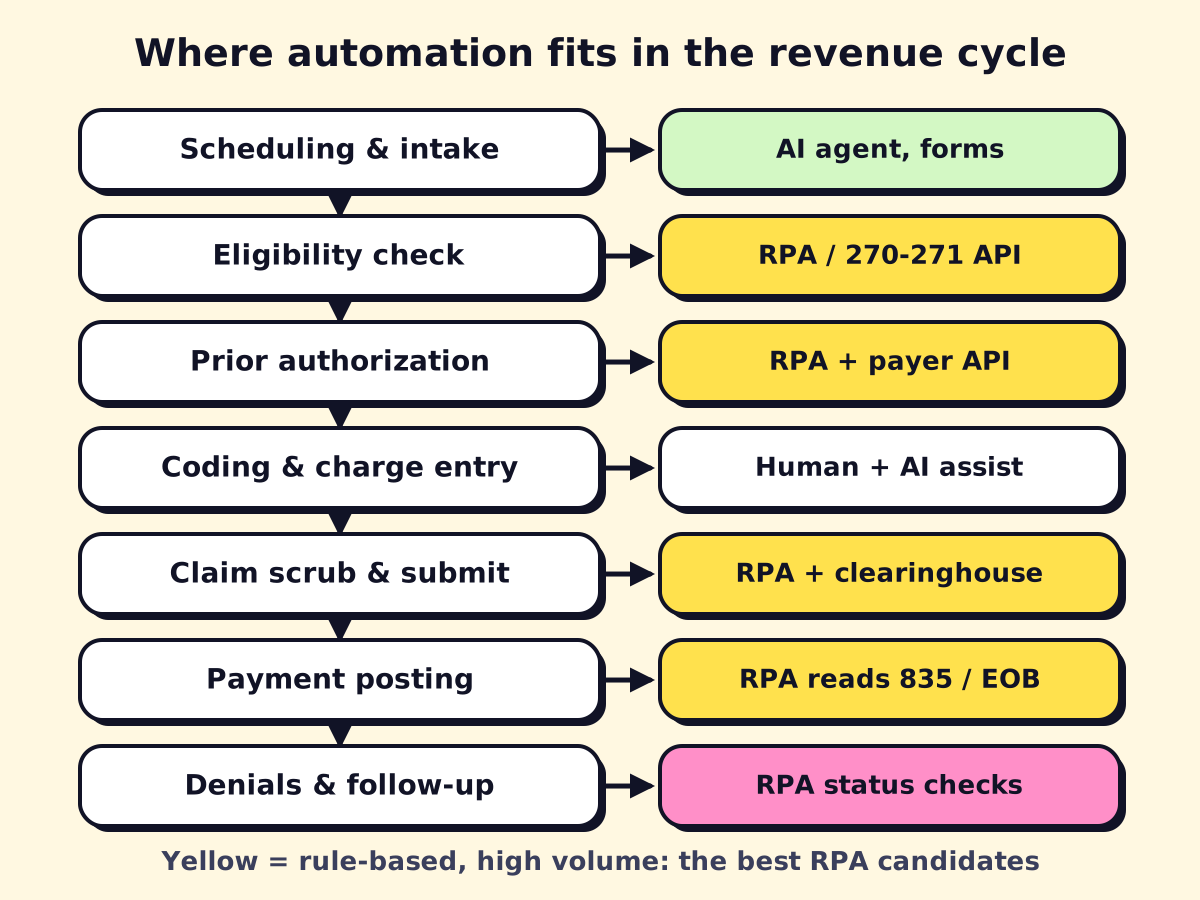 Rule-based, high-volume steps (yellow) are the strongest RPA candidates.
| RCM step | What a bot does | Fit |
|---|---|---|
| Patient access and scheduling | Copies referral and demographic data between systems, sends reminders | Medium (AI agents and forms often better) |
| Insurance eligibility verification | Checks coverage and benefits for tomorrow’s schedule, writes results to the EHR | High |
| Prior authorization | Gathers clinical and demographic data, fills payer portal forms, checks status | High for submission and status; humans for clinical review |
| Coding and charge entry | Moves charges between systems, flags missing fields | Low to medium (coding needs certified coders, with AI assist) |
| Claim scrubbing and submission | Applies payer rules, fixes simple edits, submits via clearinghouse | Medium to high |
| Payment posting | Reads 835 remittances or paper EOBs, posts payments and adjustments | High |
| Claim status and denials | Checks status in portals, pulls denial reasons, queues appeals | High |
| Patient billing | Generates statements, sets up payment plans, sends reminders | Medium |
Eligibility verification
The classic first bot. Every evening, a bot takes the next day’s appointments, checks each patient’s coverage, copay and deductible, and writes the results back to the schedule. Where payers support the standard X12 270/271 eligibility transaction through your clearinghouse, use that; use RPA for the payers or benefit details only visible in a portal.
Prior authorization automation
Prior auth is one of the most labor-intensive admin tasks in a practice. Bots can pre-fill portal forms from the EHR, attach documents, submit and then check status on a schedule, so staff only touch requests that need clinical input or are denied.
Rules are changing in your favor. The CMS Interoperability and Prior Authorization final rule (CMS-0057-F) requires Medicare Advantage, Medicaid and CHIP payers to make standard prior authorization decisions within 7 calendar days and expedited ones within 72 hours starting in 2026, and requires impacted payers (including certain marketplace plans) to offer a prior authorization API by January 2027. As those APIs come online, expect more of this work to move from portal-clicking bots to direct integrations, with RPA filling the gaps for commercial payers and portals.
Claims processing and claim status
RPA in claims processing usually means three things: applying payer-specific edits before submission, resubmitting corrected claims, and checking status in portals for claims stuck past a set number of days. The X12 276/277 claim status transaction covers some payers; bots cover the rest. The same techniques apply on the payer and insurer side, where RPA in insurance claims processing handles intake, data entry and status updates.
Payment posting
Electronic remittances (835/ERA) can be auto-posted by most practice-management systems. Bots help with what’s left: paper EOBs (after OCR extraction), payer-portal-only remittances, and reconciling deposits to posted payments. If paper and PDFs are your bottleneck, see our guide to document workflow automation.
Denials management
Bots pull denial codes, sort them by reason and payer, gather the documents an appeal needs and queue them for staff. Over time the denial data shows which upstream steps (often eligibility and prior auth) need fixing.
RPA in medical billing for small practices
You don’t need an enterprise RPA program to benefit. For a medical, dental or therapy practice:
- Start with one task that eats hours every day, usually eligibility checks or claim status.
- Check your existing tools first. Your practice-management system or clearinghouse may already automate eligibility and ERA posting; turn those on before building bots.
- Use a light tool. Power Automate desktop flows run on a Windows PC and are inexpensive to start (see Power Automate pricing); UiPath has a low-cost entry plan.
- Or buy it as a service. Many RCM companies and billing services now include automation in their fee.
Benefits of RPA in healthcare
- Staff time back. Portal lookups and copy-paste move to bots; people handle exceptions and patients.
- Faster, cleaner claims. Eligibility and auth problems are caught before the visit, not after the denial.
- Consistency. Bots don’t skip steps at 4:45 p.m. on a Friday.
- Audit trail. Every bot action is logged with time and result.
- Scales without hiring. A bot runs overnight and on weekends.
What RPA doesn’t fix: unclear payer rules, a broken intake process, or coding quality. Those need process work and people.
RPA vs AI in healthcare workflow automation
Classic RPA follows rules. A lot of healthcare admin work is messy: faxed referrals, free-text clinical notes, phone calls, patient messages. That’s where AI comes in.
| Task | Best tool |
|---|---|
| Checking a field in a payer portal | RPA |
| Reading a faxed referral and extracting patient, diagnosis and order | Document AI (OCR + extraction) |
| Answering patient calls and booking appointments after hours | AI voice agent or medical answering service |
| Summarizing clinical notes to support a prior auth request | AI with human review |
| Moving data between two systems with APIs | Workflow automation or integration engine |
The strongest healthcare automation combines them: AI reads the document, a workflow routes it, RPA keys it into the system with no API, and a person reviews exceptions. Our guide to AI agents in healthcare covers the AI side, including patient-facing chatbots.
RPA vendors and services for healthcare
| Type | Examples | Good fit for |
|---|---|---|
| General RPA platforms | UiPath, Automation Anywhere, SS&C Blue Prism, Microsoft Power Automate | Health systems and larger groups with IT staff or a partner |
| Healthcare RCM automation vendors | Companies focused on RCM AI and automation, such as AKASA, Infinx and Notable | Organizations that want prebuilt RCM workflows |
| RCM outsourcing and billing companies | Billing services that bundle automation into their fee | Practices that outsource billing already |
| Automation agencies and consultants | Build and maintain bots and AI workflows for you | Small and mid-sized practices without IT staff |
Questions to ask any vendor:
- Will you sign a BAA?
- Which payers and EHRs have you automated before?
- Do you use standard transactions and APIs where they exist, and RPA only where needed?
- Who fixes a bot when a payer portal changes, and how fast?
- Where do bot credentials and logs live, and do logs or screenshots contain PHI?
- Are payer portal terms of use respected for automated access?
HIPAA and security requirements
Bots that touch patient data handle protected health information (PHI), so the HIPAA Security Rule applies. In practice:
- Business associate agreements. Any vendor that creates, receives, stores or transmits PHI on your behalf is a business associate and needs a BAA. HHS publishes sample BAA provisions.
- Dedicated bot accounts. Each bot gets its own login with only the access it needs. No shared staff passwords.
- Secure credential storage. Credentials live in the orchestrator’s vault, not in scripts or spreadsheets.
- Careful logging. Error screenshots and logs can capture PHI; store them securely or mask them.
- Audit and monitoring. Keep run logs, review access regularly and include bots in your risk analysis.
- EHR and payer terms. Some systems require approval for automated access; prefer official APIs (including FHIR) where offered.
How to start with healthcare RPA
- List your top time sinks in patient access and billing. Count volume per day and minutes per item.
- Pick one high-volume, rule-based task, usually eligibility, claim status or prior auth status.
- Check standard options first: clearinghouse transactions, EHR features, payer APIs.
- Map the exceptions. What does staff do when the portal shows something unexpected?
- Pilot for two to four weeks in parallel with staff, then measure time saved and error rates.
- Expand step by step along the revenue cycle, adding AI where documents and messages are involved.
If your front desk or billing team spends hours in payer portals every day, we can map the work, tell you which parts suit RPA, standard transactions or AI, and build the first automation under a BAA.
We build a free demo on your own services and hours.
FAQ
What is RPA in healthcare?
RPA in healthcare is software that automates repetitive administrative computer tasks, such as checking insurance eligibility in payer portals, entering data into the EHR, checking claim status and posting payments. It follows fixed rules and works through the same screens staff use.
What does RPA stand for in healthcare?
In healthcare IT, RPA means robotic process automation. In clinical credentials, RPA or RPA-C can refer to a registered physician assistant (certified), which is unrelated to automation.
Is RPA HIPAA compliant?
RPA tools can be used in a HIPAA-compliant way, but compliance depends on how you deploy them. You need a BAA with any vendor handling PHI, least-privilege bot accounts, encrypted credential storage, audit logs and no PHI in unsecured logs or screenshots.
What are the benefits of RPA in healthcare?
Staff spend less time on portal lookups and data entry, claims go out cleaner and faster, and follow-up happens on time instead of when someone has a free hour. Every bot action is logged, which helps with audits.
Can a small medical or dental practice use RPA?
Yes, usually through a lighter tool like Power Automate desktop flows or through a vendor that provides automation as a service. Start with one high-volume task, such as next-day eligibility checks.