- A dental answering service should book new patients, handle reschedules and route true emergencies, not just take messages.
- Use the ADA's split between emergencies (airway swelling, uncontrolled bleeding, facial trauma) and urgent care (severe pain, abscess, broken tooth) to write your triage rules.
- Booking directly into your schedule depends on your software. Open Dental and Dentrix Ascend are easier to connect than desktop Dentrix or Eaglesoft, so ask for a live demo.
- Patient details make the service a HIPAA business associate. Get a signed BAA before forwarding calls.
A dental answering service answers your practice’s phone when the front desk can’t: after hours, during lunch, or when two lines ring at once. A good one books new patients into your schedule, moves hygiene appointments, and routes the rare true emergency to the ER or your on-call dentist. A weak one just takes messages, which means your team spends the morning calling people back and some of those new patients have already booked elsewhere.
This guide covers what dental offices actually need from a service: the call types, emergency rules based on American Dental Association categories, booking into your practice management software, HIPAA, scripts and a buying checklist.
What a dental answering service handles
Dental phones are busy with a predictable mix. Plan your script around these:
| Call type | When it peaks | What the service should do |
|---|---|---|
| New patient booking | Evenings, weekends, lunch | Collect details and insurance, book or hold a slot |
| Reschedule or cancel | Early morning, day before | Move it in the schedule, offer the waitlist slot |
| Hygiene recall reply | After reminder texts go out | Book the cleaning |
| Toothache, swelling, broken tooth | Nights, weekends | Run the emergency triage |
| Insurance and billing | Business hours | Log for billing staff |
| Post-op question | Evening after surgery | Page the dentist per your rules |
New patient calls are the expensive ones to miss. A caller who reaches voicemail for a cleaning often tries the next practice on the map. That’s why many offices use a dental virtual receptionist during the day as overflow, not just an after-hours service.
Dental emergency triage: what goes where
The American Dental Association split dental care into emergency and urgent categories in its 2020 guidance (ADA emergency vs. urgent guidance, PDF). Emergencies are potentially life-threatening: uncontrolled bleeding, swelling that could compromise the airway, and facial trauma that could compromise the airway. Urgent care covers severe pain from pulp inflammation, localized abscess, a broken tooth causing pain, and similar problems that need a dentist soon but not an ER.
That split maps neatly onto an answering service script:
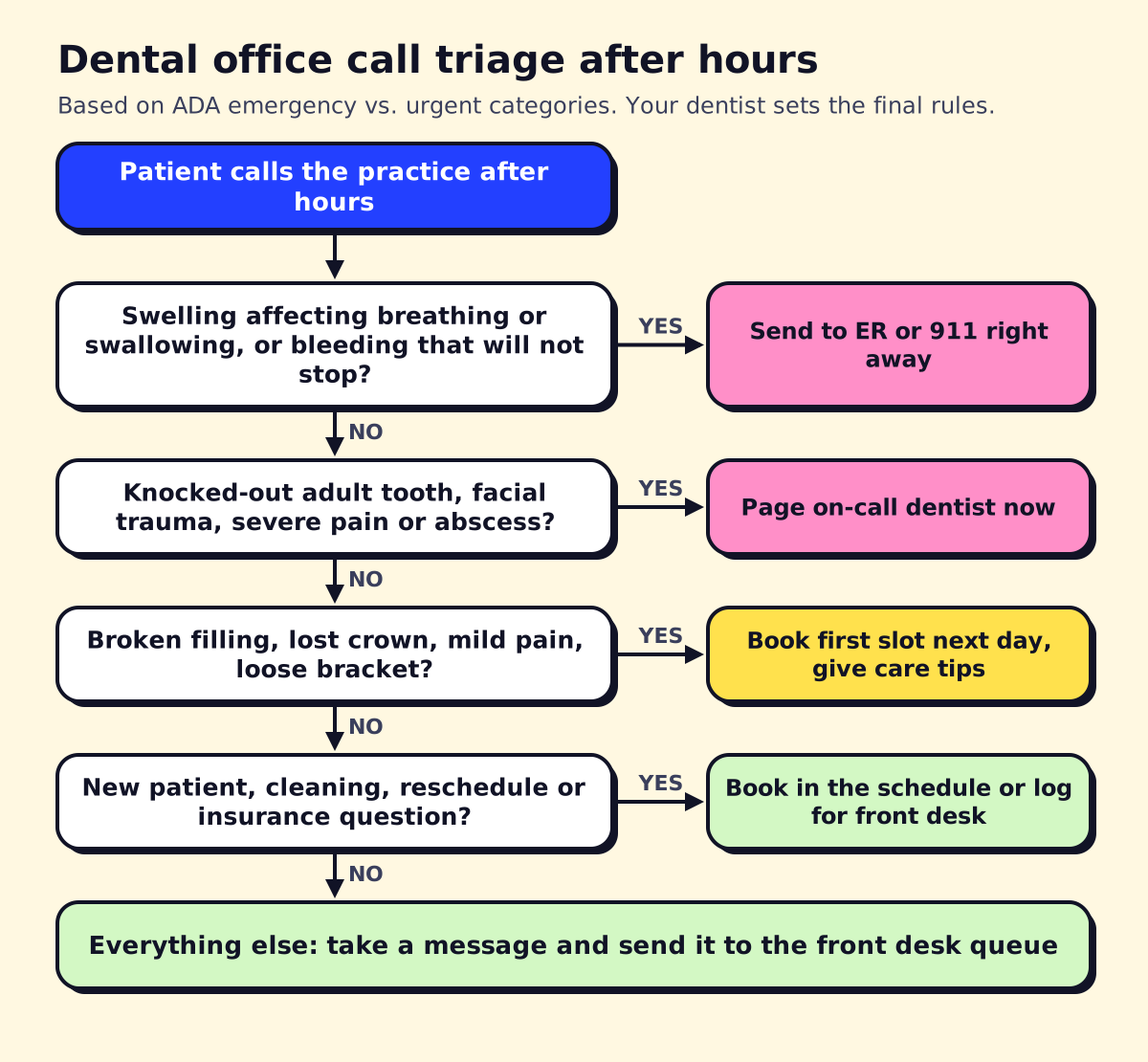 Example dental triage. Your dentist approves the final wording.
- ER or 911: swelling affecting breathing, swallowing or the eye; bleeding that won’t stop; jaw or facial injury from an accident.
- Page the on-call dentist: a knocked-out adult tooth (time matters for reimplantation), severe pain not controlled by over-the-counter medicine, an abscess with fever, post-surgical bleeding.
- First slot next business day: a broken filling, lost crown, chipped tooth without severe pain, a loose orthodontic bracket.
- Routine: everything else gets booked or logged.
Give the service approved care tips for the common cases (“Keep a knocked-out tooth in milk and call back if you can’t reach us in 15 minutes”) and nothing more. The service never diagnoses.
Booking into Dentrix, Eaglesoft, Open Dental and others
The biggest difference between dental answering services is whether they can book into your schedule or only send you a message. That depends heavily on your practice management system (PMS).
An analysis by software firm Mindbowser of what each dental PMS lets an AI receptionist book found wide gaps:
- Open Dental has the most open, documented API, including calls for finding open appointment slots.
- Dentrix Ascend (the cloud version) offers a REST API, so direct booking is practical.
- Desktop Dentrix has limited write access; creating appointments from outside is restricted.
- Eaglesoft limits API access to approved vendors, and Patterson warns practices about unauthorized integrations.
Many dental-specific AI receptionists advertise “integrates with Dentrix, Eaglesoft and Open Dental.” Treat that as a question, not an answer. Ask the vendor to book a test appointment into your system during the demo and show you where it landed, with the right provider, operatory and appointment type. If they need a sync tool installed on your server, ask who maintains it and what happens when your PMS updates.
When direct booking isn’t possible, a good fallback is a structured request (name, date of birth, insurance, preferred times, reason) delivered to a shared inbox your front desk clears first thing in the morning. We’ve built these with workflow tools like n8n; see our n8n workflow examples for the idea.
HIPAA for dental offices
Dental practices that bill insurance electronically are HIPAA covered entities, and an answering service hearing patient names, birth dates and symptoms is a business associate. You need a signed business associate agreement before forwarding calls (HHS business associate guidance).
Beyond the BAA, check three practical things: messages with patient details arrive through a secure app or portal rather than plain text messages, call recordings are stored and deleted on a schedule you agree to, and the service verifies identity before discussing an existing patient’s account. Our medical answering service guide goes deeper on BAAs and what to test.
Scripts to give your dental answering service
Vendors will write a generic script if you let them. Give them yours. These lines cover most dental calls:
Greeting: “Thank you for calling [Practice]. This is [name]. Are you calling about a dental emergency, or can I help you book or change an appointment?”
New patient: “Great, we’d love to see you. Can I get your name, date of birth, phone and email? Do you have dental insurance? What’s the name of the plan and the subscriber’s name? Is this for a cleaning and exam, or is something bothering you?”
Reschedule: “I can move that for you. The next openings with [hygienist] are [options]. Which works best?”
Urgent but not emergency: “I’m sorry you’re dealing with that. I’ll book you into our first opening tomorrow at [time]. Until then, [approved tip]. If swelling spreads toward your eye or throat, or you have trouble breathing or swallowing, go to the emergency room.”
Insurance question: “Our billing team handles that. I’ll pass your question and number to them, and they’ll call you during business hours.”
Add your office specifics: which insurances you’re in-network with, whether you see children, sedation options, parking, Spanish-speaking staff, and payment plans. Keep it on one page.
Orthodontic and specialty practices
Orthodontic answering services see few true emergencies. The common calls are poking wires, loose brackets, lost retainers and new-patient consult requests. The service should give your approved care tips (orthodontic wax, clipping a wire with clean nail clippers if you allow it) and book the next available repair slot. Consult requests from parents are often the main revenue opportunity, so treat them like new patients.
Oral surgeons and endodontists get more post-op calls: bleeding, pain after an extraction, dry socket. Their on-call rules should be stricter and the paging escalation faster.
Pediatric dental offices should script for parents, who call after falls and sports injuries. The knocked-out tooth rule differs for baby teeth, which aren’t reimplanted, so get your dentist to word that line.
Measuring whether the service is working
Dental offices often sign up, forget about it, and only notice the service when a patient complains. Track a few numbers from the first month instead:
- Answer rate: what share of calls were answered live, by your team or the service? Your phone system’s call log shows this.
- New patients booked by the service: count them in your PMS with a referral source like “answering service” so they’re easy to pull.
- Emergency pages: how many times was the on-call dentist paged, and how many of those were real? A high false-alarm rate means the triage script needs tightening.
- Messages needing a callback: if most after-hours calls end as “please call me back,” the service isn’t booking enough.
- Hold and ring times: ask the vendor for these every month.
Listen to five or ten recorded calls a week for the first month. You’ll catch wrong insurance answers, awkward phrasing and missed booking chances quickly. After that, a monthly spot check is usually enough, plus a review whenever your fees, hours or insurance networks change.
One more thing to settle early: who owns the callback list each morning. Assign it to one person at the front desk, with a target of clearing it before the first patient arrives.
Dental answering service pricing
Most dental-specific services don’t publish prices; general virtual receptionist companies do. As of November 2026, Ruby lists plans from $250 a month for 50 minutes to $720 for 200 minutes, and Smith.ai lists $300 a month for 30 calls on its starter virtual receptionist plan. AI-only dental receptionists are usually cheaper per call but vary widely, and the price often depends on whether PMS integration is included.
To compare, give each vendor the same numbers: monthly call volume, the share after hours, and average call length. Our answering service cost guide explains how per-minute and per-call billing change the math.
Choosing the best dental answering service: checklist
- Books into your PMS, proven with a live test appointment in your own system.
- Follows your emergency rules, with your dentist’s approved care tips.
- Signs a BAA and delivers messages securely.
- Handles new patients fully: insurance details, reason for visit, preferred times.
- Works as daytime overflow, not only after hours.
- Spanish or other languages if your patients need them.
- Call recordings and reports you can review weekly.
- No long contract until you’ve seen a month of real calls.
If your PMS doesn’t allow direct booking, opsmigo can build an AI receptionist that collects structured requests and drops them into your front desk’s workflow. For broader context on staffing the phones, see our virtual receptionist guide.
We build a free demo on your own services and hours.
FAQ
What does a dental answering service do after hours?
It answers calls when the office is closed, sends true emergencies to the ER or the on-call dentist, books or logs routine appointments, and delivers messages to the front desk for the morning.
Is a dental virtual receptionist different from an answering service?
A dental virtual receptionist usually works during office hours as overflow for your front desk, booking and rescheduling patients. An answering service is often after-hours only. Many vendors offer both.
Can a dental answering service book directly into Dentrix or Eaglesoft?
Sometimes. Open Dental and Dentrix Ascend have documented APIs, while desktop Dentrix and Eaglesoft restrict outside access. Ask the vendor to book a test appointment into your system during the demo.
What is the best dental answering service?
The best one for your office books into your actual practice software, follows your dentist's emergency rules, signs a HIPAA business associate agreement and lets you review every call. Test two or three with real scripted calls before signing.
Do orthodontic offices need an answering service?
Orthodontic emergencies are rare, so most orthodontic offices use an answering service mainly to capture new-patient consults and handle broken bracket or poking wire calls with care instructions and a next-day slot.