- Generative AI integration means connecting a model like GPT, Claude or Gemini to your own systems and data so it can answer, draft and act inside your real workflows.
- Most businesses climb four levels: AI seats for staff, AI steps inside workflows, RAG over your own documents, then agents that take actions.
- Model usage is usually cheap for a small business (often tens of dollars a month); the real cost is building, testing and maintaining the integration.
- Use business tiers that don't train on your data, limit what the AI can access, and plan for prompt injection before anything touches customers.
Generative AI integration is connecting a model such as GPT, Claude or Gemini to your own systems and data, so it can answer questions, draft documents and take actions inside the tools your team already uses. For most businesses that means one of four things: giving staff AI seats, adding AI steps to existing workflows, building retrieval (RAG) over your own documents, or deploying agents that act across systems. The model usage itself is usually cheap; the real work is connecting it safely.
This guide explains each level, how RAG works, what “private AI” really means, what it costs as of November 2026, and the security basics.
The four levels of generative AI integration
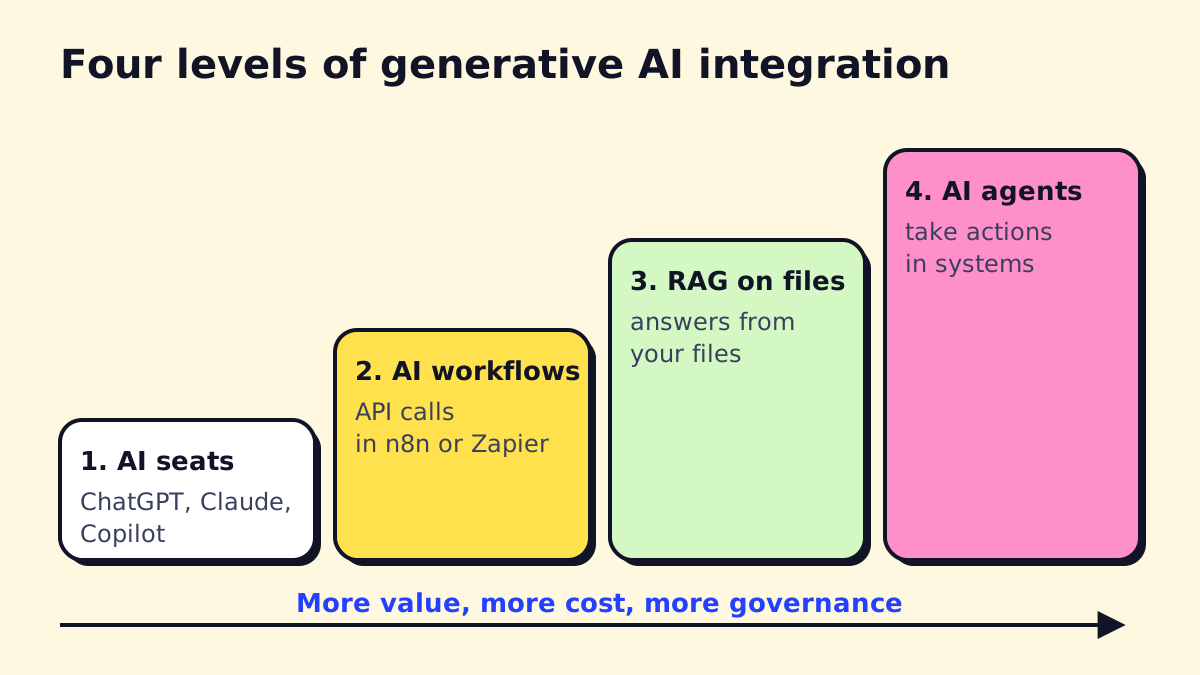
| Level | What it is | Example | Typical effort |
|---|---|---|---|
| 1. AI seats | Staff use ChatGPT, Claude, Gemini or Copilot | Drafting emails, summarizing calls | Days (plus policy and training) |
| 2. AI in workflows | An automation calls a model via API | Classify inbound emails, extract invoice fields | 1–3 weeks per workflow |
| 3. RAG on your data | The model answers from your own files | Staff assistant over SOPs and contracts | 3–8 weeks |
| 4. Agents | The model plans steps and uses tools | Book jobs, update CRM, follow up | 4–12+ weeks |
Each level adds value and also adds risk, cost and governance work. Many businesses get most of the benefit at levels 1 and 2. If you use Microsoft 365, our Copilot for Microsoft 365 guide covers level 1 in that ecosystem.
Level 2: AI inside a workflow
This is the workhorse of AI business integration. An automation platform such as n8n, Make, Zapier or Power Automate listens for an event, sends text to a model with clear instructions, and uses the answer in the next step. Our workflow automation guide covers those tools.
A generative AI workflow for a property manager might look like this:
- A tenant emails about a leak.
- The model reads the email and returns structured data: unit, issue type, urgency, photos attached.
- The workflow creates a ticket in the maintenance system.
- Urgent issues trigger a text to the on-call technician; others get a scheduled slot.
- The tenant gets a confirmation written in plain language.
The model never “decides” anything irreversible on its own. It turns messy text into clean fields, and the workflow does the rest.
Generative AI integration use cases by department
| Department | Integration | Level |
|---|---|---|
| Front desk | Summarize voicemails into tickets | 2 |
| Sales | Draft proposals from discovery notes and past proposals | 2–3 |
| Operations | Answer “how do we do X?” from SOPs | 3 |
| Finance | Extract invoice and receipt data | 2 |
| HR | Answer policy questions from the handbook | 3 |
| Support | Draft replies from the help center for agent approval | 2–3 |
| Management | Plain-language summaries of weekly reports | 2 |
Notice how many sit at level 2. A single well-designed AI step in an existing workflow often does more for a small business than a large custom project.
Automating data integration first
AI is only as good as the data it can reach. If customer details live in three places that disagree, fix that before adding AI. Often the first “AI project” is really a data integration project: syncing your CRM, booking tool and accounting app so there is one current record per customer. An AI integration platform or automation tool can keep those systems in sync on a schedule.
How RAG works (retrieval-augmented generation)
RAG lets a model answer from your documents without retraining it. You index your files once, and at question time the system finds the most relevant passages and hands them to the model with the question.
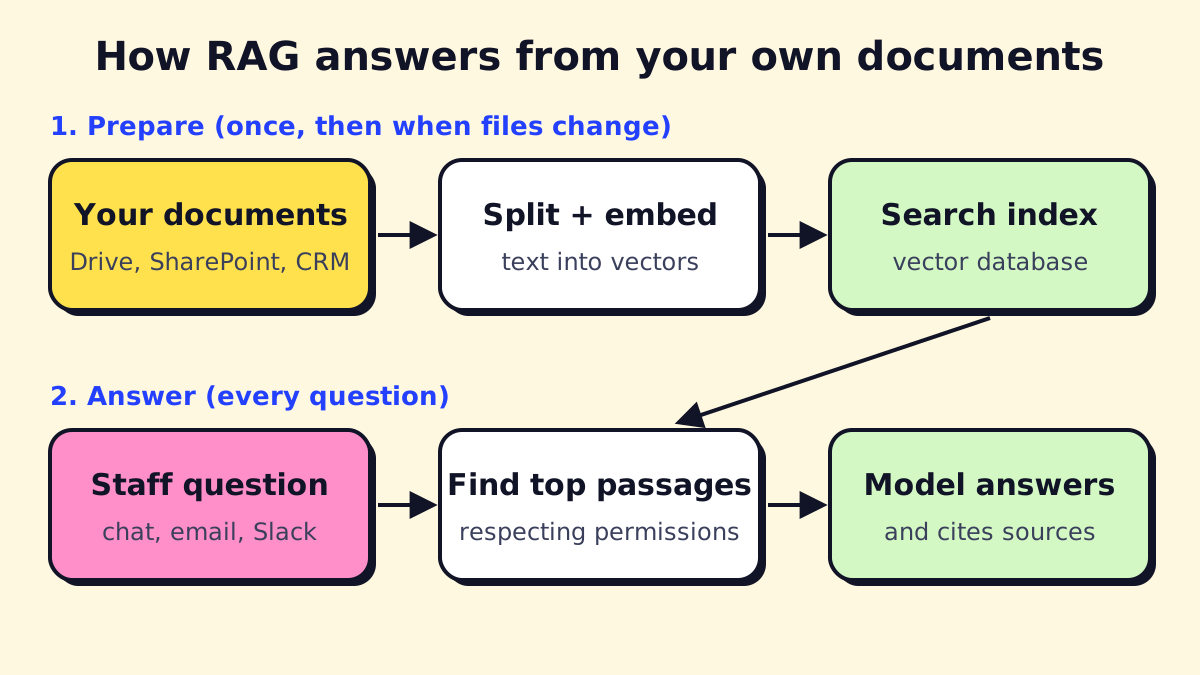
Preparation (once, then on every change)
- Collect sources: Google Drive, SharePoint, your help center, CRM notes.
- Split documents into chunks (a few paragraphs each).
- Turn each chunk into an embedding (a list of numbers that captures meaning) and store it in a vector database.
- Keep the original permissions attached, so people only retrieve what they’re allowed to see.
Answering (every question)
- Turn the question into an embedding and find the closest chunks.
- Send those chunks plus the question to the model with instructions: answer only from these sources, cite them, say “I don’t know” otherwise.
- Show the answer with links to the source documents.
When RAG works well, and when it doesn’t
| Works well | Struggles |
|---|---|
| Policies, SOPs, manuals, contracts | Spreadsheets and numbers-heavy questions |
| FAQs and help-center content | Questions that need a database query |
| Proposals and past project notes | Documents that contradict each other |
| Questions with one clear source | Very short, vague questions |
For numbers, connect the model to the database or reporting tool instead and let it run a query. That is closer to how generative AI for business intelligence works: the model writes the query and explains the result, while the database stays the source of truth.
Private AI for business: what it actually means
“Private AI” is used loosely. In practice it is a spectrum.
| Option | What you get | Good for |
|---|---|---|
| Business tiers of public AI | Provider doesn’t train on your data by default; admin controls | Most SMBs |
| Cloud AI in your own account | Models via Azure, AWS or Google Cloud, in a region you choose | Firms with data residency rules |
| Self-hosted open models | Runs on your servers or private cloud | Strict confidentiality, high volume |
For most small businesses, the first option is enough. OpenAI states that it does not train on business data from its business products and API by default (OpenAI enterprise privacy), and other major providers offer similar commercial terms. Read the current terms for whichever provider you choose, and turn on the admin controls.
Self-hosting looks attractive but adds servers, updates, monitoring and usually weaker models than the leading hosted ones. Choose it for a specific legal or contractual reason, not as a default.
What generative AI integration costs
There are three cost buckets: model usage, platform fees and the build.
Model usage (API prices, as of November 2026)
| Model | Input per 1M tokens | Output per 1M tokens | Source |
|---|---|---|---|
| Claude Sonnet 5.5 | $2 | $10 | Claude pricing |
| Claude Haiku 5.5 | $0.10 | $0.50 | Claude pricing |
| GPT-5 mini | $0.25 | $2.00 | OpenAI model page |
A token is roughly three-quarters of a word. Haiku’s listed prices apply to prompts up to 100,000 tokens; longer prompts cost more.
Worked example (illustrative): an internal assistant answering 3,000 staff questions a month, with about 4,000 input tokens (question plus retrieved passages) and 500 output tokens each.
- Input: 3,000 × 4,000 = 12 million tokens
- Output: 3,000 × 500 = 1.5 million tokens
- On Claude Sonnet 5.5: 12 × $2 + 1.5 × $10 = about $39 a month
- On Claude Haiku 5.5: 12 × $0.10 + 1.5 × $0.50 = about $2 a month
Prices change often, so recheck before budgeting. The point stands: for a small business, model usage is rarely the big number.
Platform and build costs
- Automation platform: from free (self-hosted n8n) to tens or hundreds of dollars a month for hosted plans.
- Vector database: often free at small scale, or included in the platform.
- Build: discovery, prompts, connectors, testing, permissions, monitoring. This is where most of the budget goes. See our AI automation agency guide for published price ranges.
- Maintenance: prompts drift, APIs change, documents get added. Budget a few hours a month.
Security: the risks specific to generative AI
The OWASP Top 10 for LLM Applications (2025) is the best short list of what goes wrong. The ones that matter most for a small business:
- Prompt injection (LLM01). Text inside an email, web page or document tells the AI to do something else. Never let content from outside your business directly trigger sensitive actions.
- Sensitive information disclosure (LLM02). The AI repeats data a user shouldn’t see. Enforce permissions at retrieval time, not in the prompt.
- Excessive agency (LLM06). The AI has more access than it needs. Give each integration the narrowest API permissions possible.
- Misinformation (LLM09). Confident wrong answers. Require citations and a human check for anything sent to customers.
- Unbounded consumption (LLM10). A loop or an attacker runs up your API bill. Set spending limits.
A short security checklist
- Business or API tier with training off and data retention understood.
- Separate API keys per integration, stored in a secrets manager.
- Least-privilege access to every connected system.
- Human approval before sending money, deleting data or emailing customers.
- Logs of prompts, outputs and actions, kept for a defined period.
- Monthly spend caps and alerts.
Our guide to AI governance and responsible AI turns these into a usage policy your team can follow.
Choosing an integration approach
| Your situation | Start with |
|---|---|
| Staff want help writing and summarizing | AI seats plus a usage policy |
| Repetitive email, form or document handling | AI steps in an automation platform |
| People keep asking the same questions about internal docs | RAG assistant over those docs |
| A multi-step process across 3+ systems | An agent, built after the steps above work |
If you’re heading toward agents, read our AI agent architecture explainer first. It covers tools, memory and guardrails.
Built-in AI vs. connecting your own model
Tools like Airtable, Asana, HubSpot and Notion now include AI features. Use them when they cover the job: no extra integration, and the data stays where it is. Connect your own model through an integration platform when you need a specific model, consistent instructions across tools, or data from several systems at once.
A sensible rollout plan
- Pick one workflow with clear volume and a measurable result. Our AI strategy consulting guide has a scoring method.
- Prototype in a week with real examples, including the ugly ones.
- Test with 50–100 real cases and track error types, not just a pass rate.
- Launch with a human in the loop, then reduce review as accuracy proves out.
- Monitor cost, errors and user feedback monthly.
If you’d like help picking the first integration, opsmigo can review your systems and suggest the level that fits your data and budget.
We build a free demo on your own services and hours.
FAQ
What is generative AI integration?
It is the work of connecting a generative AI model to your business systems, such as your CRM, inbox, shared drive or database, so the model can use your data and its output lands where work actually happens.
What is private AI for business?
Private AI usually means using AI in a way your data stays under your control: business tiers that don't train on your inputs, cloud regions you choose, strict access controls, or models you host yourself. Full self-hosting is only needed for the strictest data rules.
How much does generative AI integration cost?
Model usage for a small internal assistant can be a few dollars to tens of dollars a month at November 2026 API prices. Building and testing the integration is the larger cost and depends on how many systems it connects.
What is the best language for AI development?
Python has the widest set of AI libraries and examples, and TypeScript is common for web apps and automation tools. For most business integrations, the language matters less than good tests, logging and access control.
Can I add AI to tools like Airtable or Asana?
Yes. Both offer built-in AI features, and both can be connected to external models through automation tools like Zapier, Make or n8n when you need more control.